Page: 85
JFS-A1 INSTALLATION, OPERATION, AND INSTRUCTION MANUAL
Document # : DOC230
Issued: August 27, 2012
Revised: N/A
To add and congure a DACT module:
1. Select the Dialer function from the system panel.
2. Click the Add Device button. e “Add Dialer” window displays.
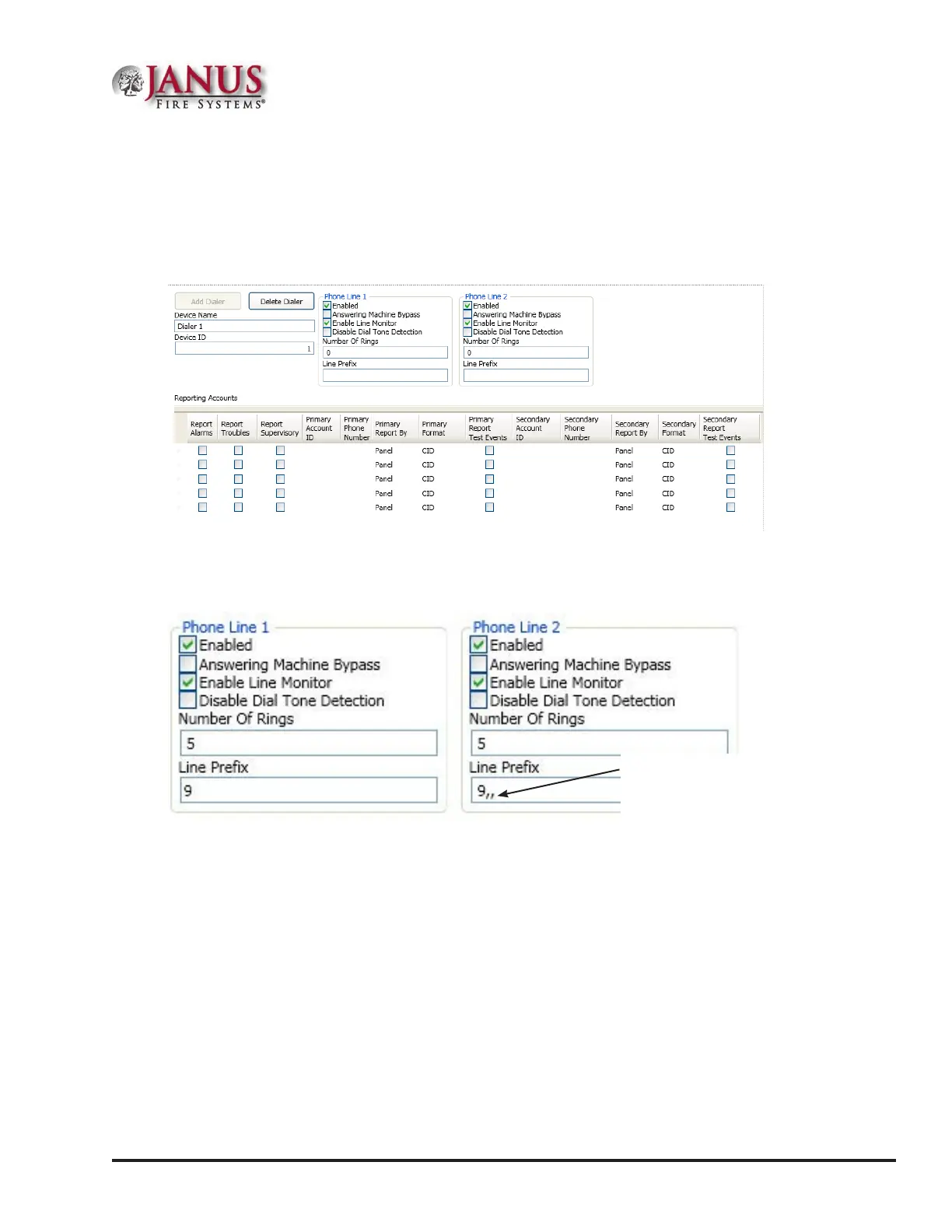
Figure 110. Example of Add Dialer Window
3. In the “Phone Line 1 and Phone Line 2” elds, make any necessary changes.
Figure 111. Example of Phone Lines Options
Enter the number of rings you want the DACT to pickup when receiving a call.
Note: If you do not change the default from "0", the DACT will never pick up a call!
Enter the appropriate line prex, if any is required for your phone lines.
Example: In the example shown above, the phone line requires that "9" is dialed to get an outside line.
e two ",," (commas) instruct the dialer to pause 2 seconds before dialing the reporting account numbers.
Each "," (comma) creates
a 1-second pause before
the dialer attempts to dial a
reporting account number.



 To Next Page