LABORIE Goby Owner’s Manual GOBY-UM02 17
3.2.3 Assemble Goby™ on a Tabletop
Follow the instructions provided to assemble the Goby™ on a Tabletop:
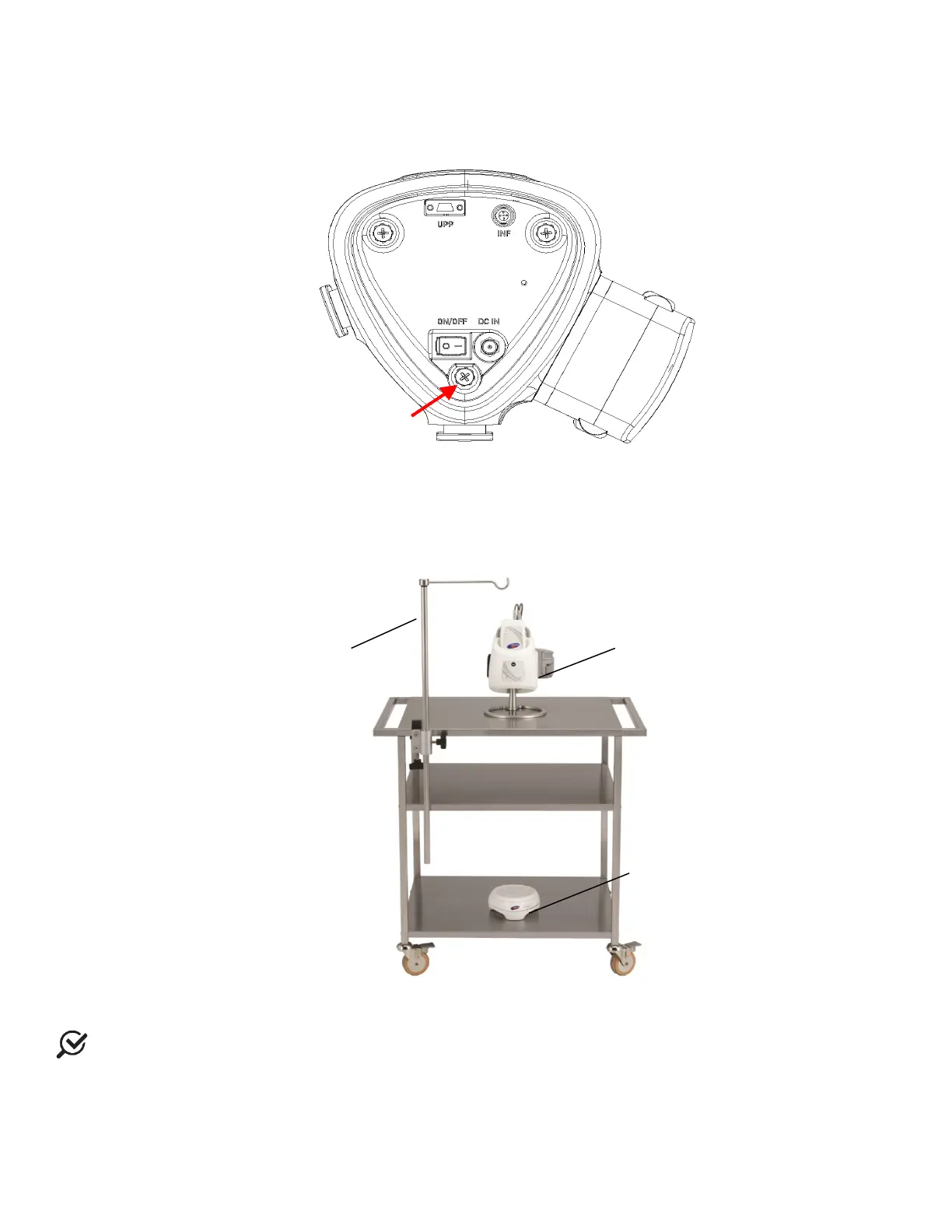
• Attach the foot mount onto the Goby™ Hub using the opening behind the power switch of the Goby™ Hub as
the insertion point (
Figure 7). Do not insert the foot into the other Goby™ Hub openings.
Figure 7: Goby Hub – Foot Mount Insertion Point
• Place the Goby™ Hub with the Goby™ Hub foot onto the tabletop. Attach the IV pole tabletop mounting clamp
securely to the edge of the table (
Figure 8). Place the IV pole into the clamp and secure the IV pole with the
thumbscrew.
Figure 8: Goby™ on Tabletop Setup
NOTE: LABORIE recommended that a table with a minimum 1.5” thickness and edge of 1” be used to mount the IV
pole.
• Place the Urocap™ IV on the floor as needed for tests.
• (Optional) Attach the UPP puller to the tabletop with the mounting clamp. Plug the UPP cable into the rectangular
connector at the bottom of the
Goby™ Hub.
foot mount here
UDS Roam
with tabletop



 To Next Page