LABORIE Goby Owner’s Manual GOBY-UM02 61
The comparison is provided in a percent difference from the table value. The following is the mathematical formula used
in the calculations:
These percent values are found in the patient statistics of the Voiding Summary printout. The M% represents the male
values and the F% represents the female values.
WARNING: The comparison with normal parameters should not be used for diagnostic purposes. It is recommended
to repeat the study if the total voided volume is inferior to 55 ml; normal parameters are not available below this volume.
Statistic values cannot be given if the voided volume is less than 55 cc and more than 555 cc.
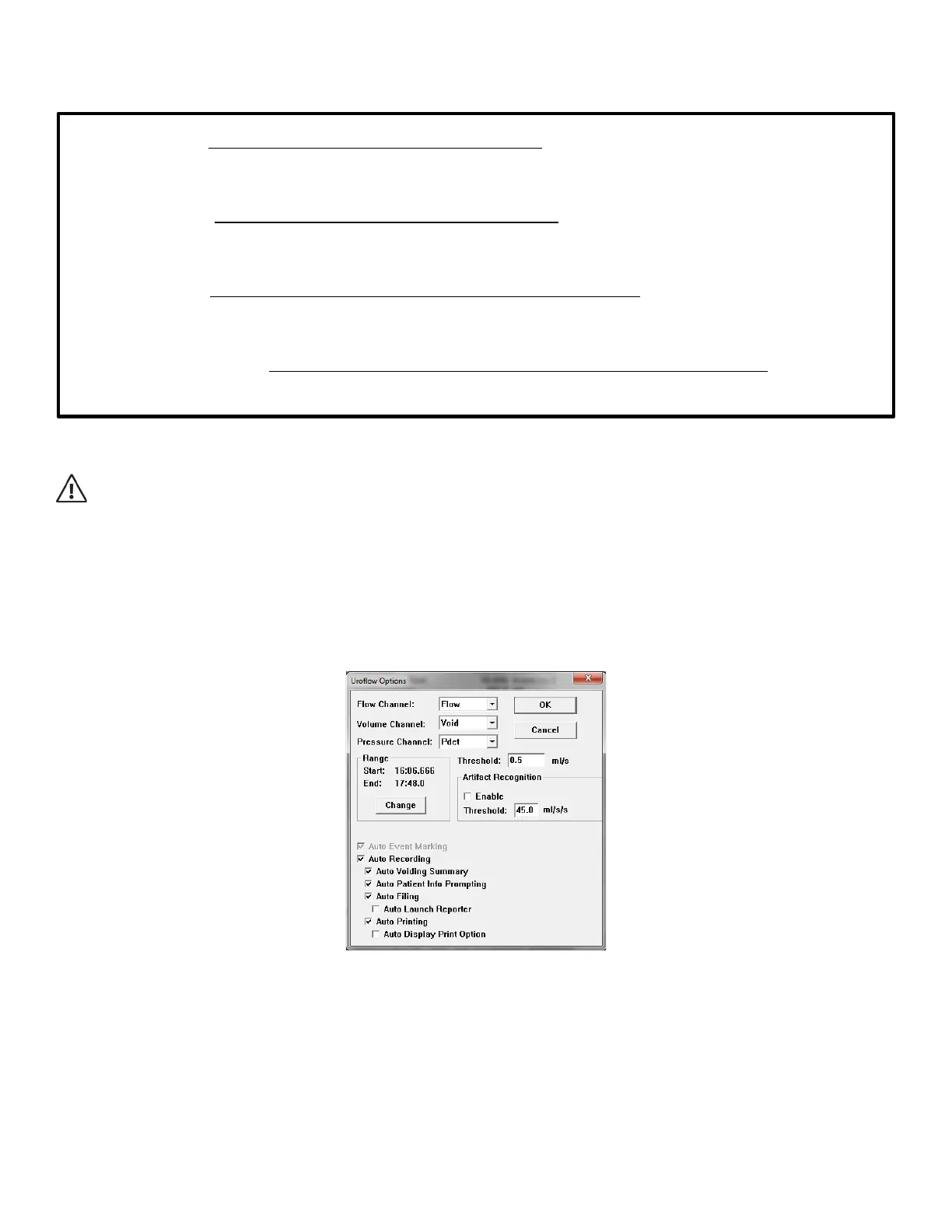
5.6.7.1 Uroflow Options Dialogue Box
The Uroflow Options Dialog Box is available from the Voiding Summary Menu. Click the Options button to launch the
dialogue box. From the Uroflow Options Dialog Box you can:
• Customize how the Voiding Summary is calculated.
• Make changes to the channels and configuration parameters.
Figure 72: Uroflow Options Dialogue Box
Refer to the descriptions in the following list for parameters which can be changed in the Uroflow Options Dialog Box.
• Default channels: Flow, Volume, and Pressure.
• Range: Default range is from start to end of test.
• Threshold: The minimum flow rate value used in calculating the Voiding Summary. Anything below this threshold
is considered noise or insignificant flow.
• Enable Artifact Recognition: Select check box to enable.
• Artifact Recognition Threshold: Indicates the maximum acceptable change in Flow (acceleration) that is
physiologically possible.
Peak Flow:
( )
( )
%100
,
,
∗
−
SexVolumenPeakFlowMi
SexVolumenPeakFlowMiPeakFlow
Mean Flow:
(
)
( )
%100
,
,
∗
−
SexVolumenMeanFlowMi
SexVolumenMeanFlowMiMeanFlow
Flow Time:
( )
( )
%100
,
,
∗
−
SexVolumeuritionMaxTimeOfMict
FlowTimeSexVolumeuritionMaxTimeOfMict
Time To Peak Flow:
( )
( )
%100
,
,
∗
−
SexVolumexFlowMaxTimeOfToMa
FlowTimeToPeakSexVolumexFlowMaxTimeOfToMa



 To Next Page