LABORIE Goby Owner’s Manual GOBY-UM02 69
Auto Bladder Compliance
The Auto Compliance feature automatically calculates bladder compliance segments and calculations instead of having to
manually select the segments from the graph. Click the
Configure button in the Compliance Measurement Range window
to open the Configuration window to the Compliance tab. The Configuration window can also be accessed from the Config
menu,
Config > Set up/Modify > Compliance tab; refer to the Compliance Tab section on page 43.
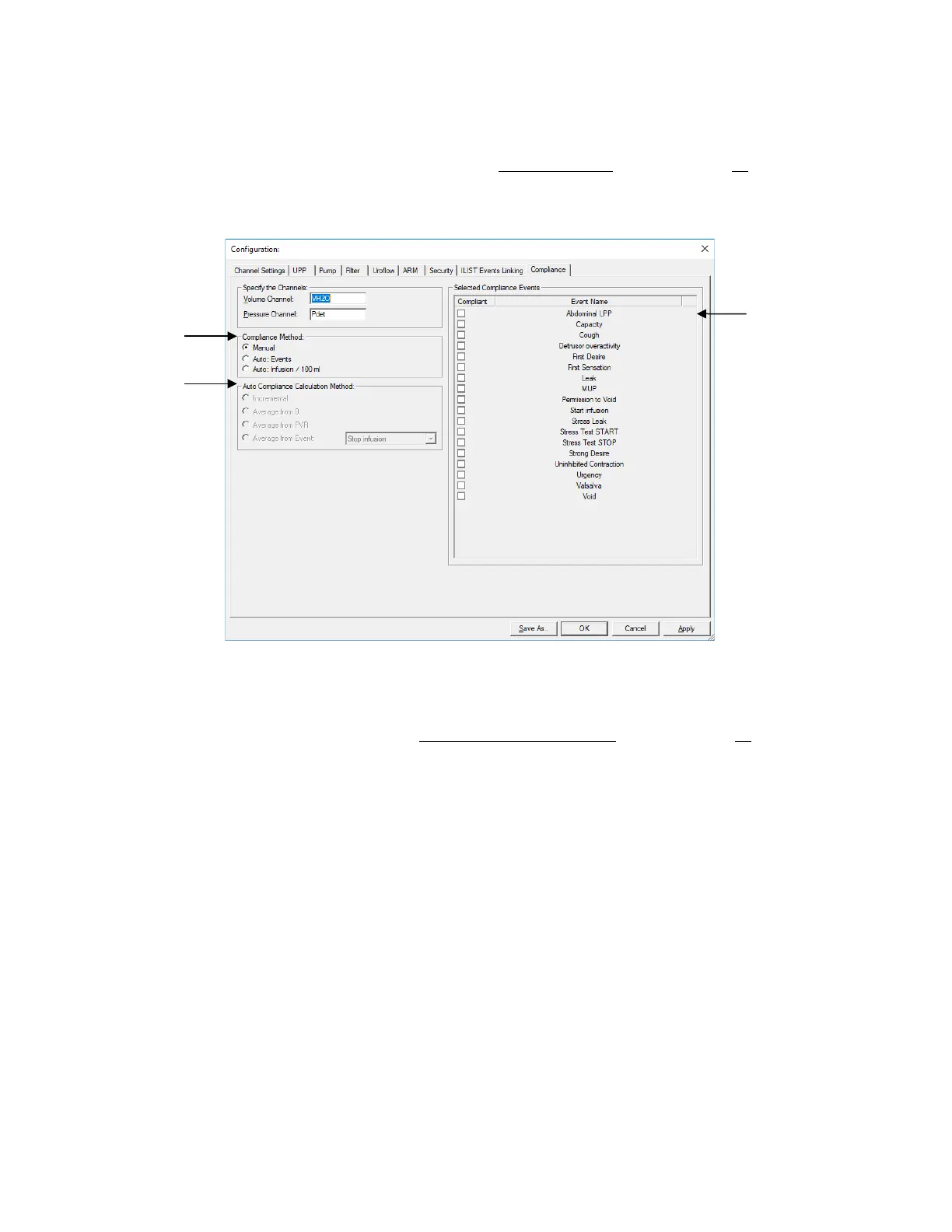
The Compliance tab provides three Compliance Methods: Manual, Auto: Events, and Auto: Infusion / 100ml. Refer to
Figure 82 for a visual of the Compliance tab and its menus:
Figure 82: Compliance Window
Select Auto Compliance Method
• Manual – Selection of this option will grey out Auto Compliance Calculation Methods; manually select the
segments for calculation as instructed in the
Manual Bladder Compliance section on page 68.
• Auto: Events – Selection of the Auto: Events option necessitates setup of the desired Auto Compliance Calculation
Method.
• Auto: Infusion/100mL – Selection of this option sets Infusion volumes of 100mL as the auto compliance calculation
reference points.
Select Auto Compliance Calculation Method
Auto compliance calculation methods allow the software to automatically create segments based on test events instead of
requiring the user to manually select segments from the graph post study. For the software to automatically create
segments, the user must set calculation start and calculation end events. The Auto Compliance Calculation Method menu
allows the user to select the desired start point of the segments. The following options are available:
• Incremental – compliance segments are created between events selected from the Selected Compliance Events
listing on the right-hand side of the screen.
• Average from 0 – compliance segments are created from time zero of the test to the events selected from the
Selected Compliance Events listing on the right-hand side of the screen.
• Average from PVR – compliance segments are created from the point where VH20 = PVR entered at the end of
the pressure flow test (mL).
• Average from Event – Compliance segments are created from the test event selected from the dropdown menu.
Once the calculation start event is selected in Auto Compliance Method, select calculation end events using the Select
Compliance Events
menu.
Method
Calculation Method
Events



 To Next Page