LABORIE Goby Owner’s Manual GOBY-UM02 25
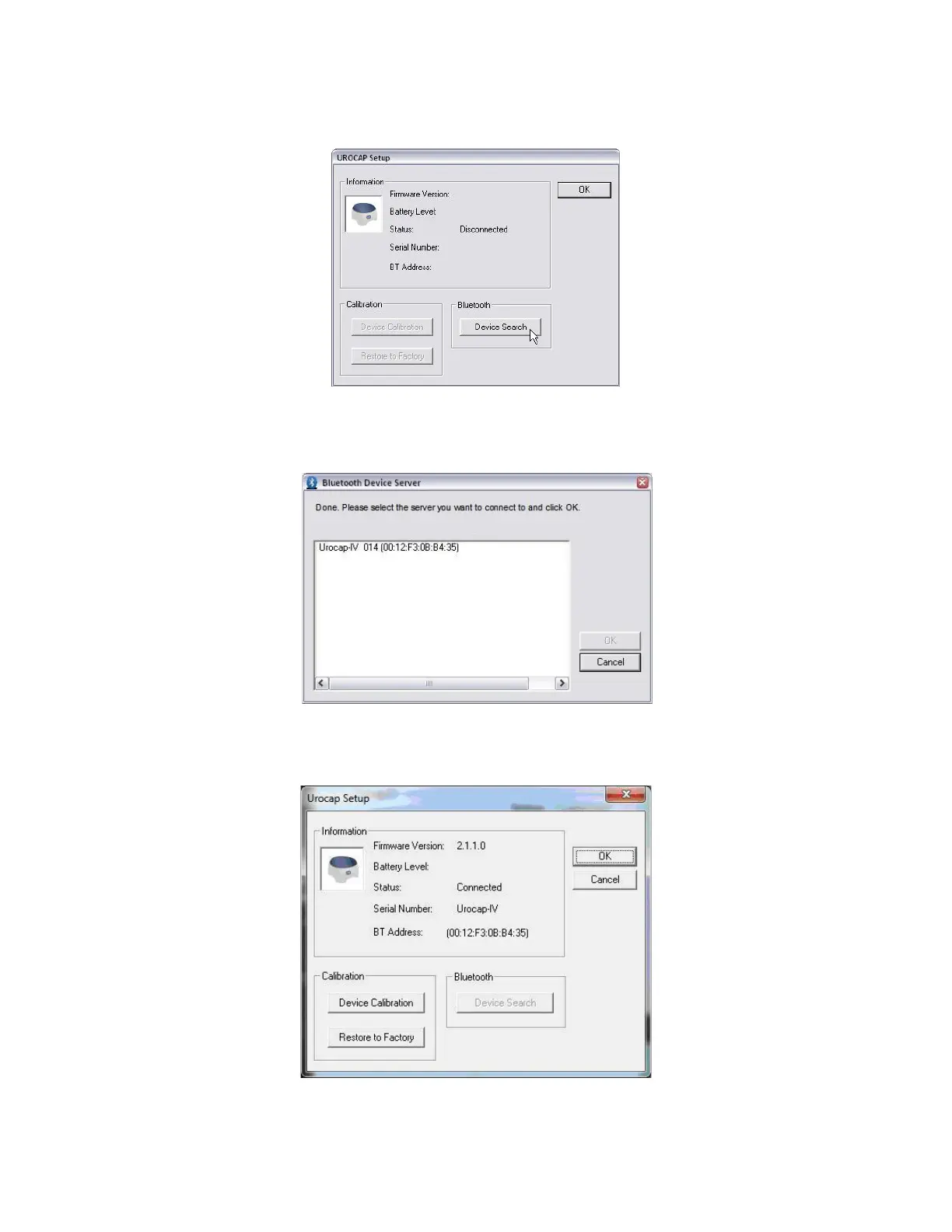
1. In the
Urocap™
Setup window, click the Device Search button to start locating the Uroflowmeter that needs to
be connected to the system (
Figure 18). If the device is not found, click Cancel in the Bluetooth Device Server
window and click
Device Search again.
2.
Figure 18: Launching Device Search
3. Wait for the Urocap™ to be located. When the Urocap™ appears in the Bluetooth Device Server window,
highlight the name and then click
OK (Figure 19).
Figure 19: Selecting Urocap™ IV Device
4. When a connection is established, the Bluetooth address and serial number fields will display the device
information (Figure 20).
Figure 20: Urocap Setup –Connected
5. Click OK to go back to the Goby™
Device Manager
window.
6. Repeat the steps provided to connect the Goby™ Hub and the UDS Roam to the system.



 To Next Page