LABORIE Goby Owner’s Manual GOBY-UM02 32
5.1.1 Zoom Button on Control Panel
Create and use a zoom button on the control panel for a more detailed look at a particular section of the graph. Begin by
creating a
Zoom button on the control panel (if not already created):
1. Click Options > Control Panel Definition and find an empty spot on the control panel to add the button.
2. Type the name under the Label column, the zoom value under the Definition column, and select the Zoom
description under the listing in the third column.
3. Click OK.
4. Press and hold the left mouse button and drag the cursor to highlight the particular area on the UDS graph to zoom.
5. Click Zoom button on the control panel.
6. Click the Zoom Back button to return to regular view.
5.2 GRAPH DISPLAY AREA
5.2.1 Hiding/Showing Channels
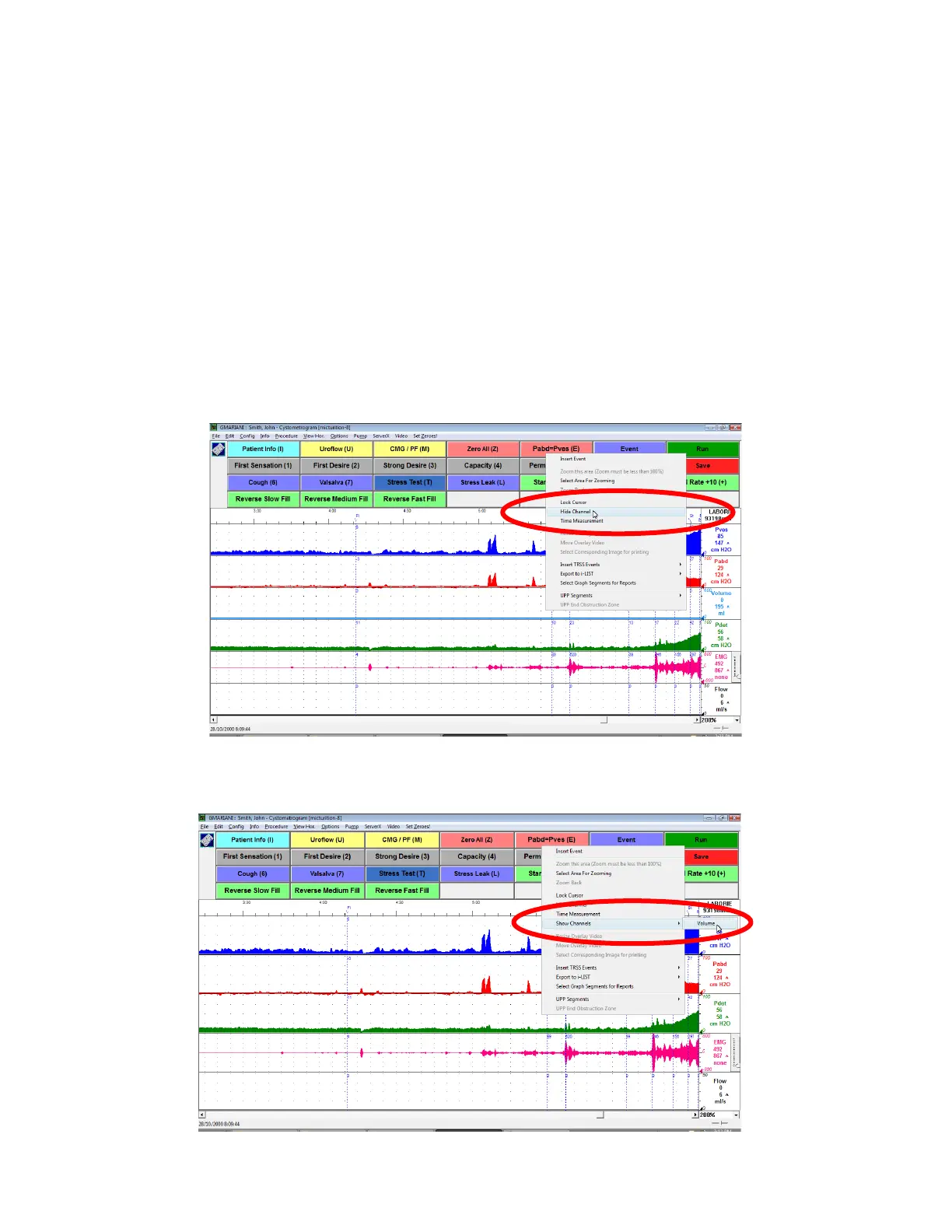
To hide any visible channels, right-click on the channel’s line on the graph and then select the Hide Channel option in the
resulting context menu. For example, to hide the
Volume
channel, right-click on the volume channel’s line and select Hide
Channel from the context menu (Figure 26). This can be repeated for as many channels as needed.
Figure 26: Hiding a Channel
To bring back the channel, right-click anywhere on the graph and select Show Channels and then select the channel name
to make it visible again (
Figure 27). Note that the channel will appear at the bottom of the graph.
Figure 27: Showing a Channel



 To Next Page