LABORIE Goby Owner’s Manual GOBY-UM02 90
7.2 CALIBRATE THE PUMP
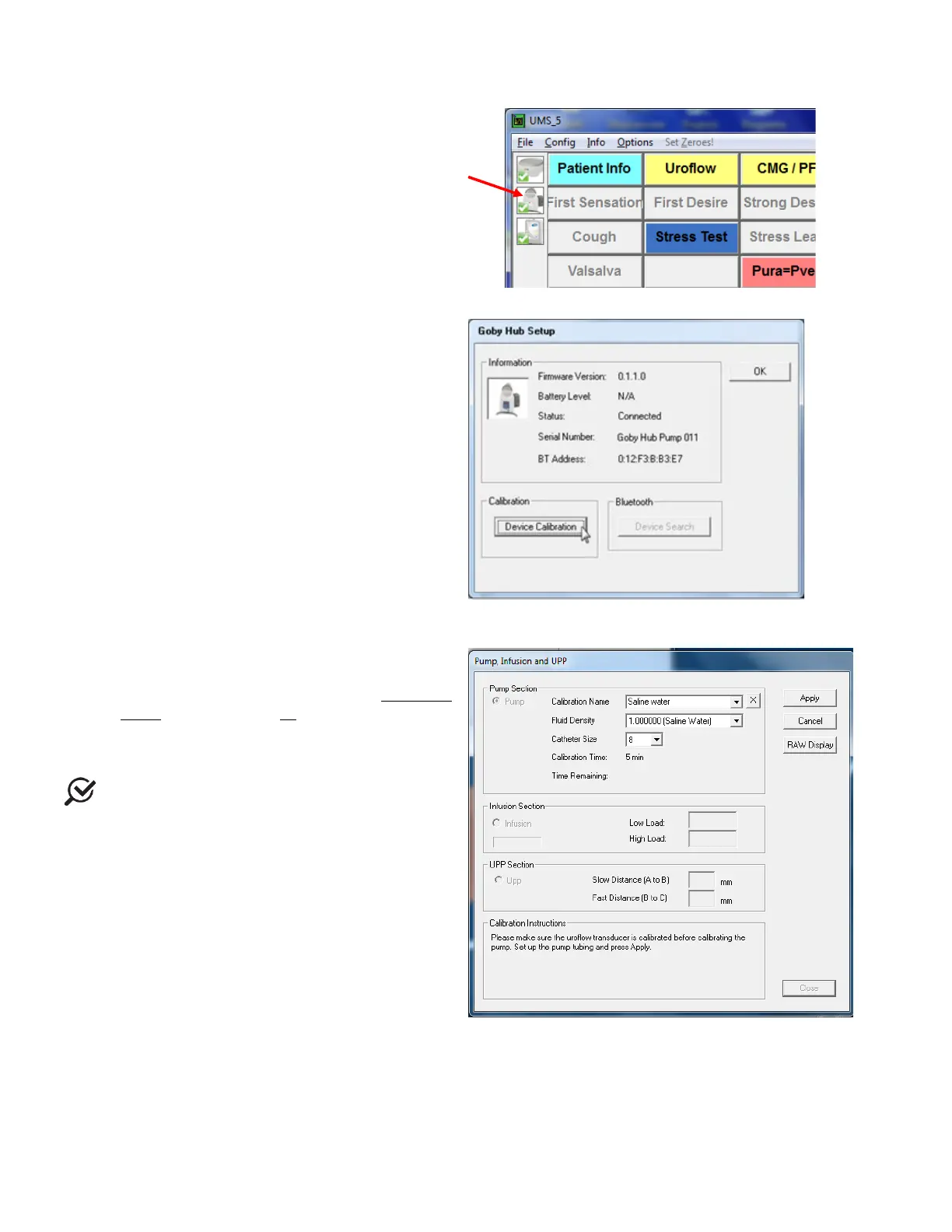
1. Switch ON the Goby™ Hub.
2. Start the UDS120 Goby software and double-
click the
icon in the main window
to open the Goby Device Manager window
(
Figure 108).
Figure 108: Access Goby Device Manager – Goby™ Hub
3. Click the Setup button to launch the Goby Hub
Setup window. Click the
button (
Figure 109).
Figure 109: Goby Hub Setup Window
4. Select the Pump option under the Pump Section
(Figure 110).
5. Set up the pump tubing. Refer to the
Set up the
Pump section on page 18.
6. Type in the
. The name will be
used
when selecting a calibration set before
running a test.
Do not use commas in Calibration Names.
7. Select the Fluid Density and the Catheter Size
that will be used during the Pump calibration
and enter their values in the appropriate fields.
8. Follow the on-screen instructions to complete
the calibration.
Figure 110: Pump, Infusion, and UPP Calibration Window



 To Next Page