LABORIE Goby Owner’s Manual GOBY-UM02 91
7.3 CALIBRATE THE UDS ROAM™ FOR EMG, PRESSURE TRANSDUCERS,
AMBULATORY REMOTE, AND/OR ACCUTAK
1. Switch ON the Goby™ Hub .
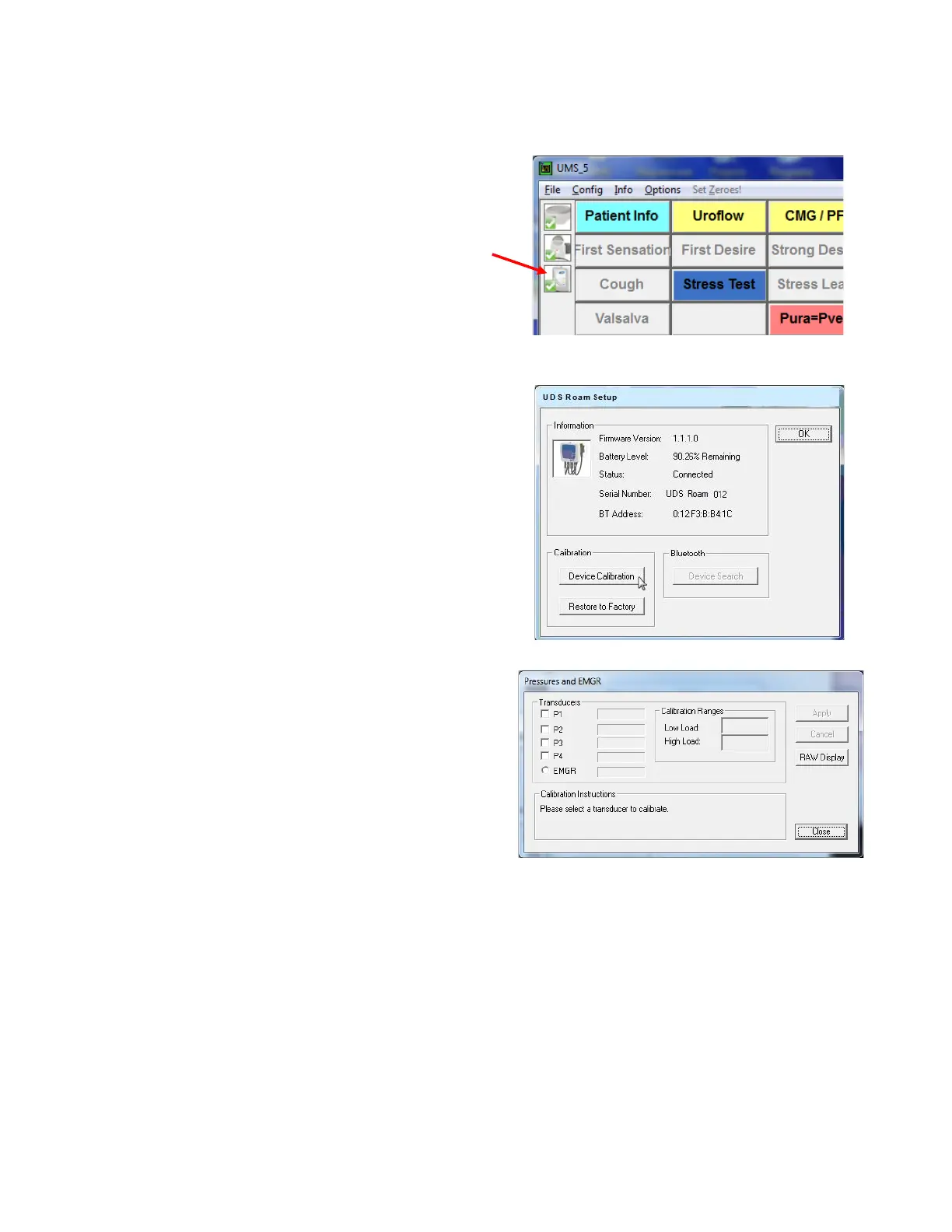
2. Start the UDS120 Goby software and double-click
the
icon in the main window to open
the Goby Device Manager window (
Figure 111).
Figure 111: Access Goby Device Manager – UDS
Roam™
3. Click the Setup button to launch the UDS Roam
Setup window. Click the
button
(
Figure 112).
Figure 112: UDS Roam Setup Window
4. Select the pressures and/or EMG to calibrate under
the Transducer heading by checking the applicable
box (
Figure 113).
5. Follow the on-screen instructions to complete the
calibration
Figure 113: Pressures and EMGR Calibration Window



 To Next Page