LABORIE Goby Owner’s Manual GOBY-UM02 85
8. Press the button on the remote control with the lowest RAW value (as found in step 6) and click Apply. The
Pressures and EMGR window will close.
6.4.1.2 Part 2: Configure File Settings for Remote Detection Algorithm
1. Click the CMG/PF button on the Software Control Panel.
2. Click Config > Setup/Modify to launch the Configuration window.
3. Click the Channel Settings tab and then click the Clear Config button.
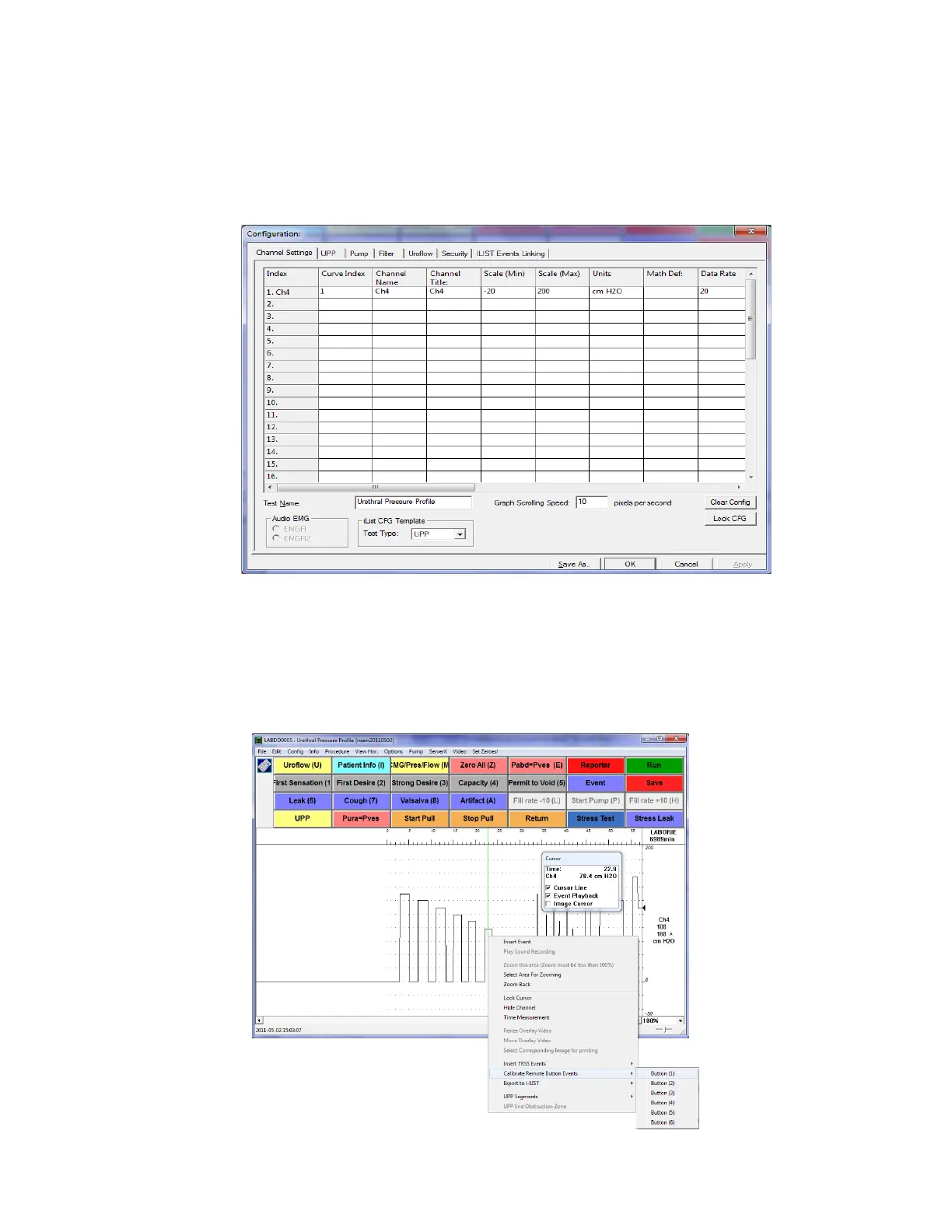
4. Add Ch4 to the channel settings with the following data and click OK. (as shown in Figure 98)
Figure 98: Configuration Window – Channel Settings
5. Run a sample test and press the remote buttons one by one, starting with Button (1). Each instance will be
marked on the graph as an event providing a relative CH4 value. Take note of the order you press the
buttons.
6. On the graph, right-click on the first event to open the context menu as shown in Figure 99
. Click Calibrate
Remote Button Events > Button (1) from the context menu. Repeat for all other buttons using their
correlating events.
Figure 99: Calibrate Remote Button Events



 To Next Page