LABORIE Goby Owner’s Manual GOBY-UM02 34
5.2.2.4 Drag/Drop Channel Ordering
Change the channel order quickly, in the Graph Display Area, without accessing the Configuration dialog box. For
instructions on changing channel order in the
Configuration dialog box refer to the Config Menu section, subheading
Channel Settings Tab on page 38.
To change channel order using drag/drop mouse tool:
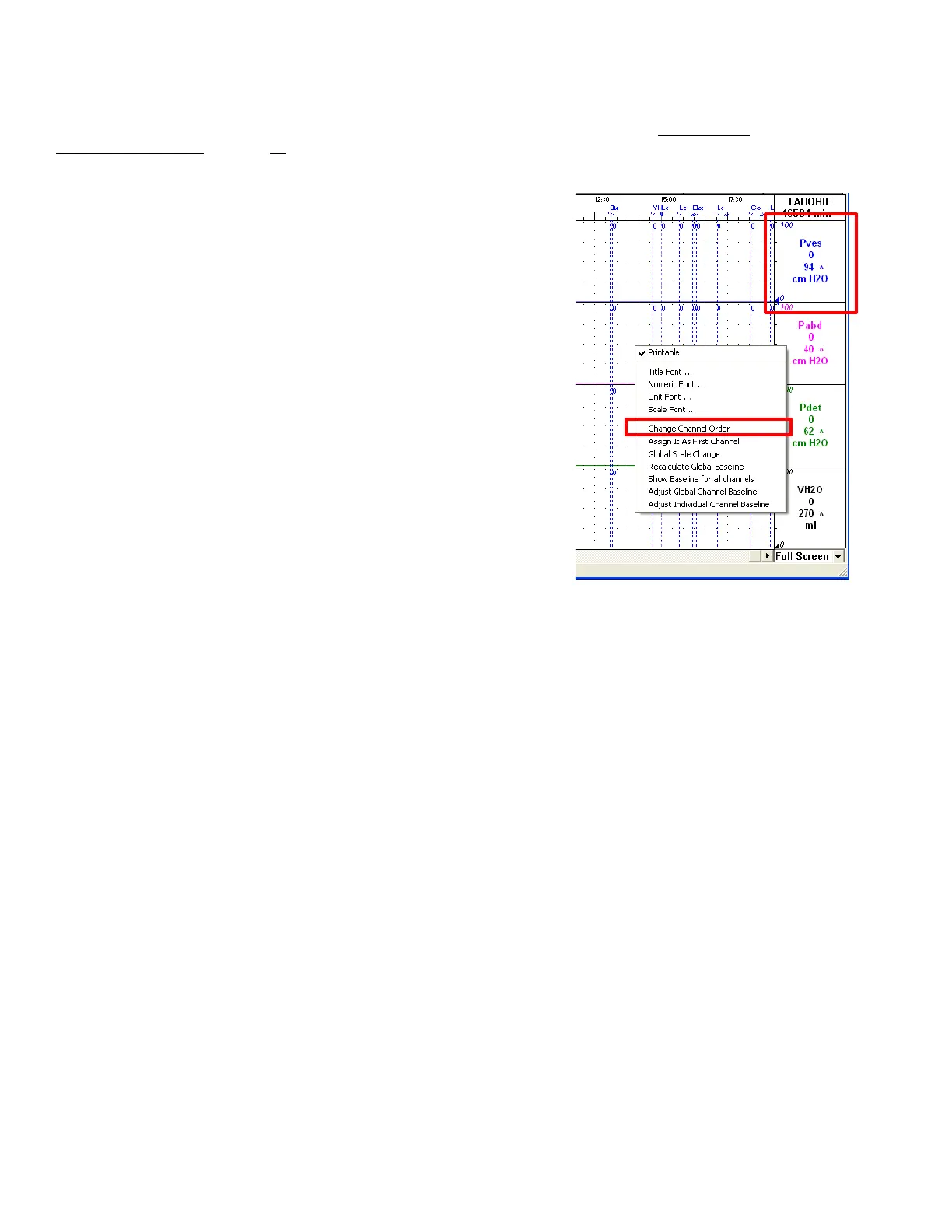
1. Right click on the channel information area. The channel
information area displays the title of the channel. To use the
drag and drop tool the user must right click the channel
information area; do not select the graph portion of the
display. A popup menu will appear.
2. Select
. The mouse pointer will
change to a hand.
3. Drag the channel information area of the channel being moved
to its new position and release the left mouse button. The
channel changes order in accordance with selected
positioning.
4. Repeat steps 2-3 for other channels selected for re-ordering.
5. After all channels are re-ordered, right-mouse click in the
channel information area to show the popup menu and
deselect the
menu item.
Refer to Figure 32.
Figure 32: Reordering Channels



 To Next Page