LABORIE Goby Owner’s Manual GOBY-UM02 29
4.2.2 Battery Status
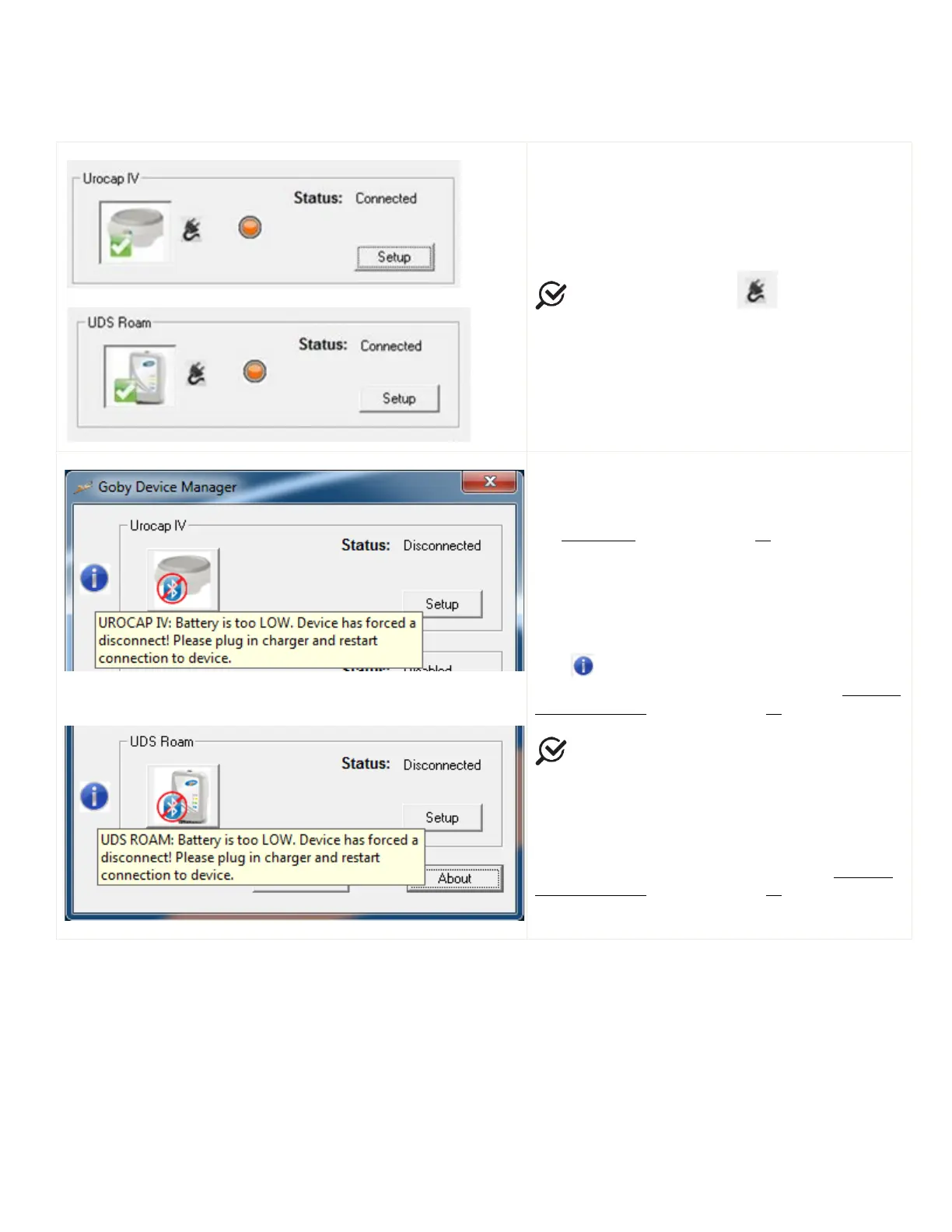
Table 4 provides an overview of the battery status provided in the Device Manager Window indicating with instructions on
how to proceed based on the battery status indicated:
The battery status will display in the
window in addition to the device LED
indicators. The LED light color on the device will be
the same as the color displayed in the
window.
: the plug symbol signifies that the
device’s battery is being charged.
Before the battery power is completely drained, for
either the
or the UDS Roam, the
device’s LED lights will flash orange as outlined in
the
LED Lights section on page 27.
When the battery power reaches total power
depletion, the device will disconnect from the system
and the status messages (as illustrated on the left)
will be displayed in the
window.
Place the mouse cursor over the information bubble
icon to find more information. To restart the
connection, follow the steps provided in the
Connect
Goby™ Devices section on page 24.
If either the
or the UDS
Roam shutdown due to low battery while a test is in
progress, the graph will stop scrolling and an event
named
Low Battery Shutdown or UDS
Roam Low Battery Shutdown will be marked on the
graph. Stop the test, plug the device into the
charger, and reconnect as described in the
Connect
Goby™ Devices section on page 24.
Table 4: Battery Status in the Device Manager



 To Next Page