LABORIE Goby Owner’s Manual GOBY-UM02 89
7 CALIBRATION
To calibrate the Urocap™ IV, the UDS Roam™, the pump on the Goby™ Hub, the infusion transducer, or the UPP Puller,
open the Goby Device Manager window and select the appropriate device.
IMPORTANT: Plug the Urocap™ IV, the UDS Roam™, and/or the Goby™ Hub into their chargers before beginning
calibration. Make sure the cart is on a level surface and the wheels are locked.
The power switch for the Goby™ Hub is located at the bottom of the Hub. For an overview of connections for the Urocap™
IV and the Goby™ Hub see the Device Connectors and Buttons section on page 30.
7.1 CALIBRATE THE UROCAP™ IV UROFLOWMETER
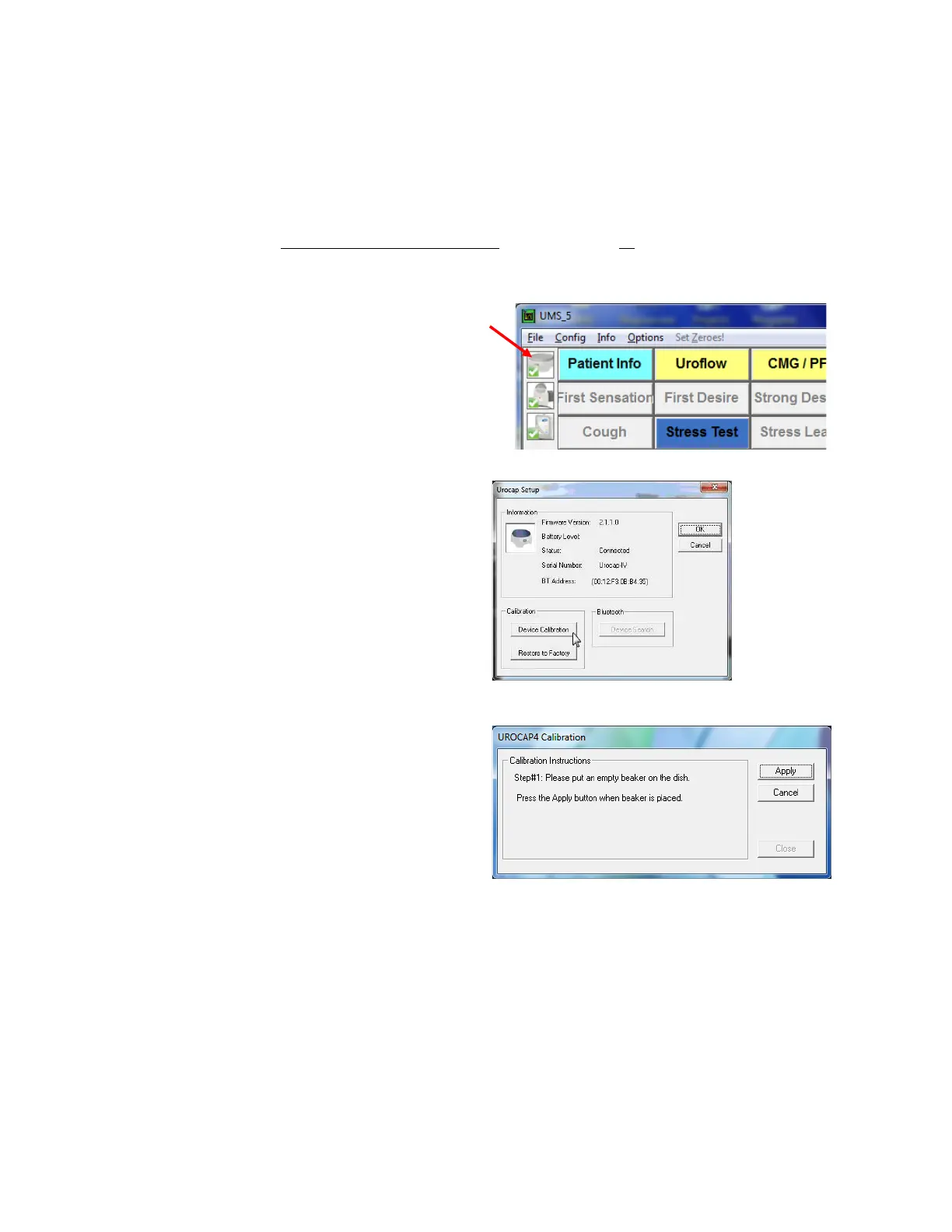
1. Plug the Urocap™ IV into the charger and plug the
charger into an outlet.
2. Start the UDS120 Goby software and double-click the
icon in the main window to open the
Goby Device Manager window (
Figure 105).
Figure 105: Access Goby Device Manager – Urocap IV
3. Click the Setup button in the Urocap section to launch
the Urocap™ Setup window. Click the
button (Figure 106).
Figure 106: Urocap Setup – Device Calibration
4. Place an empty beaker on the Urocap™ IV and then
click
in the UROCAP4 Calibration window
(
Figure 107).
5. Follow the on-
screen instructions to complete the
calibration.
6. Click
once calibration is complete.
Figure 107: UROCAP4 Calibration Window



 To Next Page