LABORIE Goby Owner’s Manual GOBY-UM02 42
5.5.3.6 ARM Tab
Set the channels that correspond to Anorectal Manometry measurements under the Arm Tab. For more information on
setting up and performing ARM tests with the Goby system, please refer to the ARM Owner’s Manual.
NOTE: select the Enable Reverse Pump option to activate the reverse pump button on the control panel.
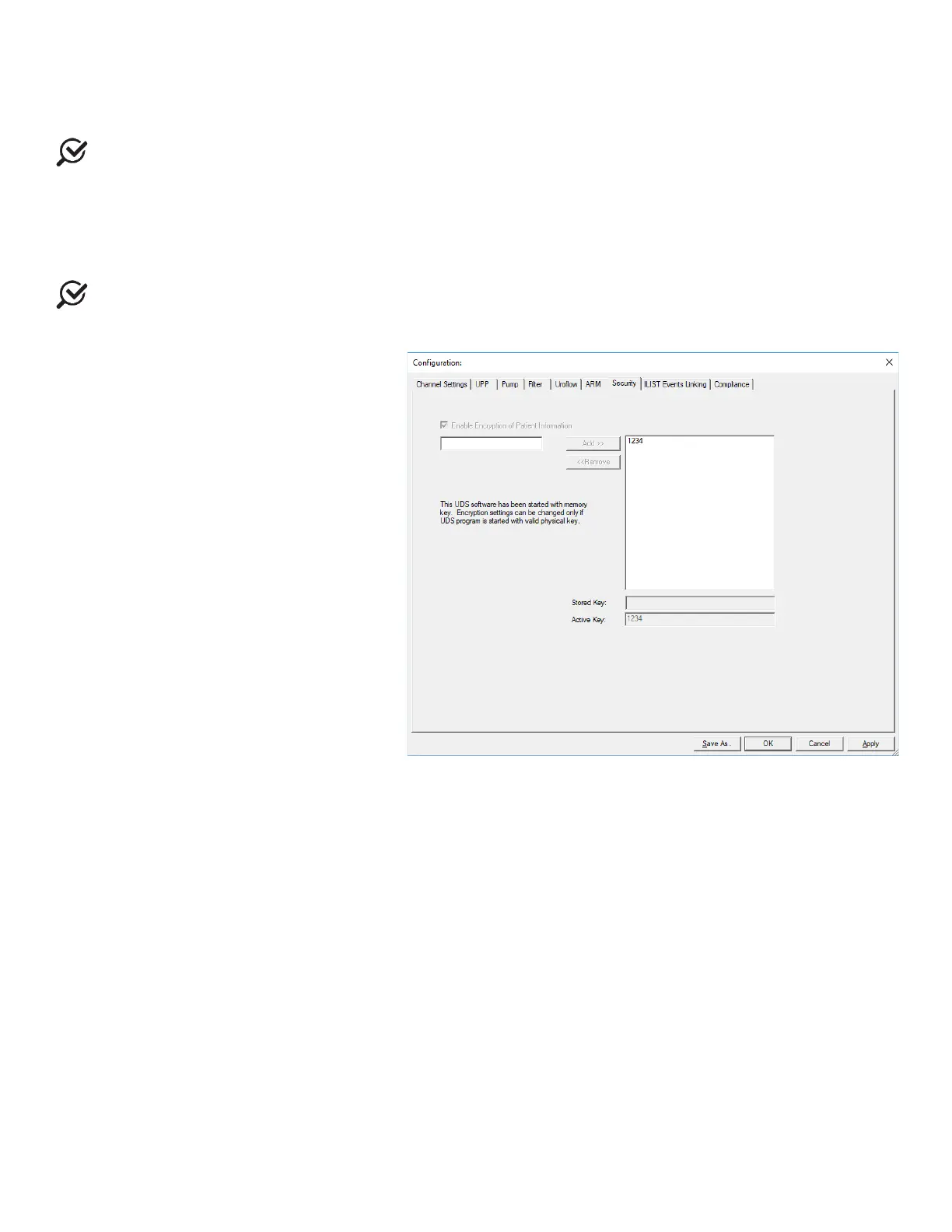
5.5.3.7 Security Tab
Under this tab you can set the security features to protect, or encrypt, a patient’s name and information such as Medical
Record Number, History, Diagnosis, Doctor’s name, Clinic name, and Comments.
Once encryption is set, only the virtual
key that is associated with the patient file can see the decrypted information.
NOTE: This security feature needs to be set before you start running a test. Make sure that a virtual key is installed on
your PC
.
To encrypt patient information:
1. Click the
tab.
2. Make sure that the Enable Encryption
of Patient Information box is selected.
3. Click the
button to add your key’s
serial number to the secure list.
4. Click
to save your selections.
5. Run your UDS test and save the test
data.
6. In the
>
box, make sure
that the Encrypt Patient Information
box is selected.
Refer to Figure 44.
Once you save the patient information with
encryption and if someone uses a virtual key
that is not associated with the file they will see
the word ENCRYPTED in all the Patient
Information fields.
Figure 44: Configuration – Security Tab



 To Next Page