119
Feature Pages
REVIEW:
SOUND EFFECTS
are moveable. If you like any of the factory keyboard settings, you can assign that sound
effect to one of the green
GENIUS Sound Effects buttons without losing the use of the 12 notes on the Lower
Keyboard. You could assign a Sound Effect to one of the long or short foot pedals. A Sound Effect can be
assigned to any one of the six Controllers.
•LEFT TOUCH BAR
•RIGHT TOUCH BAR
•LEFT FOOT SWITCH
•RIGHT FOOT SWITCH
•LONG (NATURAL) FOOT PEDAL
•SHORT (BLACK) FOOT PEDAL
Any Sound Effects setting can be saved to a BANK PRESET. Pressing the RESET button or turning the organ
off will return the organ to the factory setting.
2. Keyed Drums
What It Does:
The KEYED DRUMS feature turns the Lower Keyboard into various drum kits. Drum Kits are groups of per-
cussion sounds selected for a particular style of music. The normal function of the Lower Keyboard is
replaced with drums and percussion sounds.
3. Theatre Drums - SHORTCUT=FEATURE + THE THEATRE DRUM TAB
What It Does:
Theatre organs were originally called “Unit Orchestras” because of the organ’s ability to sound like an
orchestra. The THEATRE DRUMS feature recreates the Bass Drums, Snare Drums, Triangles, Cymbals,
Castanets, and other percussion instrument sounds of a theatre or
gan. These percussion sounds are played
from the lower keyboard and/or pedals just like an authentic theatre organ. The THEATRE DRUMS tab
enables the player to recreate authentic Theatre Organ effects.
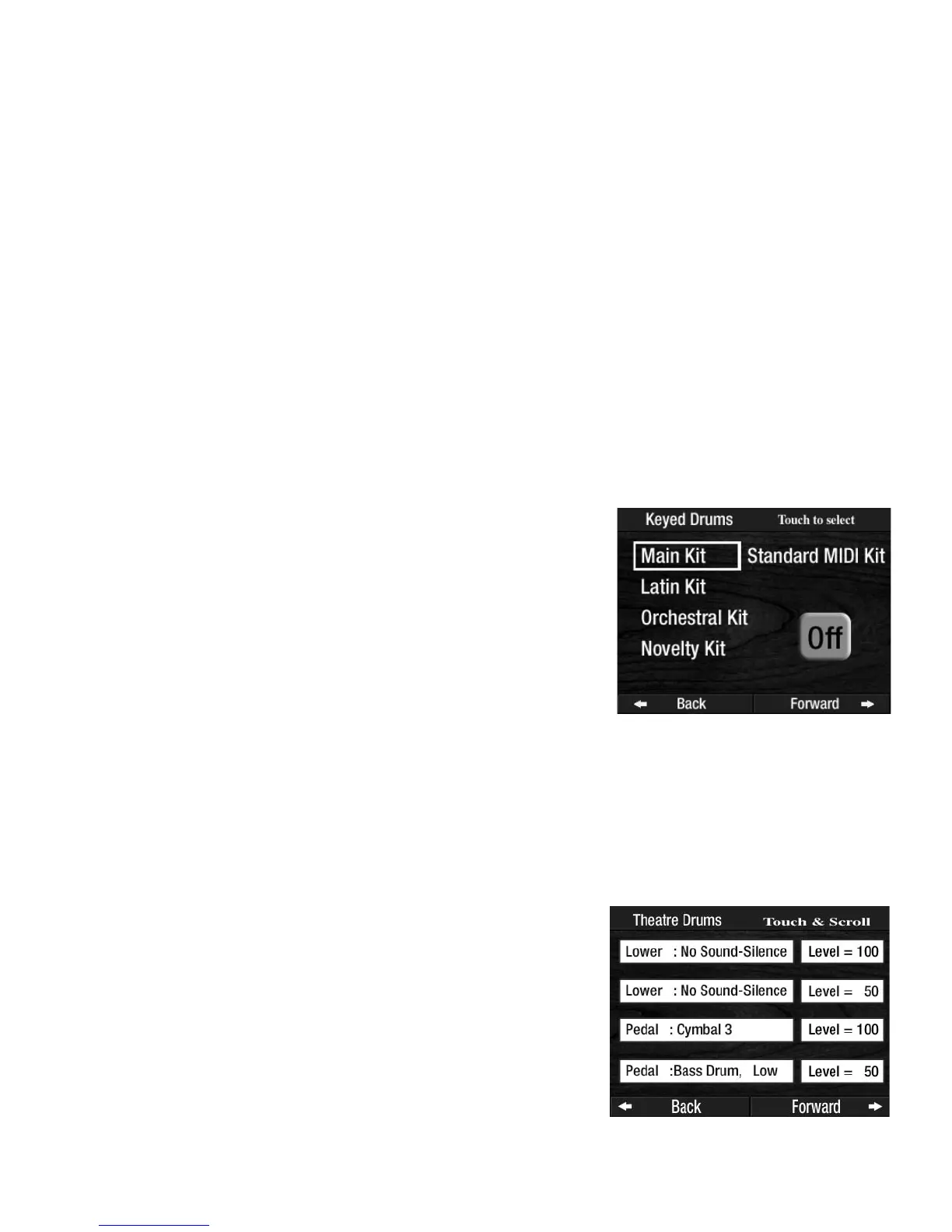
The first two lines control the Lower Keyboard sounds and volumes.
The last two lines control the Pedal
sounds and volumes.
How It Works:
Pressing the THEATRE DRUMS tab will turn on a set of drum sounds
for the Lower Keyboard and Pedals. The Lower Keyboard and the
Pedals each have two possible percussion sounds. Sounds available
are listed in the back of the book:
SOUND EFFECTS AND DRUM
VOICE LIST.
Pressing the words
THEATRE DRUMS on the screen displays four
lines of Theatre Drum sounds.
How It Works:
Pressing the words KEYED DRUMS on the screen displays the drum
kits available. Press the Drum Kit name, on the screen, to activate the
feature on the Lower Keyboard.
How To Use It:
With a Rhythm Style playing, play a No Chord (N.C.) and play a
drum solo along with the beat of the Rhythm Style.
Press the lighted
FEATURE(CLEAR) button to return to the POWER-UP
screen.



 To Next Page