127
Feature Pages
1. Preset Information- SHORTCUT=FEATURE+ANY GENERAL, BANK, OR CATEGORY
PRESET BUTTON
What It Does:
The PRESET INFORMATION feature displays the Upper Keyboard sounds, in groups of 11, in each of the
General Presets, Category Presets, Bank Presets, and Rhythm Presets.
A rectangle appears around the preset name on the screen, indicating that it is the currently active preset.
Change preset by pressing one of the preset buttons or touching the desired preset name on the screen. The
same selection method may be used for
CATEGORY, BANK and RHYTHM PRESETS.
If you are using a
CATEGORY PRESET, the display will list the 11 set-ups available in each category.
For example, when using the
BIG BAND CATEGORY PRESETS, the display will list the 11 set-ups for that
Category.
When using a
BANK PRESET, the display will list the 11 set-ups available in each bank. For example, when
using BANK A PRESETS, the display will list those 11 set-ups.
When using a
RHYTHM PRESET (Nor,al or Organ) the display will list the 11 set-ups available for the select-
ed Rhythm Style plus the Rhythm Style name.
Press the lighted
FEATURE(CLEAR) button to return to the POWER-UP screen.
How To Use It:
PRESET INFORMATION is a quick and easy way of determining what sounds are in a particular Preset. For
example: Press the
CUSTOM #4 button (a factory preset shortcut) and then press the LATIN Category Preset
button. The screen displays the 11 sounds for the Latin Category presets.
How It Works:
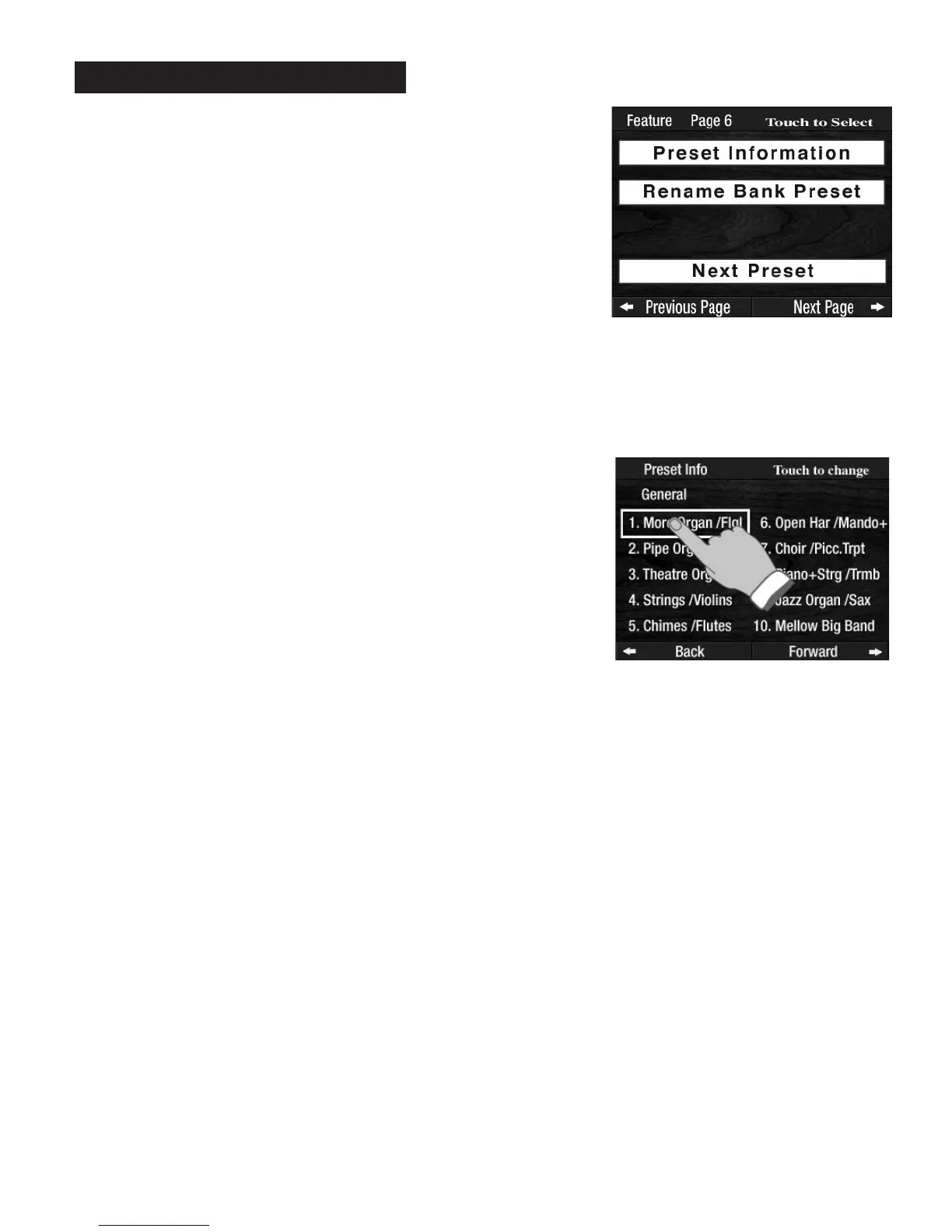
Pressing the words PRESET INFORMATION on the screen displays
information regarding the Preset section being used. If no preset sec-
tion is being used, the display will list the 11 set-ups available in the
GENERAL PRESETS.
PREVIEW:
FEATURE PAGE 6
controls three features involving GENERAL PRE-
SETS, CATEGORY PRESETS, BANK PRESETS, and RHYTHM PRE-
SETS.
1.
PRESET INFORMATION.
2. RENAME BANK PRESET.
3. NEXT PRESET.
Feature Page 6



 To Next Page