17
Presets
What It Does:
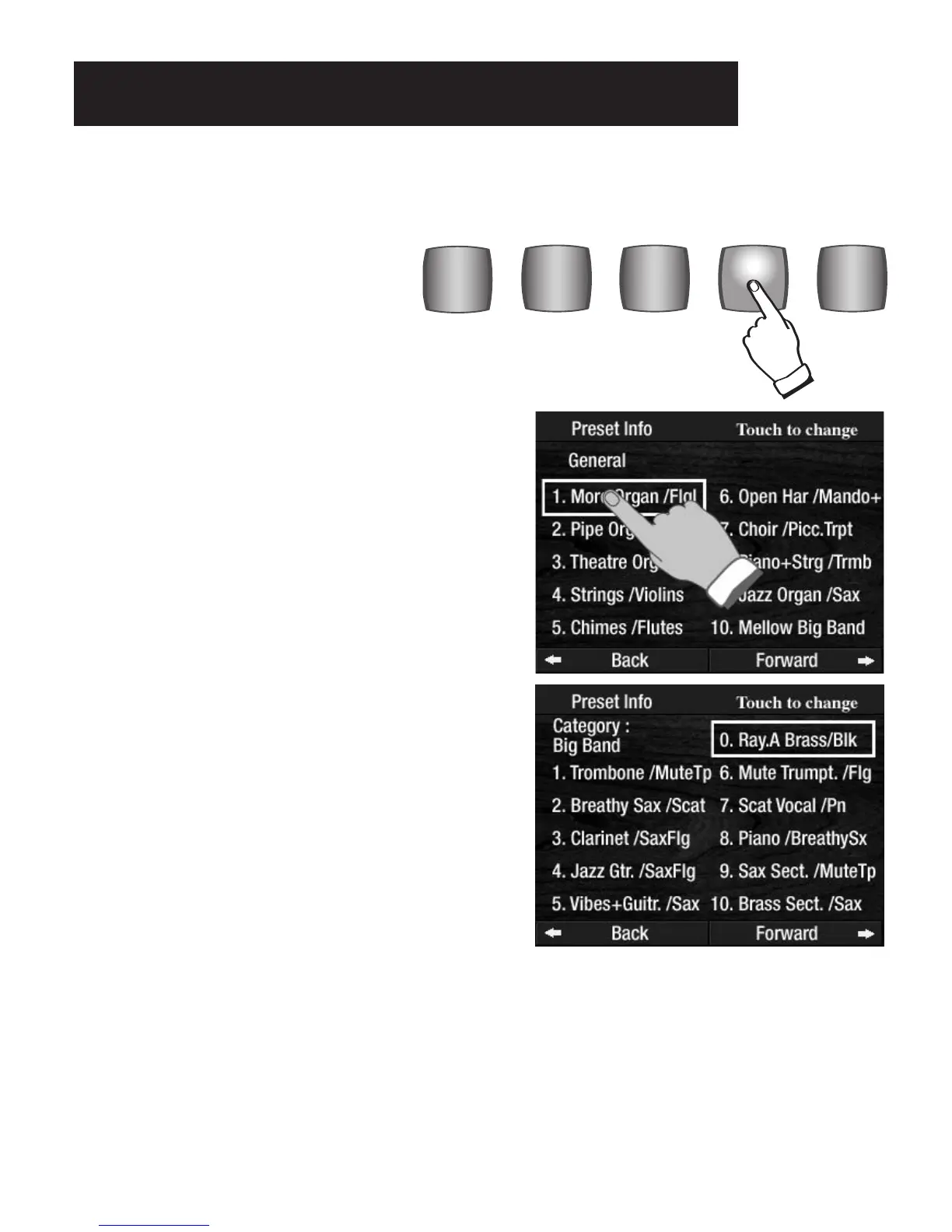
The PRESET INFORMATION feature displays a description of the Upper Keyboard sounds (in groups of 11)
in the General Presets, Category Presets, Bank Presets, and Rhythm Presets.
For example, if you press the BIG BAND CATEGORY PRE-
SET
button, and then press the CUSTOM 4 button (both but-
tons illuminated) the
PRESET INFORMATION display for
CATEGORY: BIG BAND will appear on the screen, as pic-
tured to the right.
The active preset will be highlighted on the screen. In this
example,
PRESET 0 is active. Touch the screen, or press
one of the 10 preset buttons, to select a different BIG BAND
CATEGORY PRESET
.
A rectangle will appear around the preset name on the
screen, indicating it is active. To change the preset, press
one of the
GENERAL PRESET buttons or the touch desired
preset name on the screen.
How It Works:
Press the CUSTOM 4 button, located to the
left of the lower keyboard, to display a
listing of the 11 presets currently being
used. (If no presets are selected the dis-
play will list the 11 GENERAL PRESETS).
Preset Information








 To Next Page