13
Presets
TRY THIS: Try the following steps to see how the NORMAL RHYTHM PRESET button works.
1. Open your black Lowrey Song Book to page 18 “Aloha, Oe.”
2. Press the
RESET button. Wait for the ‘Power Up’ screen to appear.
3. Press the blue
HAWAIIAN Rhythm Style button. The NORMAL RHYTHM PRESET button is illuminated red.
This red colored light in the button means that the Rhythm Preset is activated.
The entire organ is set up with a beautiful Hawaiian registration simply by pressing the blue
Hawaiian Rhythm Style button.
4. Press the
INTRO/ENDING 1 button.
5. Play a “C” chord on the lower keyboard to hear the Hawaiian Rhythm Style Introduction. Let the
colored stripes in the songbook and the RED, BLUE and GREEN lights above the lower keyboard
guide your left hand.
6. While playing the song, reach up and press the
GENERAL PRESET 1 button. You will hear a different
melody sound. Press the
GENERAL PRESET 2 button. The melody sound will change again.
Each General Preset button holds a different Rhythm Preset registration.
7. When finished playing the song press the INTRO/ENDING 1 button again and enjoy the Ending.
8. When the Ending is finished playing, the light in the NORMAL RHYTHM PRESET button is illuminated
yellow. The yellow color indicates that the Rhythm Preset is “Standing By.”
9. To play another song, select a blue Rhythm Style button. The
NORMAL RHYTHM PRESET button will
again be illuminated red, indicating the organ is set up and ready to be played. The only other button you
may wish to press is the
INTRO/ENDING 1 or INTRO/ENDING 2 button. You are again ready to play!
TRY THIS: Try the following steps to see how the ORGAN RHYTHM PRESET button works.
1. Open your black Lowrey Song Book to page 16 “Release Me.”
2. Press the
RESET button. Wait for the ‘Power Up’ screen to appear.
3. Press the blue
COUNTRY 1 Rhythm Style button.
4. Press the ORGAN RHYTHM PRESET button, causing it to become illuminated red.
The entire organ is set up with a down home Country music registration simply by pressing the blue
Country 1 Rhythm Style button.
5. Follow steps 4 through 9 listed above. The
ORGAN RHYTHM PRESETS provide a variety of organ
sounds for your songs.
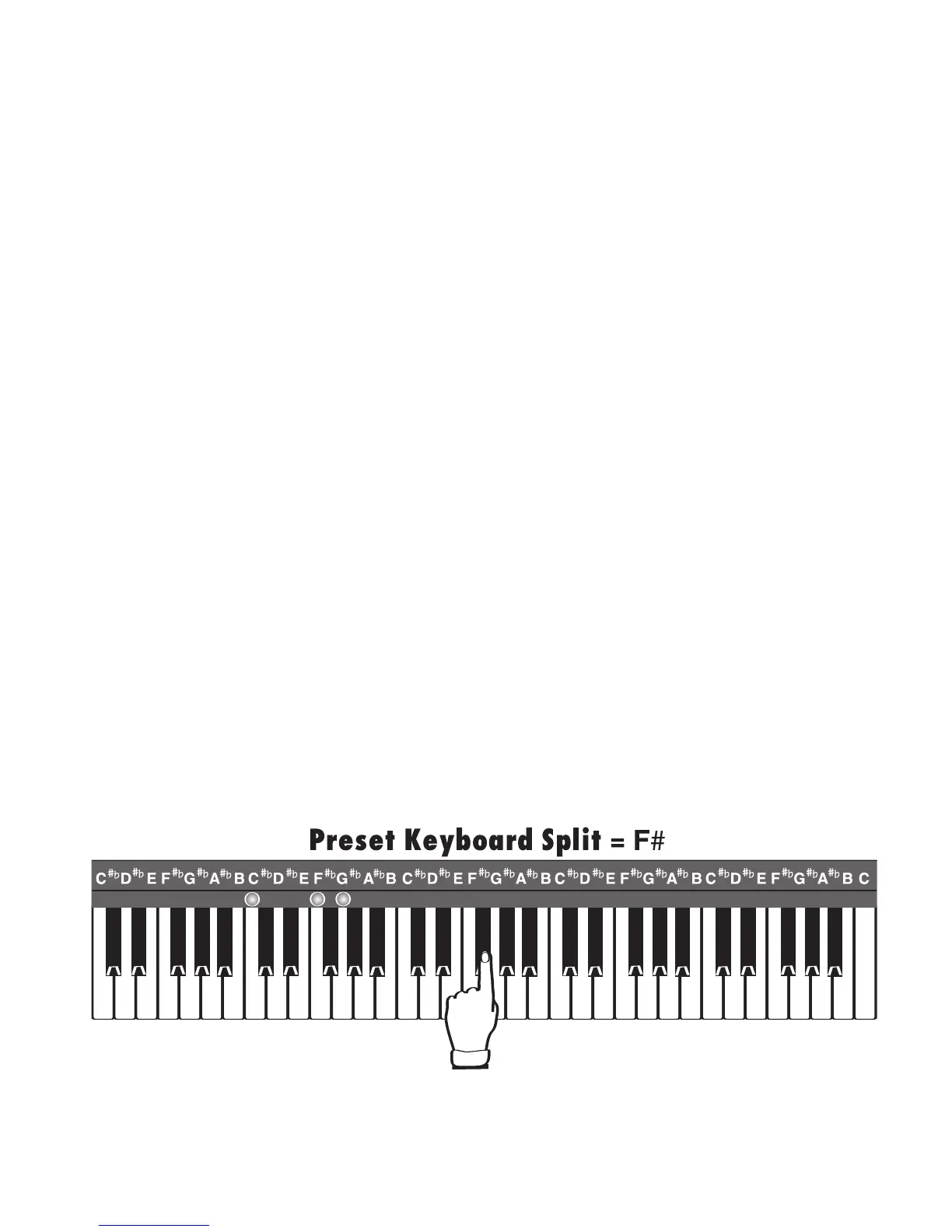
RHYTHM PRESETS activate the lower “Keyboard Split” feature, which also places melody sounds on the
right half of the lower keyboard. The factory-set split location is at the third F# key, as pictured below. See
FEATURE PAGE 7 - SET KEY SPLITS on page 129, and on pages 75 and 81.




 To Next Page