90
The following explains the monitor items except those described in Section 1.2.1,
DESCRIPTION OF MONITOR, [1] Monitor Display (common to all modes)”.
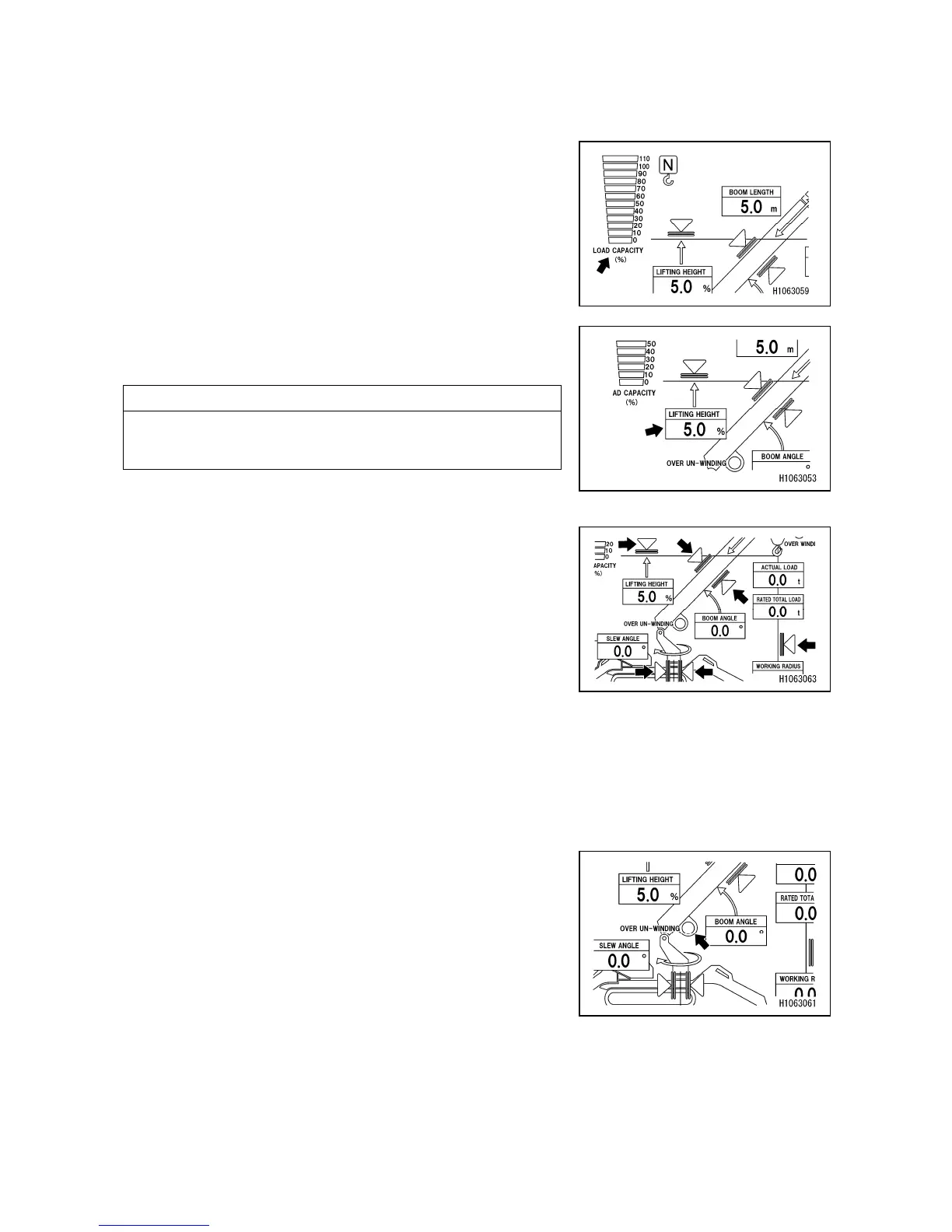
[1] Load capacity ratio indication
Indicates the moment limiter load capacity ratio by lighting
up and off of the “Bar” indication.
[2] Lifting height indication (LIFTING HEIGHT)
Continuously displays the current lifting height during
crane operation.
NOTES
The lifting height refers to the vertical distance from the
ground to the lower end of the hook.
[3] Lifting height limiter switch
[4] Working radius limiter switch
[5] Boom angle upper limit switch
[6] Boom angle lower limit switch
[7] Clockwise slew angle limiter switch
[8] Counter-clockwise slew angle limiter switch
When the working radius of the boom is limited due to
workplace factors or other reasons, these switches can be
used to specify the working radius of the boom to a desired
range. To set the working radius of the boom, move it to a
desired position and push and hold the corresponding
switch on the touch panel. Once the working radius has
been set, the illuminated blue indicator turns to orange.
[9] Over unwinding indication (OVER UNWINDING)
Lights up when the hook is unwound excessively (the
unwound length of the wire rope becomes maximum)
during crane operation.



 To Next Page