5-4 (E)
LH71A / LH72
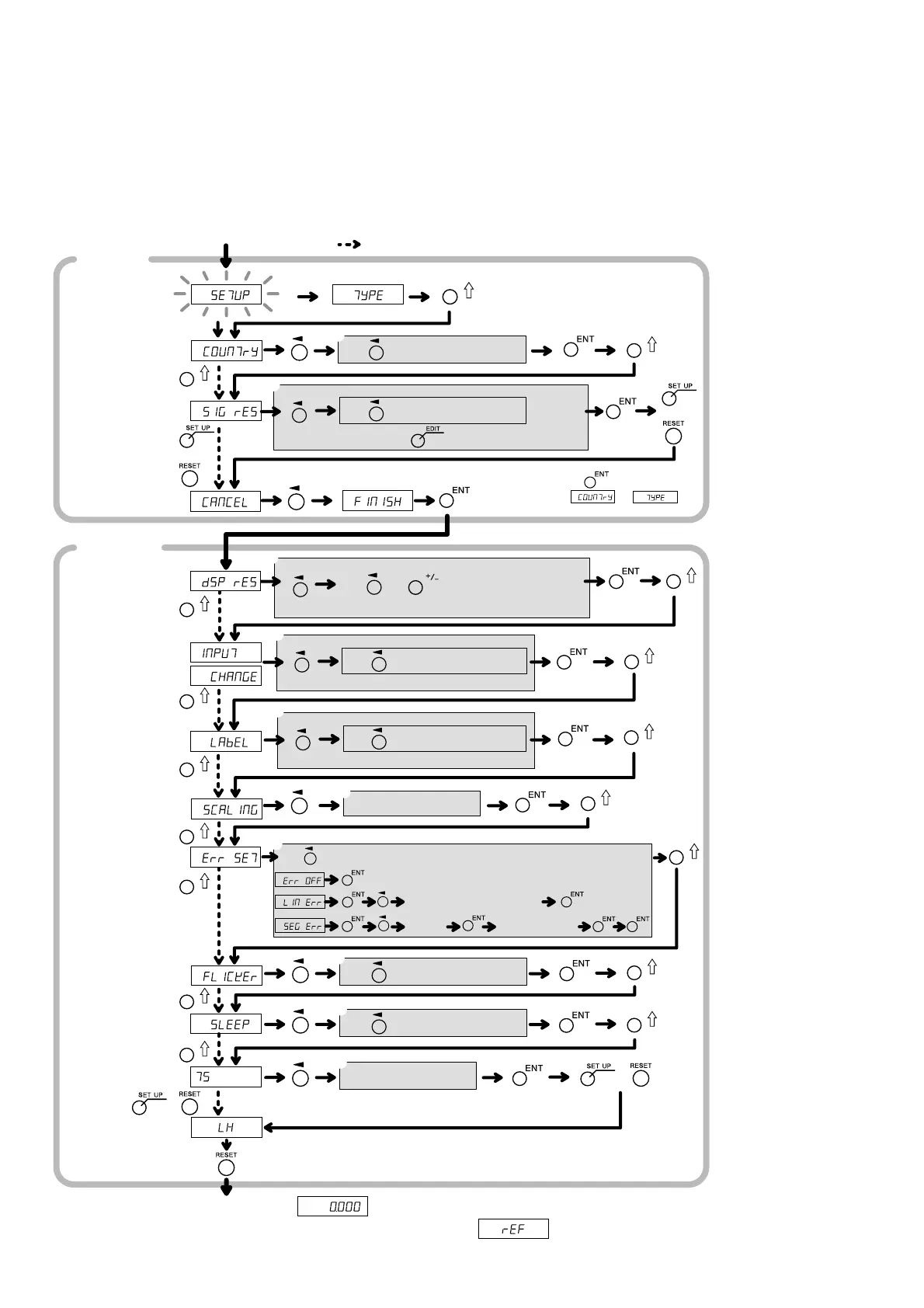
5-2. Settings for General-purpose Applications and Milling Machine Function
5-2-1. When Power is Turned On for the First Time after Factory Shipping
(LH71A general-purpose applications and milling machine function)
q STD/US/JPN
w 0.1/0.5/1/5/10/
00.00.01/
00.00.10/
00.01.00/
00.10.00
<Expanded>
0.05/2/20/25/
50/100/
01.00.00
e Setting at w or
higher/Diameter
display at w
(except for
angle)/Polarity
r IN-1/IN-2/IN-3/
IN -
t X/Y/Z
y 0.100000 -
9.999999
u OFF/LIN Err/
SEG Err
∗ See Part 5-5,
“Compensation”.
i OFF/1/2
o OFF/1/5/10/30/
60
!0 1.0000 - 20.0000
q
w
e
r
t
y
u
i
o
!0
Power ON
Basic
settings
Start of operation
(When the display resolution is 0.001 mm)
Detailed
settings
Model
Destination
country
(STD)
Scaling
(1.000000)
Measuring unit
resolution
(1)
Display
resolution
(Measuring
unit resolution)
Display
switching
(1-1, 2-2, 3-3)
For 2-axis and
3-axis models only
For 1-axis and
2-axis models only
Axis label
switching
(1-X, 2-Y, 3-Z)
Compensation
value
(OFF)
Flicker control
(2)
Sleep
(OFF)
Select axis
Performed for each axis.
or
or
Note 1
1-axis/2-axis model
3-axis
model
Approx.
2 seconds
Use and to select setting content
Select axis
Performed for each axis.
Use to select setting content
Select axis
Use to select setting content
Use to select setting content
Performed for each axis.
Select axis
Performed for each axis.
Enter the setting value
Use to select the setting (compensation), and then set each option
Enter the compensation value
Enter the
compensation value
Enter the
position
Select axis
Use to select setting content
Use to select setting content
Use to expand the selection option.
Touch sensor
radius
(5.0000)
Enter the setting value
or
∗ The setting in parentheses ( ) is the factory setting.
∗ indicates the process when the setting does not be changed.
Note 1: Use to return
to or .
∗ When the segmented error compensation value is set, is displayed,
the unit switches to reference point acquisition mode.
Use to select setting content
or
5. Settings



 To Next Page