(E) 7-1
LH71A / LH72
7. Operation Method
7-1. How to Perform Key Operations
LL
LL
L Basic operations
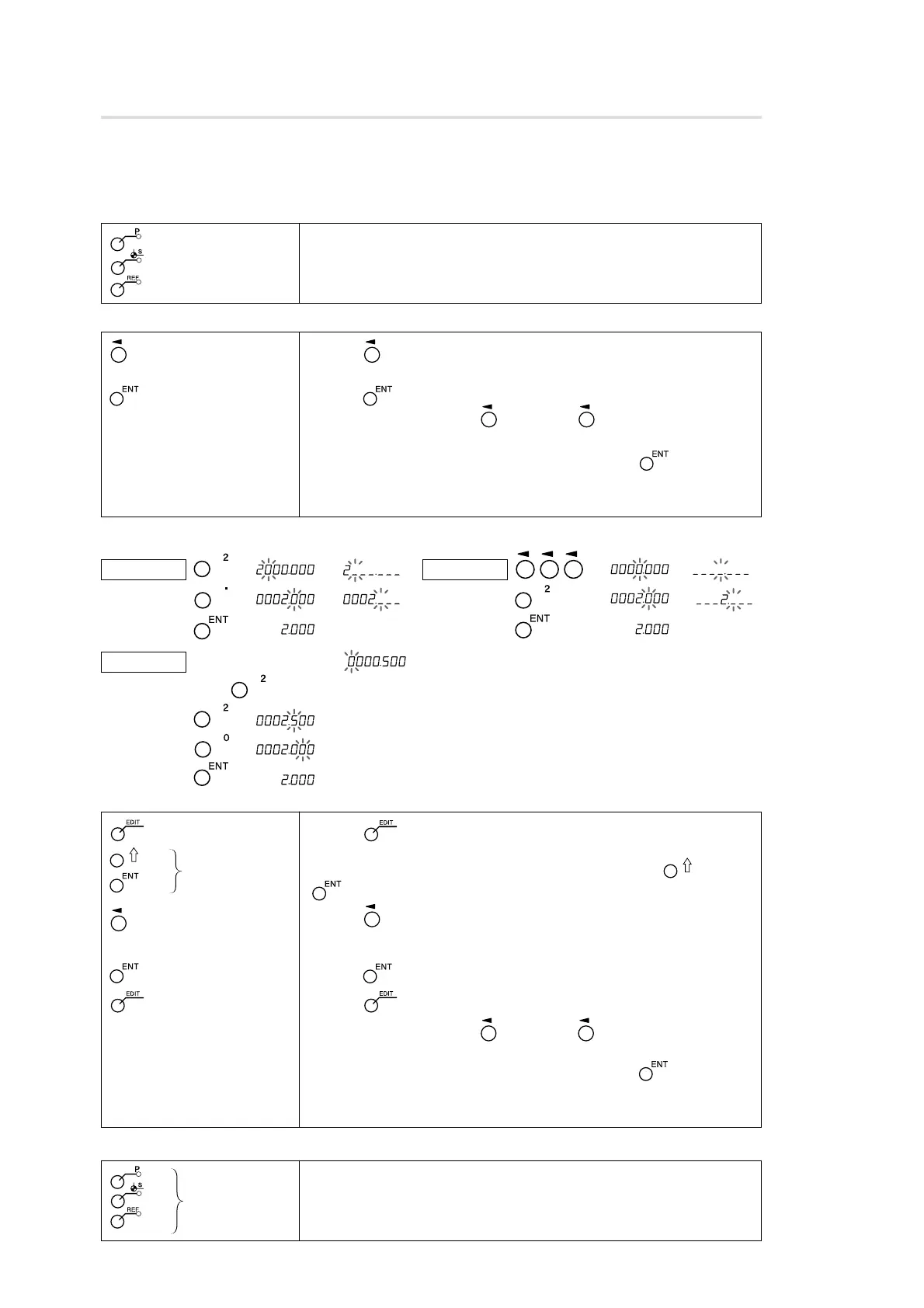
To enter a mode
: Preset mode
: Datum point mode
: Reference point mode
Select axis
Numeric keys Value input
Finalize
Other
methods
Press the mode key to enter the respective mode (lamp lights up).
Use the key to select the axis (axis label flashes).
Use the numeric key to enter the value (see entry example).
Use the key to finalize the setting.
• After selecting with the key, use the key again to select the
value (flashing) to be changed. That value only can be changed.
• If you press another select axis key instead of the key when
finalizing the setting, the current value is finalized, and entry can be
made for the selected axis.
To enter a value
Edit mode
Select number
Select axis
Numeric keys Value input
Finalize
Exit
Other
methods
Use the key to set to numerical value edit mode. (EDIT flashes)
(The number is displayed for approx. 1 s.)
The number to be edited can be selected by pressing the key or
key. (The number is displayed for approx. 1 s.)
Use the key to select the axis.
Use the numeric key to enter the value (see entry example).
Use the key to finalize the setting.
Use the key to exit edit mode (EDIT goes out).
• After selecting with the key, use the key again to select the
digit (flashing) to be changed. That value only can be changed.
• If you press another select axis key instead of the key when
finalizing the setting, the current value is finalized, and entry can be
made for the selected axis.
To edit
To exit a mode
Entry example: Entering “2.000”
Example 1 → (or )
→ (or )
→
Mode exit
Example 2 → (
or
)
→ (
or
)
→
Example 3 (after 0.500 is entered) ( )
Enter using the operations in examples 1 and 2
→
→
→
Press the mode key to exit the respective mode (lamp goes out).
Pressing another mode key directly exits the current mode and enters the
new mode.



 To Next Page