LH71A / LH72
(E) 3-1
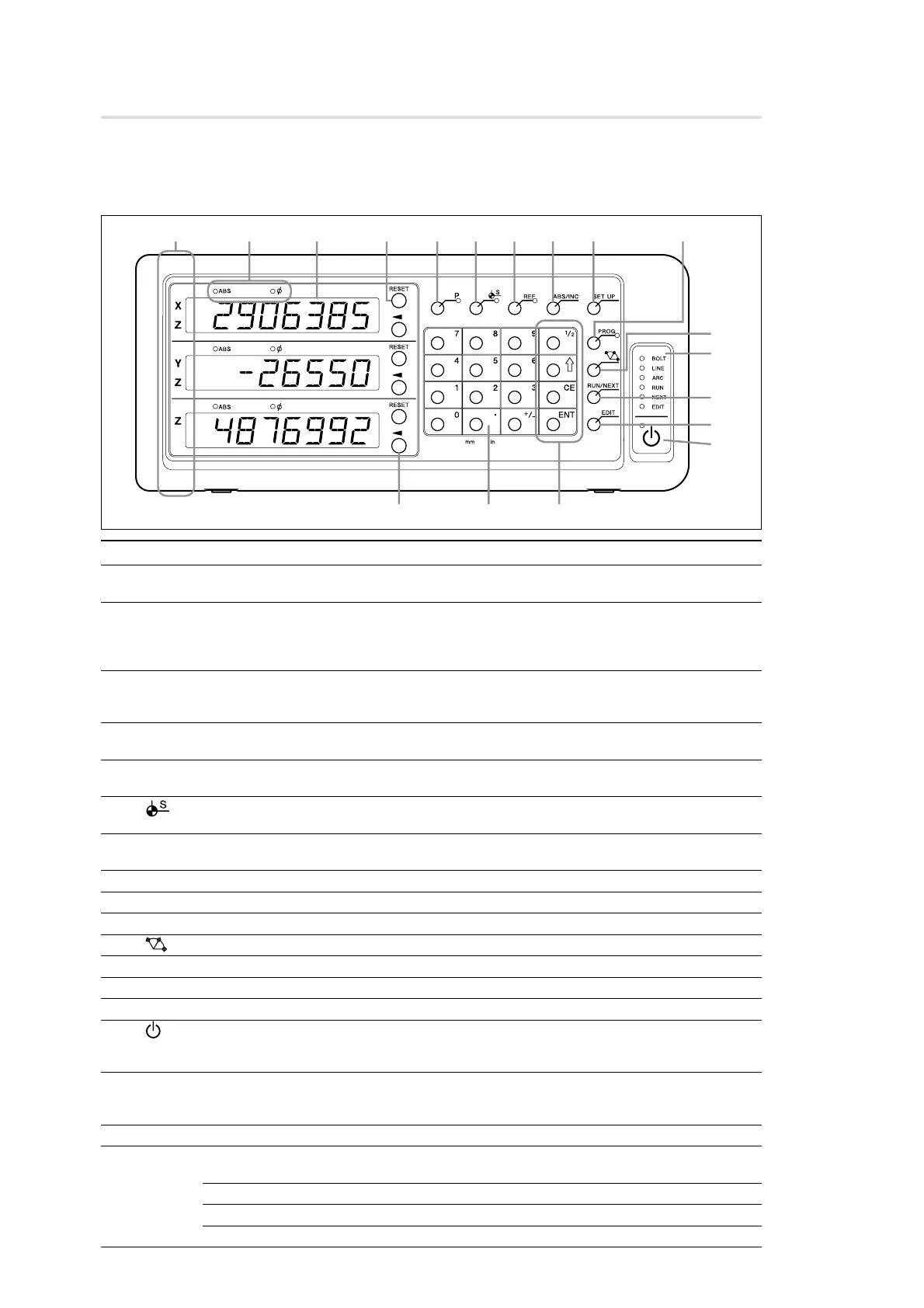
3-1. Front Panel
3-1-1. LH71A
3. Name and Function of Each Part
No. Name Function
q Axis label Axis lamp Lights up: Axis being measured
Flashing: Selected axis
w Lamp display ABS lamp Lights up: When displaying absolute value (ABS mode)
Goes out: When displaying incremental value (INC mode)
φ lamp Lights up: When displaying diameter
Goes out: Normal display
e Counter display From the top: Display 1 (X, Z), Display 2 (Y, Z), and Display 3 (Z)
Shows status with alphabetical letters when making mode settings
An alarm display is shown in case of error (see Part 10)
r RESET key Resets incremental value to zero
Switches to INC mode during ABS mode
t P key Presets values (mode lamp will be lights up when selected)
Calls up values (mode lamp will be lights up when selected)
y key (Datum Point Setting key) Used to go into datum point mode (mode lamp will be lights up when
selected)
u REF key Used to detect measuring unit reference point (mode lamp will be lights up
when selected)
i ABS/INC key Switches between ABS mode and INC mode
o SET UP key Used to make various settings
!0 PROG key Used to write and run programs (mode lamp will be lights up when selected)
!1 key (Canned Cycle key) Used to perform predetermined routines, such as bolt hole circles
!2 Status lamp Will lights up or be flashing when performing an operation or in a mode
!3 RUN/NEXT key Used to run an operation such as program mode or canned cycle
!4 EDIT key Used to change a program, a canned cycle, a preset value, etc.
!5 key (Standby key) Turns power ON and OFF
Lamp in upper left Lights up: Power is OFF Flashing: Startup
Goes out: Power ON
!6 / key (Select Axis key) Selects axis
Selects setting content
Selects digit of setting value
!7 Numeric key Value input
!8 Function key Used to perform various operations
1/2 key Halves the displayed value
E key Advances to next item when making settings or programming
CE Cancels value input and various function key operations
ENT key Finalizes settings
0
!2
!3
!5
8
7
6
!4
!1



 To Next Page