(E) 8-9
8. Applied Functions
LH71A / LH72
8-2-2. Program Execution
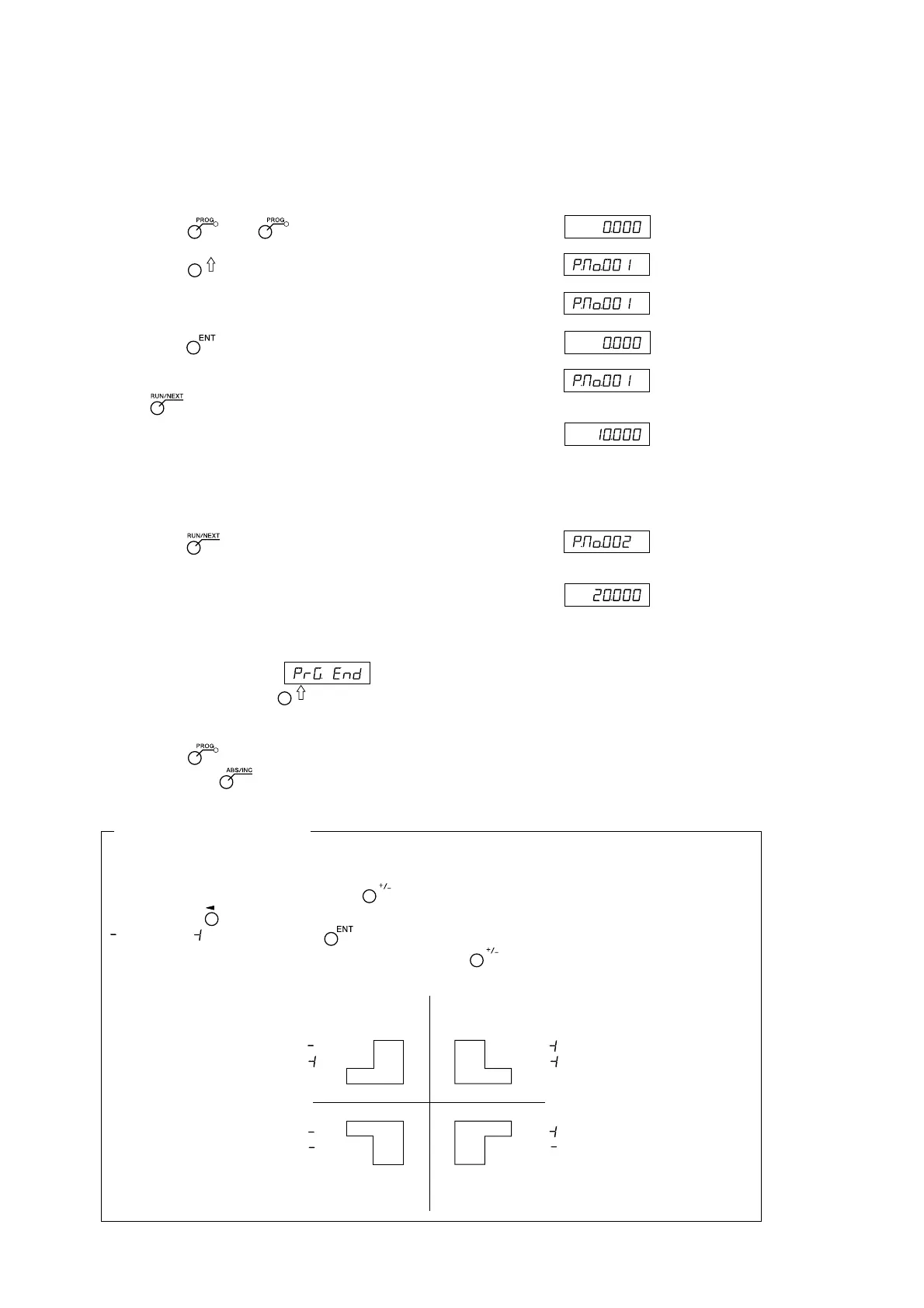
This executes the entered and edited programs.
Display
1 Press the key. ( lamp lights up)
2 Press the key.
3 Enter the start No. of the program to be executed.
4 Press the key. (RUN lamp flashes)
5 Move the measuring unit to the start position, and press
the key.
↓
The displacement of the first step will be displayed.
6 Move the measuring unit until the value (displayed shift
value) becomes approximately zero (within ±3 counts).
A beep tone will sound, and the NEXT lamp will flash.
7 Press the key.
The displacement of the next step will be displayed.
↓
8 Repeat steps 6 and 7.
9 When the program ends, will be displayed, and the current value will be displayed.
∗ When you press the key, the step No. will be displayed, indicating that the program can be
executed once again.
10
Press the key. The system exits the program mode.
∗ If you press the key during the program mode, the coordinates corresponding to the time at which
the start position was defined as the reference will be displayed.
Application: Mirror Image
When machining the applicable shape with respect to the X-axis and Y-axis, you can perform mirror
image machining.
Before executing the program, press the key to switch to mirror image selection mode.
Each time the key is pressed for the axis using the mirror image value, the indicator switches to
(reversed), (original). Use the key to finalize the setting.
∗ You can check the mirror image setting by pressing the key during program execution.
(Current value
display)
(Current value
display)
(Example:
10.000)
(Example:
20.000)
Y-axis
X-axis
X-axis only is reversed with
respect to the program
Created by the program
X and Y axes are both reversed
with respect to the program
Y-axis only is reversed with
respect to the program
X:
Y:
X:
Y:
X:
Y:
X:
Y:



 To Next Page