5-12 (E)
LH71A / LH72
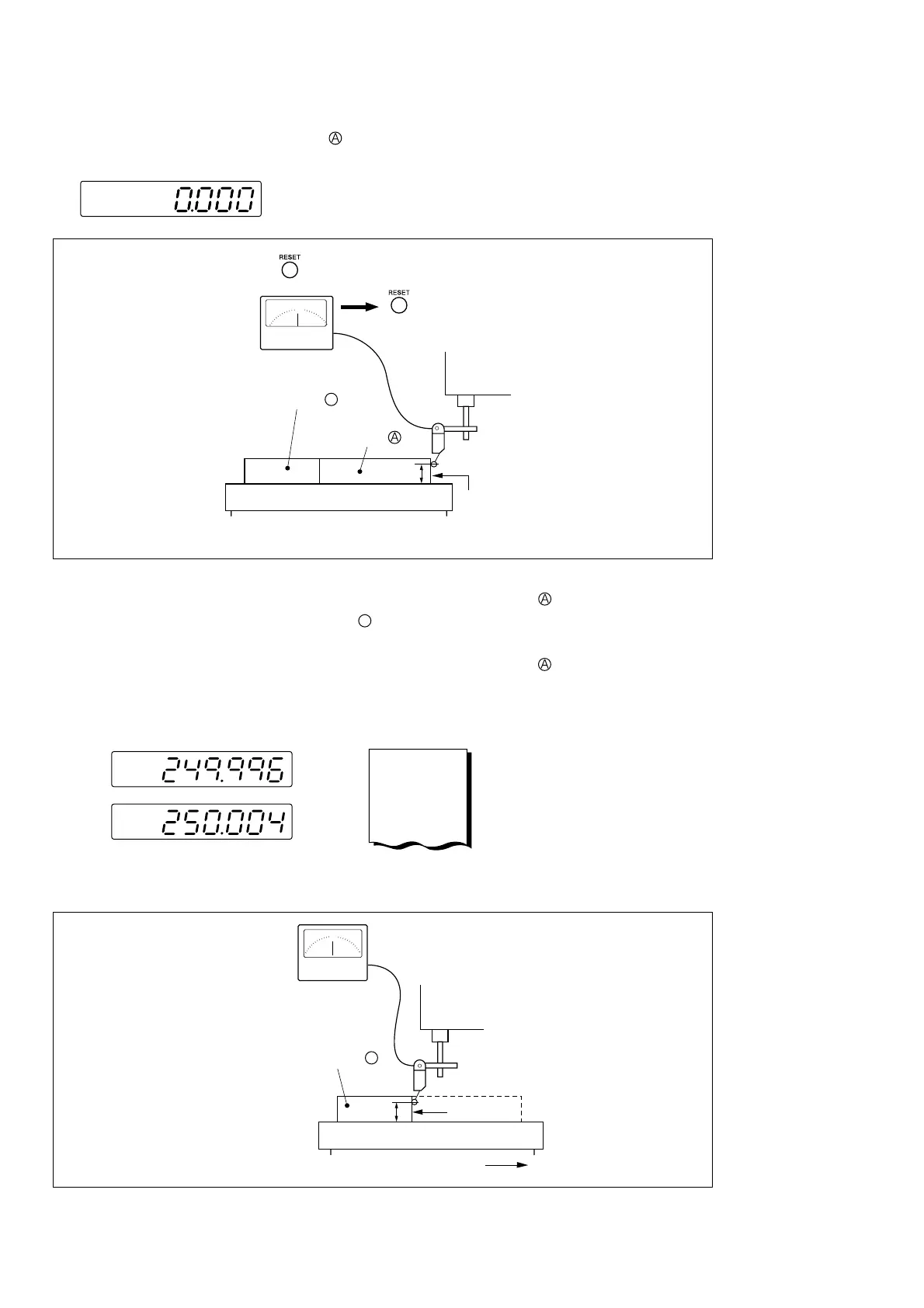
2 Touch the surface A of the block gauge with the probe of an electric micrometer or dial gauge and
align the micrometer hand to read “0.” Simultaneously reset the counter unit.
When the display resolution is 0.001 mm
3 Next, move the table away from the probe and remove the block gauge , move the machine table
again, touch the surface C of the block gauge
B
with the probe of the electric micrometer or dial gauge,
and move the machine table until the meter reads “0.” Be sure to make a note of the difference between
the displayed value on the counter unit and the length of the block gauge , because this is the linear
error to be compensated.
An example of setting the amount of linear compensation is shown below.
h
key
Electric micrometer
Spindle head
Block gauge
Block gauge
q Touch probe to surface
Surface A
Machine table
w Press key when the meter reads “0.”
or
Make a note of linear error to be
compensated for.
0
h
Spindle head
w Touch probe to surface
Surface C
Movement direction
Electric micrometer
Block gauge
B
Machine table
q Move the machine table.
e Move it until the meter reads “0.”
MEMO
–0.004
or
0.004 mm
Note: Do not change the probe height h until finished measuring.
5. Settings
B



 To Next Page