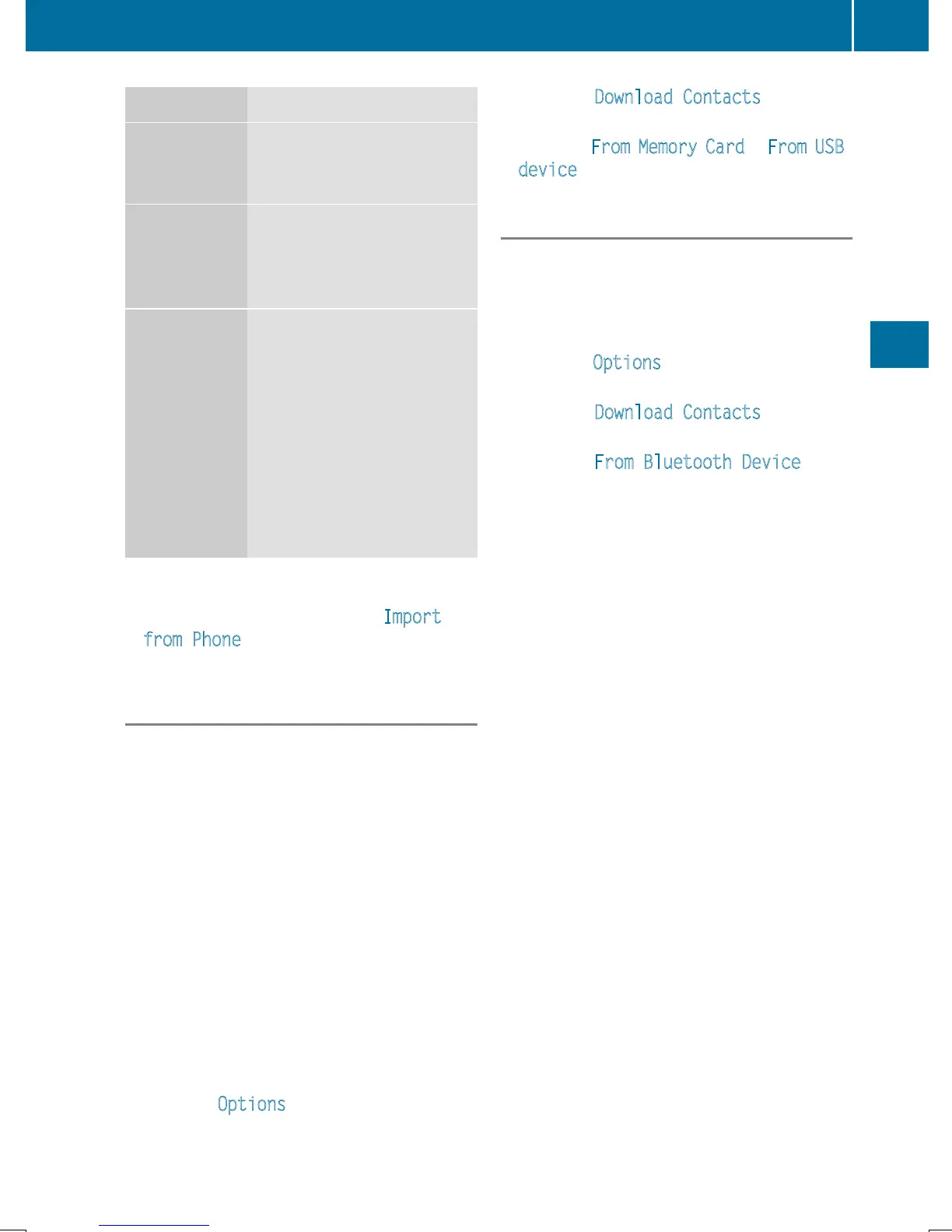
Source Prerequisites
Memory card The SD memory card is
inserted. It contains
importable contact details.
USB device The USB device is inserted
into the USB port. It con-
tains importable contact
details.
Bluetooth
®
connection
If the sending of vCards is
supported via Bluetooth
®
,
vCards can be received on
mobile phones or net-
books, for example.
Bluetooth
®
must be activa-
ted in COMAND and on the
respective device (see the
manufacturer's operating
instructions).
i
If automatic calling up of the contacts is
deactivated (
Y page 132), the Import
from Phone option is available.
Importing from the memory card or USB
device
Contacts imported from the memory card or
from a USB device are identified by the ¯
symbol.
The following conditions must be fulfilled in
order to import vCards:
R
vCards (vcf files) may be located in the main
directory or in folders. COMAND allows you
to select the relevant folders directly.
R
vCards must have the file extension ".vcf".
i
COMAND supports vCards in versions 2.1
and 3.0.
X
To switch to the menu bar in the telephone
menu or the address book: slide 6 the
controller.
X
To select Options: turn and press the con-
troller.
X
To select Download Contacts: turn and
press the controller.
X
To select From Memory Card or From USB
device: turn and press the controller.
Receiving vCards via Bluetooth
®
COMAND
X
To switch to the menu bar in the telephone
menu or the address book: slide 6 the
controller.
X
To select Options: turn and press the con-
troller.
X
To select Download Contacts: turn and
press the controller.
X
To select From Bluetooth Device: turn
and press the controller.
If COMAND is connected to a mobile
phone, the connection is terminated.
vCards can now be received by a device
(PC, mobile phone) via Bluetooth
®
.
External device
X
Start the data transfer (see the manufac-
turer's operating instructions).
The number of vCards received is displayed
in COMAND.
COMAND
X
To cancel the transfer: press the controller.
If a mobile phone was connected, the con-
nection to the mobile phone is established
again.
Received vCards are identified by the ®
symbol in the address book.
i
If you switch to another main function,
e.g. navigation, while receiving vCards, the
reception of vCards will be terminated.
Address book
133
Telephone
Z







 To Next Page