De-authorizing (deregistering) a Blue-
tooth
®
audio device
X
To select a Bluetooth
®
audio device from
the Bluetooth
®
device list: turn the control-
ler.
X
To select the symbol to the right of the
Bluetooth
®
audio device: slide 9 and
press the controller.
X
To select Deauthorize: press the control-
ler.
A prompt appears asking whether you
really wish to deauthorize this device.
X
To select Yes or No: turn and press the con-
troller.
If you select Yes
, the device is deleted from
the Bluetooth
®
device list.
If you select No
the process is canceled.
i
Before re-authorizing the Bluetooth
®
audio device, you should also delete the
device name MB Bluetooth
from your
Bluetooth
®
audio device's Bluetooth
®
list
(see the Bluetooth
®
audio device's operat-
ing instructions).
Switching to Bluetooth
®
audio mode
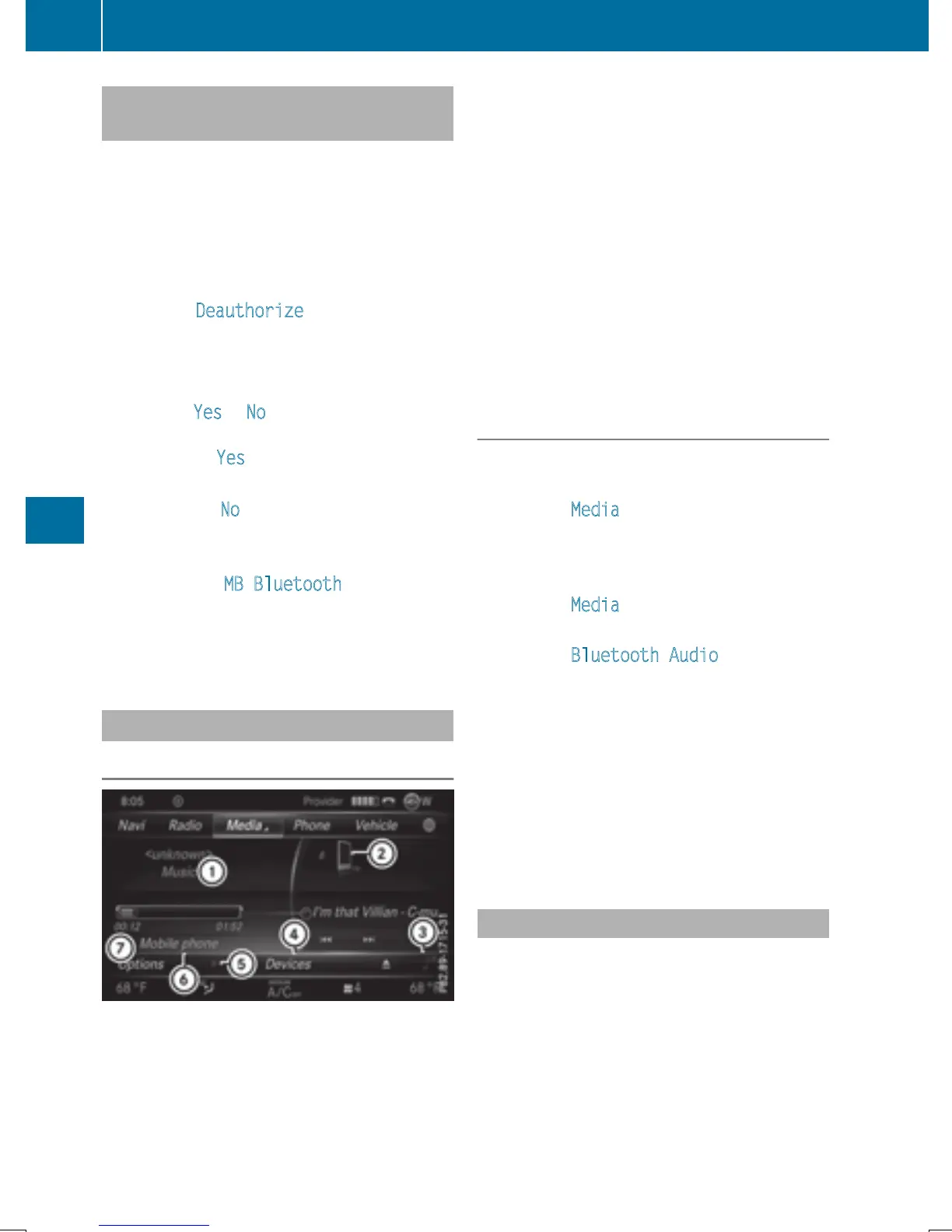
Basic display
:
Audio transmission status (depending on
the Bluetooth
®
audio device, also title
name and artist)
;
Data medium position in the media list
=
Sound settings
?
Device list
A
To stop Ë or start Ì playback
B
Name of the connected Bluetooth
®
audio
device (example)
C
Options menu
Some mobile phones only support two Blue-
tooth
®
profiles at the same time (e.g. Hands-
Free Profile for Bluetooth
®
telephony and
Bluetooth
®
audio profile for audio streaming).
If you activate Bluetooth
®
audio mode and
there is already an active Internet connection,
this can cause the connection to be termina-
ted.
Switching to Bluetooth
®
Audio
X
To show the main function bar: slide 5
the controller.
X
To select Media: turn and press the con-
troller.
The last media source you have set is dis-
played.
X
To select Media: slide 5 and press the
controller.
X
To select Bluetooth Audio: turn and
press the controller.
COMAND activates the Bluetooth
®
audio
device. The basic display then appears.
Playback starts.
i
If the Bluetooth
®
audio device connected
supports metadata and corresponding data
is available, then the artist, track and album
name can be displayed.
Starting/stopping playback
X
To select Start playback Ì: turn and
press the controller.
Playback starts. Ë is selected.
X
To stop playback: select Ë.
A message appears. Ì is selected.
X
To continue playback: select Ì.
A message appears. Ë is selected.
198
Bluetooth
®
audio mode
Media


 To Next Page
 Loading...




