Chapter 10 SECURITY SETUP
10.3 Setting/Performing each option
126 HORIBA
7. Press ENTER key and input the
numeric letters.
8. Repeat the above step 6. to step
7., and input the password.
9. When the input is completed, press
F4 (RETURN).
The new user is registered, and the
OPERATOR REGISTRATION menu
appears.
"16.6 Default settings" page 249
An erroneous password cannot allow logon.
When the password is lost, the stored data is
not available.
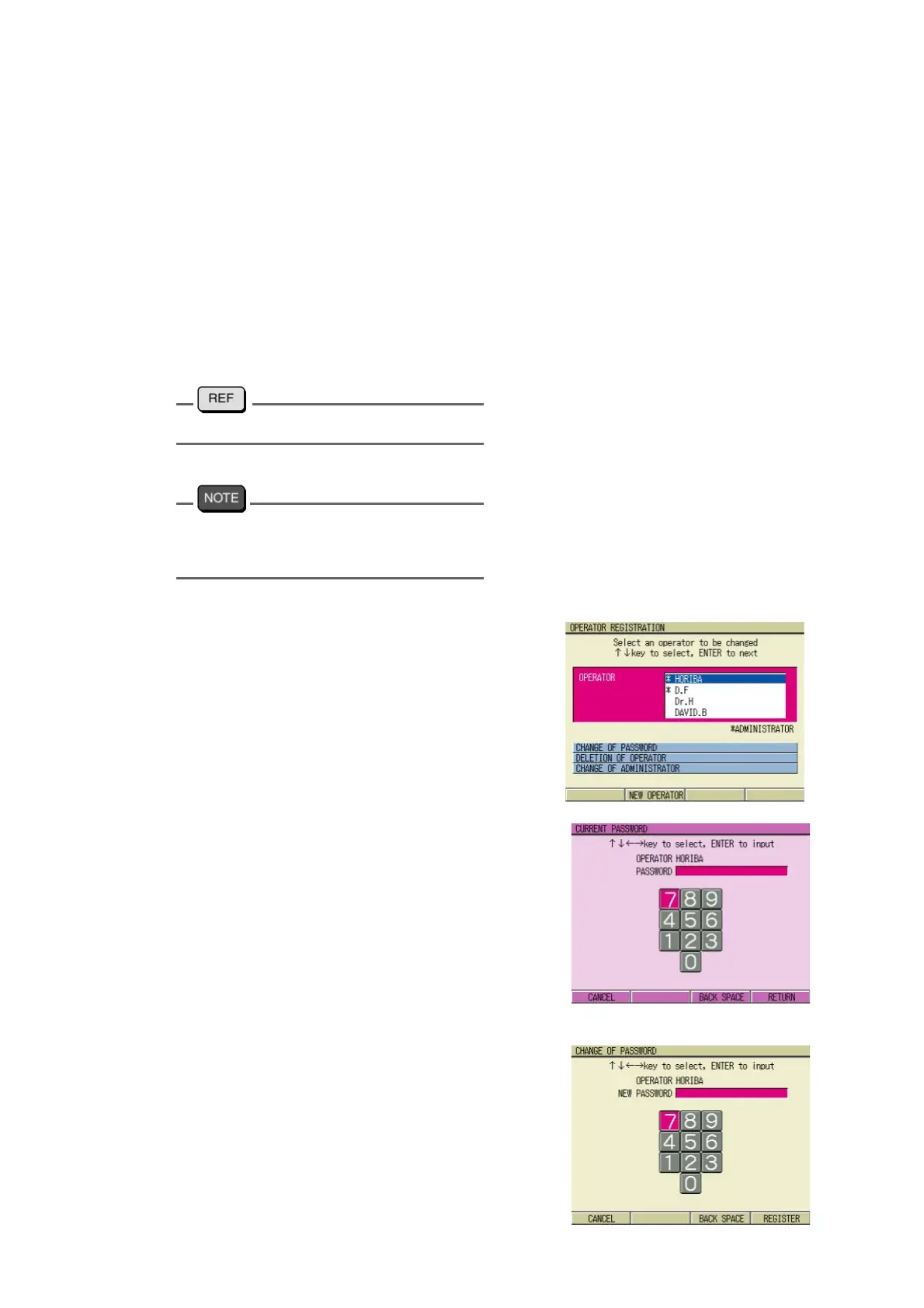
● Changing the password
The password can be changed on the OPER-
ATOR REGISTRATION screen.
1. Press ↑ or ↓ key, and select the
operator which password is to be
changed.
2. Press the ENTER key.
Move the cursor to the CHANGE OF
PASSWORD option.
3. Press the ENTER key.
The input menu appears and requires
the current registered password.
4. Press ← , ↑ and/or ↓ , → key,
select the numeric letters, and
press the ENTER to input the val
-
ues.
5. Repeat the above step 3. to step 4.
to input the password.
6. When the input is completed, press
F4 (RETURN).
The menu appears and requires new
password.



 To Next Page