Firewall Protection
203
NETGEAR ProSAFE VPN Firewall FVS318G v2
5. Enter new poll interval in seconds.
6. Click the Set
Interval button.
Wait for the confirmation that the operation succeeded before you close the window
.
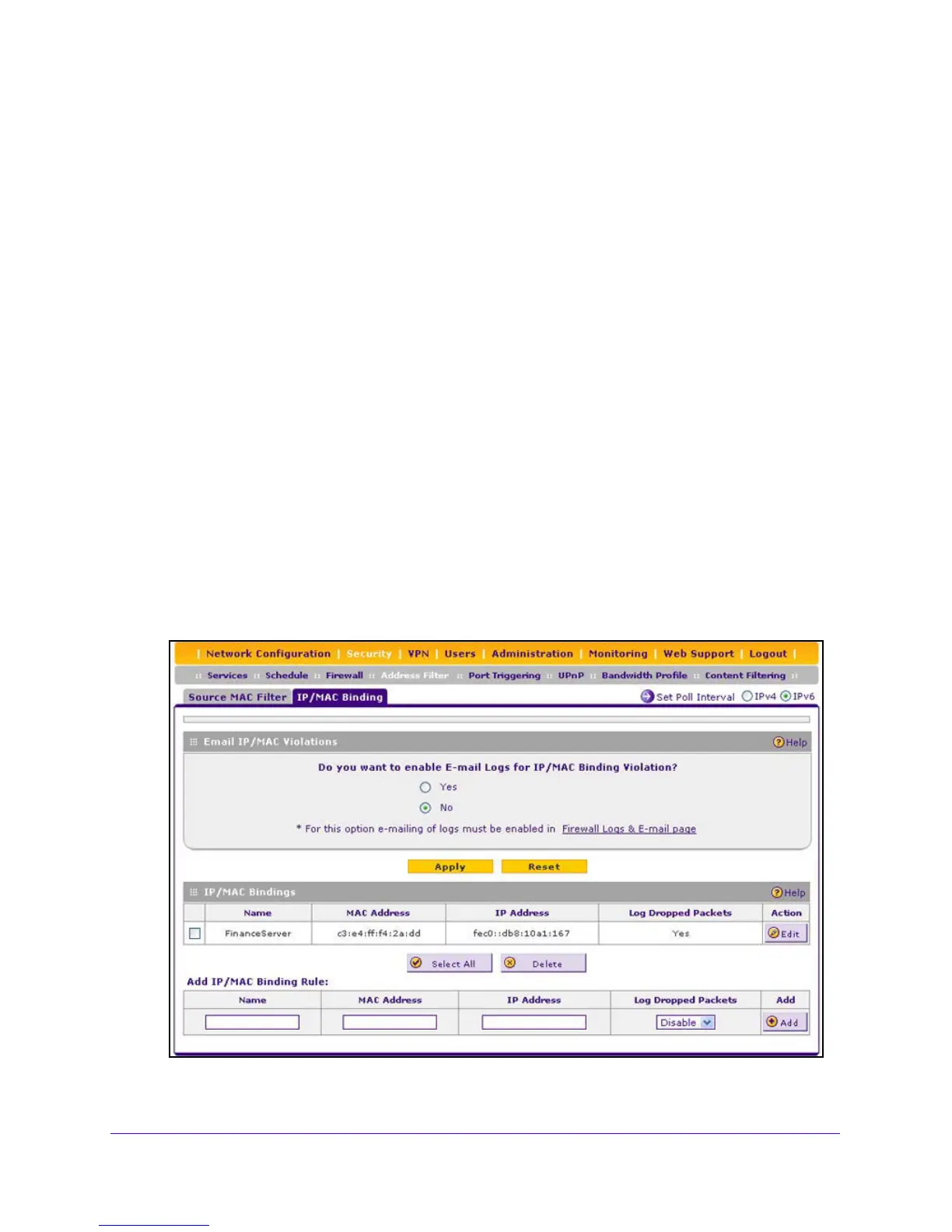
IPv6/MAC Bindings
To set up a binding between a MAC address and an IPv6 address:
1. Log in to the unit:
a. In the address field of any of the qualified web browsers, enter
https://192.168.1.1.
The NETGEAR Configuration Manager Login screen d
isplays.
b. In the Username
field, enter admin and in the Password / Passcode field, enter
password.
Use lowercase letters. If you changed the password, enter your personalized
password. Leave the domain as it is (geardomain).
c. Click
the Logi
n button.
The Router Status screen displays. After five minutes of inactivity
, which is the default
login time-out, you are automatically logged out.
2. Select Security
>
Address Filter > IP/MAC Binding.
The IP/MAC Binding screen displays.
3. Select the IP
v6 radio button.







 To Next Page