Chapter 2
Pipeline Hardware, Installation & Setup
10
March, 2009
Pipeline Quads can encode and decode NTSC or PAL with DV/DVCPRO 25Mb, IMX 30, 40, 50, and
MPEG2 I-Frame 50Mb video (FlipFactory workflows), and 48 kHZ, 16 bit, uncompressed audio, in up to
four concurrent sessions; each individual Pipeline channel operates independently, each communicating
via a common physical Ethernet port on the Quad’s backplane.
The Pipeline Quad provides common, dual power supplies for redundancy and fail-safe operation. The
Pipeline can operate normally on a single power supply, but you lose the safety of the second power
supply.
Using SDI Sync Input
The SDI Sync Input is used in both capture and playout modes but for two different purposes.
In capture mode, the SDI Sync Input is used as a method for supplying a common timecode reference to
all input channels. For the timecode to be extracted, the SDI signal connected to the SDI Sync Input must
contain a valid timecode in the vertical blanking area of the signal. This timecode is usually referred to as
VITC (vertical interval timecode). The SDI signal must be a digital signal that is frame synchronized with
the SDI signals used as the input video source for the timecode extraction to work properly. An analog
signal cannot be connected to the SDI Sync input.
In playout mode, the SDI Sync Input is used as a frame synchronization source for each of the SDI
outputs. Any timecode on the SDI Sync Input is ignored in this mode. If no signal is connected to the SDI
Sync Input, each of the SDI outputs will free run (i.e. they will not be synchronized with each other or with
any house reference). An analog signal cannot be connected to the SDI Sync input.
Using SDI Sync Out
The SDI Sync Out port is a re-clocked loop-through port of SDI Sync In. You can use this re-clocked
reference for additional Pipelines or other devices.
Processing Closed Caption and Time Code Data
Pipeline automatically processes Ancillary Data on ingest operations to obtain closed captions and time
code data. Pipeline encodes the closed caption and time code data into the data stream of the digital
output, making it available for further processing by client applications, such as FlipFactory and Episode.
The Pipeline automatically analyzes the signal during the Vertical Blanking Interval (VBI) on ingest
operations to obtain closed captions and time code data. Closed caption data is extracted from line 21, and
time code data from lines 16 through 20 (the 5 lines beginning with line 16). The last line (usually line 20)
with a valid time code is the line whose data is used.
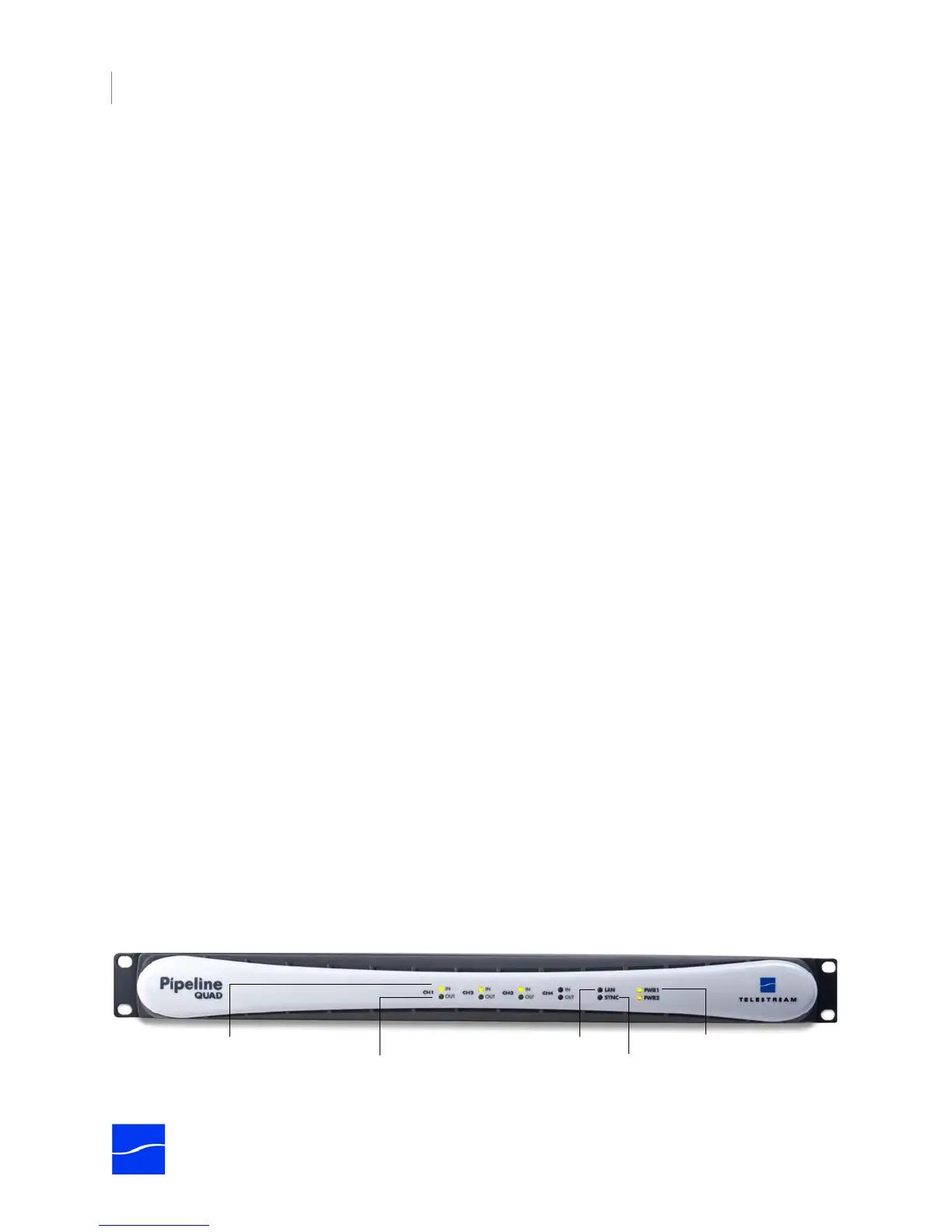
Front Panel Indicators
The front panel contains LED indicators, making it easy to check its status.
Figure 2–3. Pipeline Quad front panel
Power 1 & 2 LEDs
SDI In LED (1 per channel)
Link LED
SDI Out LED (1 per channel)
Sync LED



 To Next Page