Typical Pipeline Systems and
Considerations
25
74-0085-05
Concurrent Edit/Transcode Workflows
For capture with concurrent edit or transcode workflows, calculate the total read/write speed requirements
based on the write processes of Pipeline streams and read processes for edit and transcode operations.
To guarantee error-free operations you must use disk buffering. Use an internal or direct-attached non-
shared RAID array that meets the read/write performance requirement (Disk Buffering Details on page 27).
Pipeline's media storage location (NAS, direct-attached shared storage, or shared network folder) must
also meet certain read/write performance requirements. When using NAS, direct-attached shared storage
or shared network folder, be sure to verify that your system has the communications bandwidth for writing
all Pipeline media data to the media storage location in real-time.
Capture Workflows Utilizing NAS|Direct-Attach Storage|Network Folders
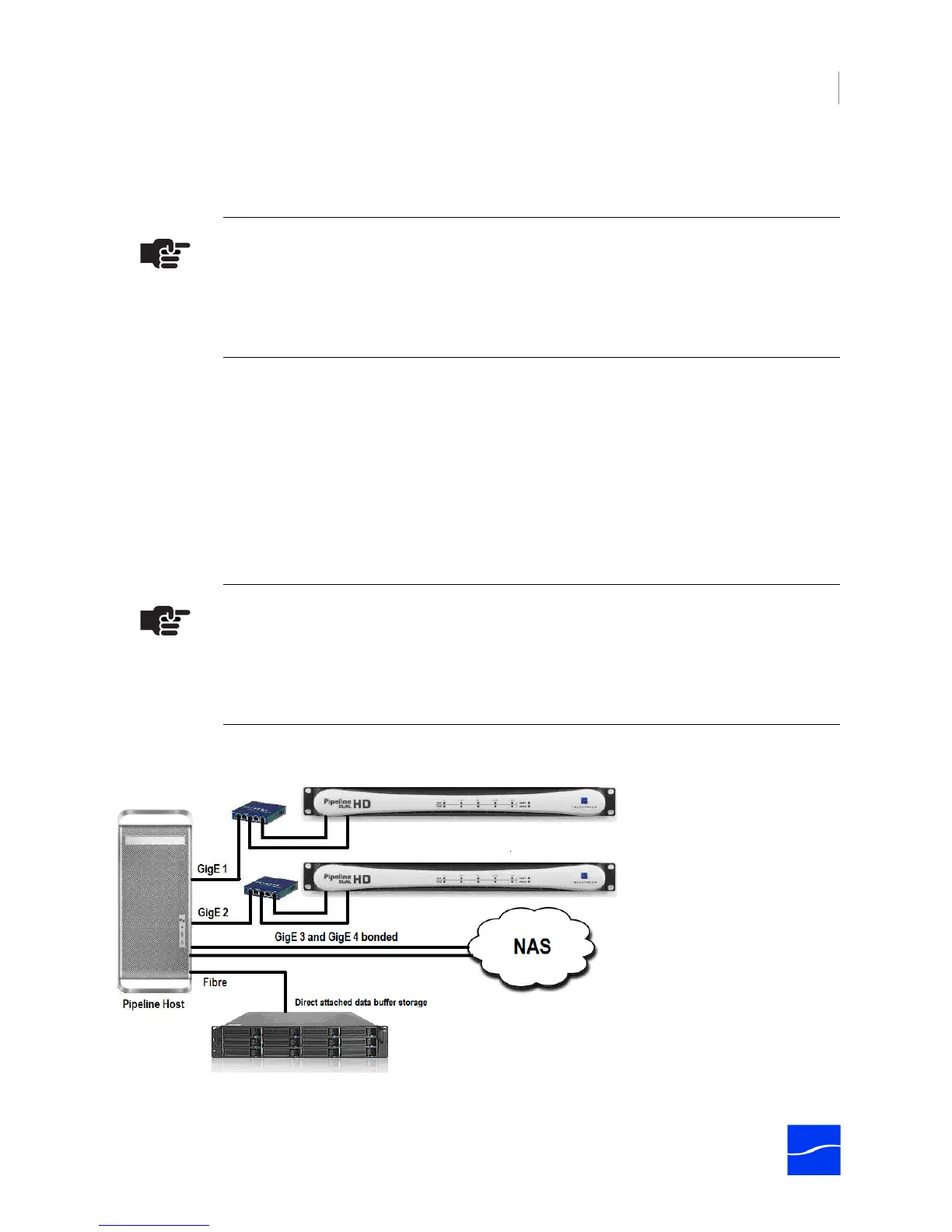
For capture writing to NAS, direct-attached shared storage or shared network folder, you should enable
Pipeline disk buffering (Disk Buffering Details on page 27).
Disk buffering requires a separate RAID array to guarantee error-free write operations of media streams.
Figure 3–4. Configuration for capturing 4 HD streams onto NAS with Fibre-attached buffer space.
Note
Disk buffering (Use Disk Buffering on page 119 (Mac OS X) or Use Disk Buffering on
page 123 (Windows)) is required when the destination path is a located on a NAS,
Shared Storage device, a shared network folder, or when edit/transcode while capture
operations are to be performed on the incoming Pipeline media files.
Note
Disk buffering (Use Disk Buffering on page 119 (Mac OS X) or Use Disk Buffering on
page 123 (Windows)) is required when the destination path is a located on a NAS,
Shared Storage device, a shared network folder, or when edit/transcode while capture
operations are to be performed on the incoming Pipeline media files.



 To Next Page