Chapter 6
Using Pipeline in Final Cut Pro & Episode Desktop
76
March, 2009
SETTING PREFERENCES
The Pipeline Plugin allows you to set up your import and export preferences, determine how often to check
for software updates, and select preset or custom keyboard settings of your choice.
Displaying the Preferences Panel
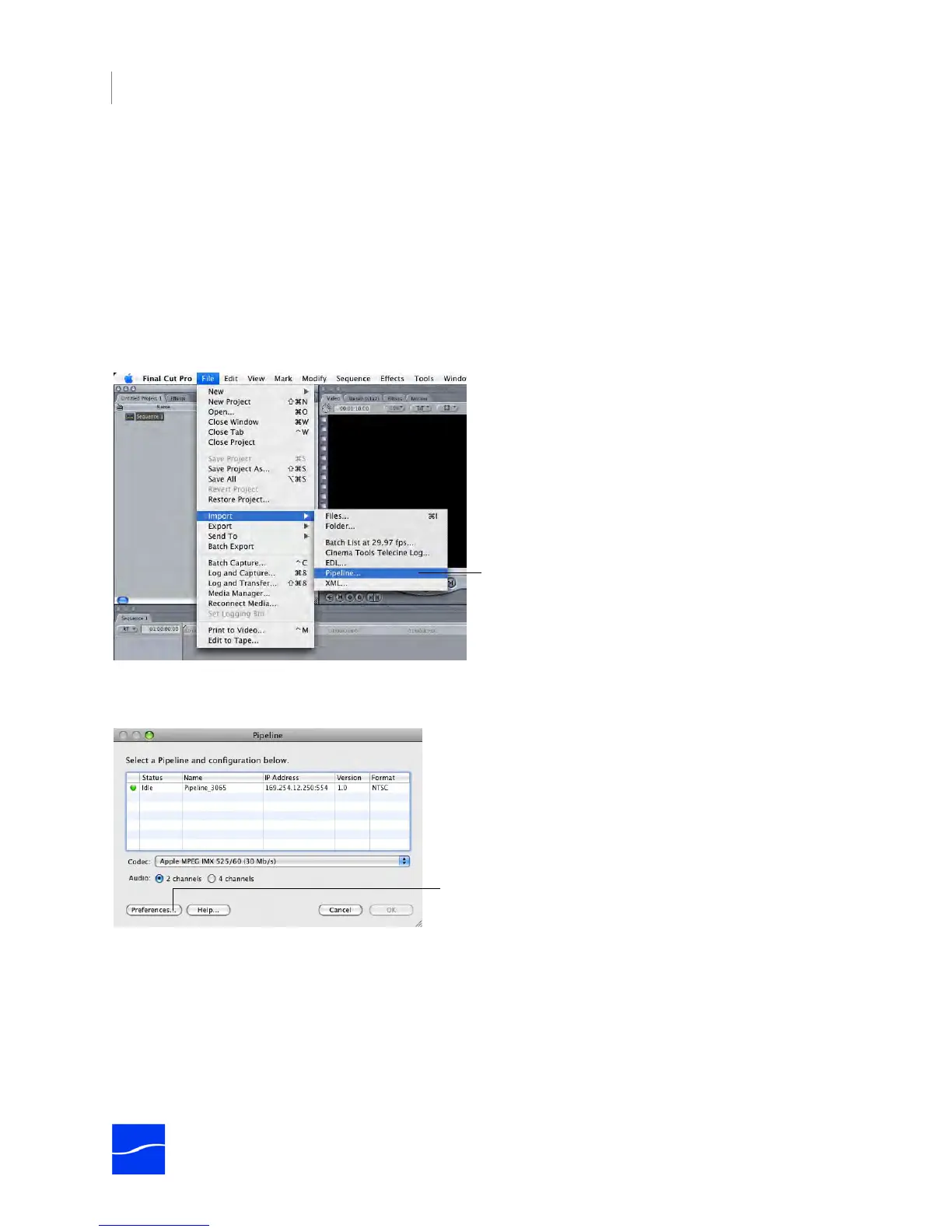
Final Cut Pro. Open Final Cut Pro and select File > Import > Pipeline.
Episode. Open Final Cut Pro and select File > Import > Pipeline.
Figure 6–1. Select File > Import > Pipeline to display the Pipeline Browser.
The Pipeline Plugin displays the Pipeline Browser.
Figure 6–2. Use the Pipeline dialog to select the Pipeline and set the codec for this import.
Click Preferences to display the Pipeline Preferences window. (The Preferences button is also displayed
on the Pipeline Import window for your convenience.)
In addition to the tabs, the window displays two important buttons:
Default. Click to return all preferences for this tab to their default settings.
OK. Click to update all preferences and close the window. You can display each tab and make changes
before clicking OK.
Click File > Import > Pipeline to display the Pipeline
Browser.
Click Preferences to display Pipeline Preferences.



 To Next Page