Alteon Application Switch Operating System Application Guide
Firewall Load Balancing
Document ID: RDWR-ALOS-V2900_AG1302 685
Any of the following load-balancing metrics can be used: hash, leastconns, roundrobin, minmiss,
response, or bandwidth. See Metrics for Real Server Groups, page 180 for details on using each
metric.
Note: Some metrics allow other options (such as weights) to be configured.
Free-Metric with Four-Subnet FWLB
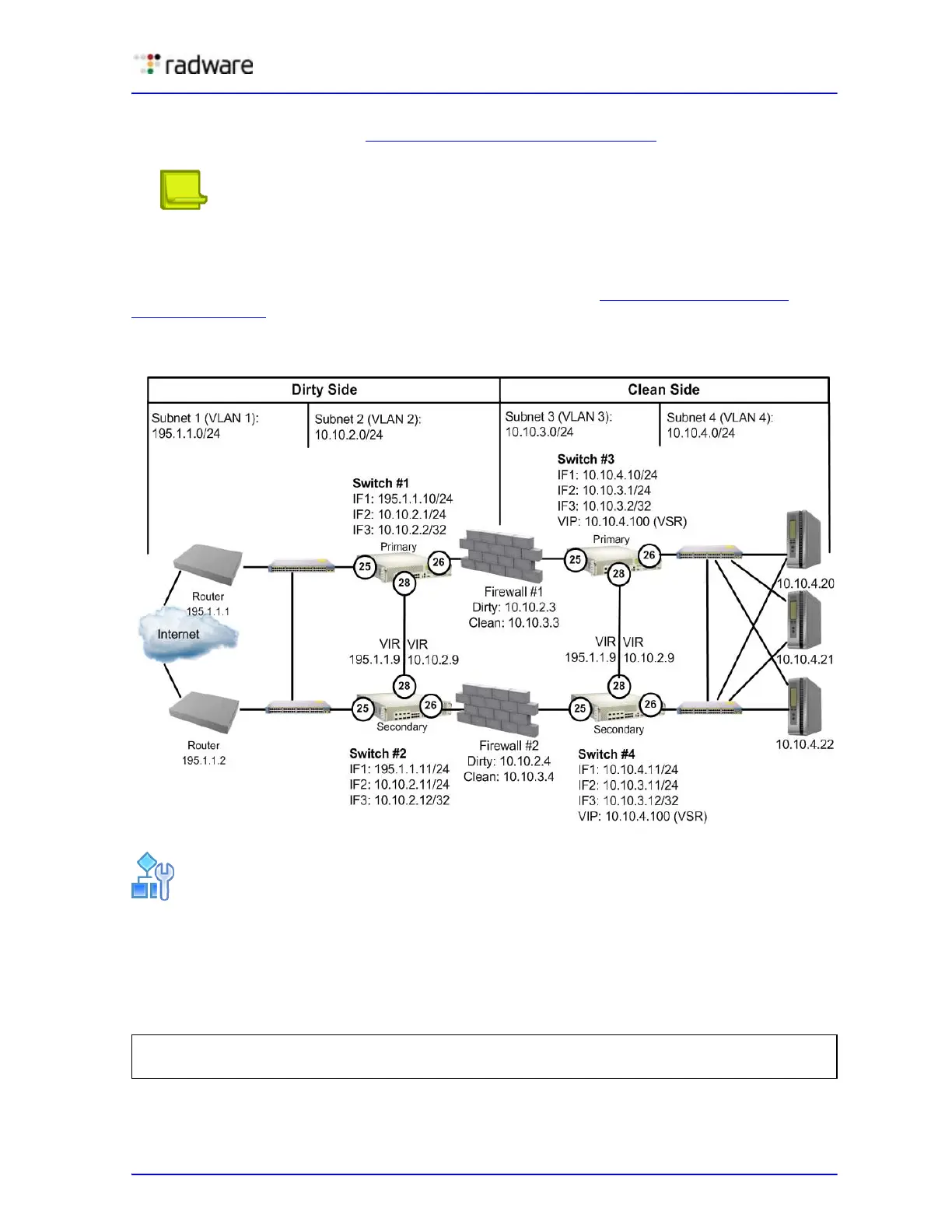
This example uses the four-subnet FWLB network as illustrated in Figure 114 - Four-Subnet
Network, page 685:
Figure 114: Four-Subnet Network
To use free-metric FWLB in a four-subnet FWLB network
1. On the clean-side Alteons, enable RTS on the ports attached to the firewalls (Port 3) and on the
interswitch port (port 9).
Enable filter and server processing on Ports 3 and 9, so that the responses from the real server
are looked up in the session table on both clean-side Alteons:
2. On the clean-side Alteons, remove the redirection filter from the ports attached to the real
servers (Ports 4), and ensure filter processing is enabled.
>> # /cfg/slb/port 26/rts enable
>> # /cfg/slb/port 28/rts enable



 To Next Page