ODIN Intercom Matrix Menu System Description 111
Max Field
The Max field displays the maximum voltage the power supply has recorded.
This value resets at reboot.
Current Field
The Current field displays the latest current reading.
Min Field
The Min field displays the minimum current recorded on the power supply.
This value resets at reboot.
Max Field
The Max field displays the maximum current recorded on the power supply.
This value resets at reboot.
Cooling Fans
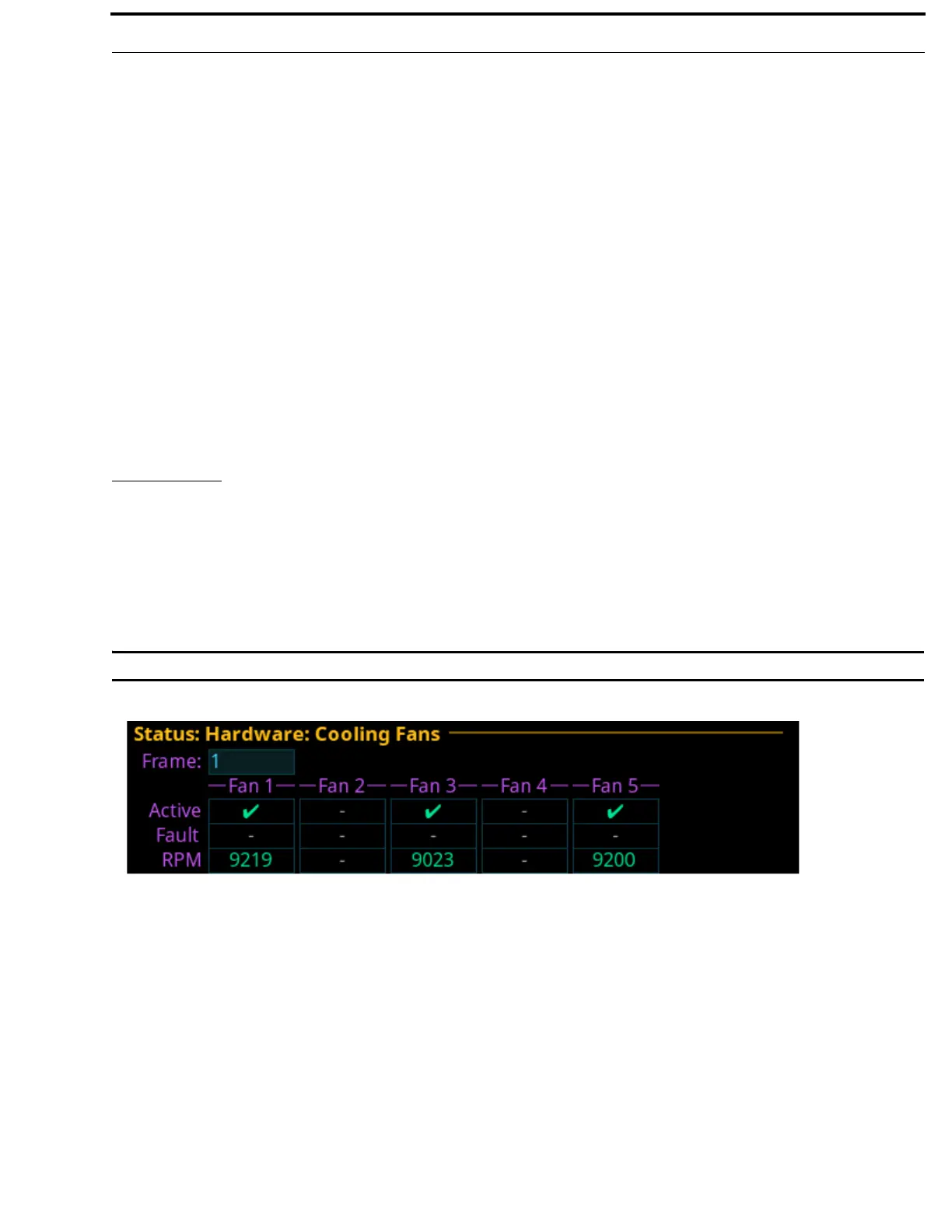
The Cooling Fans menu item displays fan readings for the frame. ODIN has five cooling fans located on the left panel of the
frame. They are used to keep the frame and its components cool to ensure proper operation. The frame self-monitors the fans and if
the readings are outside the recommended operating conditions, an alarm is generated.
NOTE: Only three fans are active at a given time. One failed fan does not mean the entire fan tray needs to be replaced.
For information on replacing the fan bank, see “Fan Tray” on page 69.
IMPORTANT: This information is for diagnostic purposes only!
Frame Field
The Frame field is used to select the frame to be viewed.
Fan 1 through Fan 5 Field
The Fan 1 through Fan 5 fields are used to display status for the individual fans which can be used to monitor or narrow down fan
problems. Fan 1 is at the rear of the frame.
Active Field
The Active field displays which fans are currently active. A green check mark signifies the fan is active, a blank field signifies the
fan is not running.
FIGURE 42. Status | Hardware | Cooling Fans



 To Next Page