94 Menu System Description ODIN Intercom Matrix
Status Field
The Status field displays the connection status.
Available statuses are:
Errors To/From Field
The Errors To/From field displays the number of errors that have occurred in sending and receiving messages via the AIO port.
BER To/From Field
The BER (Burst Error Rate) To/From field displays the number of errors that have occurred in the last 10 minutes, when
sending or receiving messages via the AIO port. If the intercom has been running less than 10 minutes, it prorates the number of
errors that would occur in a 10 minute period at the same rate. For example, three errors in five minutes would be shown as a BER
of 6.
The maximum displayed BER value is 255.
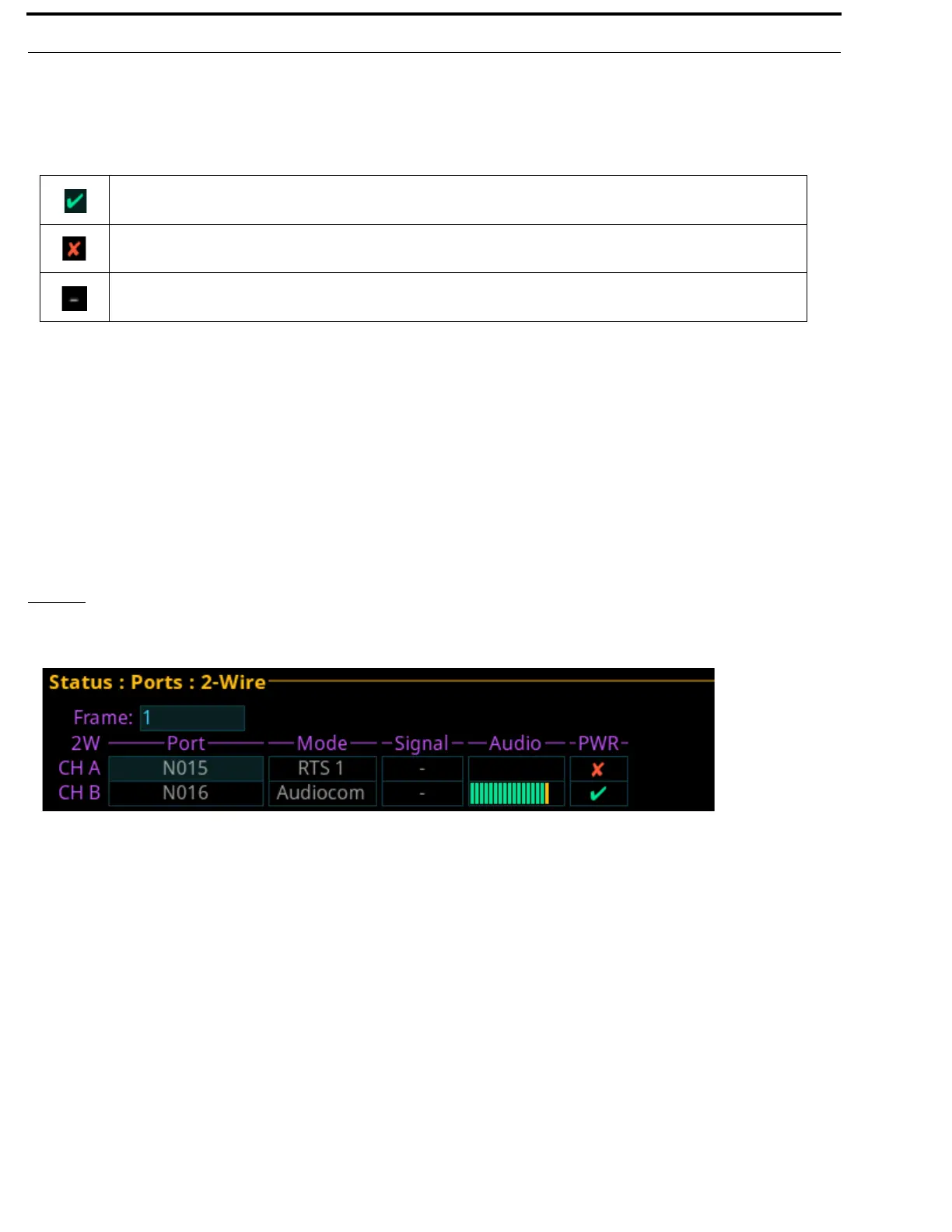
2-Wire
The 2-Wire screen displays status information for the two connectors, CH A and CH B, located on the rear panel of ODIN.
Frame Field
The Frame field is used to select the frame to be viewed.
Port Field
The Port field displays the port number and alpha assigned to the channel.
The panel is connected.
The panel was connected, but is no longer connected.
There is no connection.
FIGURE 26. Status | Ports | 2-Wire



 To Next Page