ODIN Intercom Matrix Menu System Description 143
Horizontal Menu Transitions Field
The Horizontal Menu Transitions field is used to set the speed of horizontal transitions within a menu. Horizontal menu
transitions are movements within a menu structure to the next / previous menu item using the right encoder to navigate.
Available options for this field are:
None No transition animation is seen. Navigation is seen as jumps. The purple focus frame jumps to a new menu item.
Normal The purple focus frame smoothly slides horizontally from icon to icon.
Fast The purple focus frame slides horizontally from icon to icon faster than normal; however, it may not be as
smooth.
The default for this field is Normal.
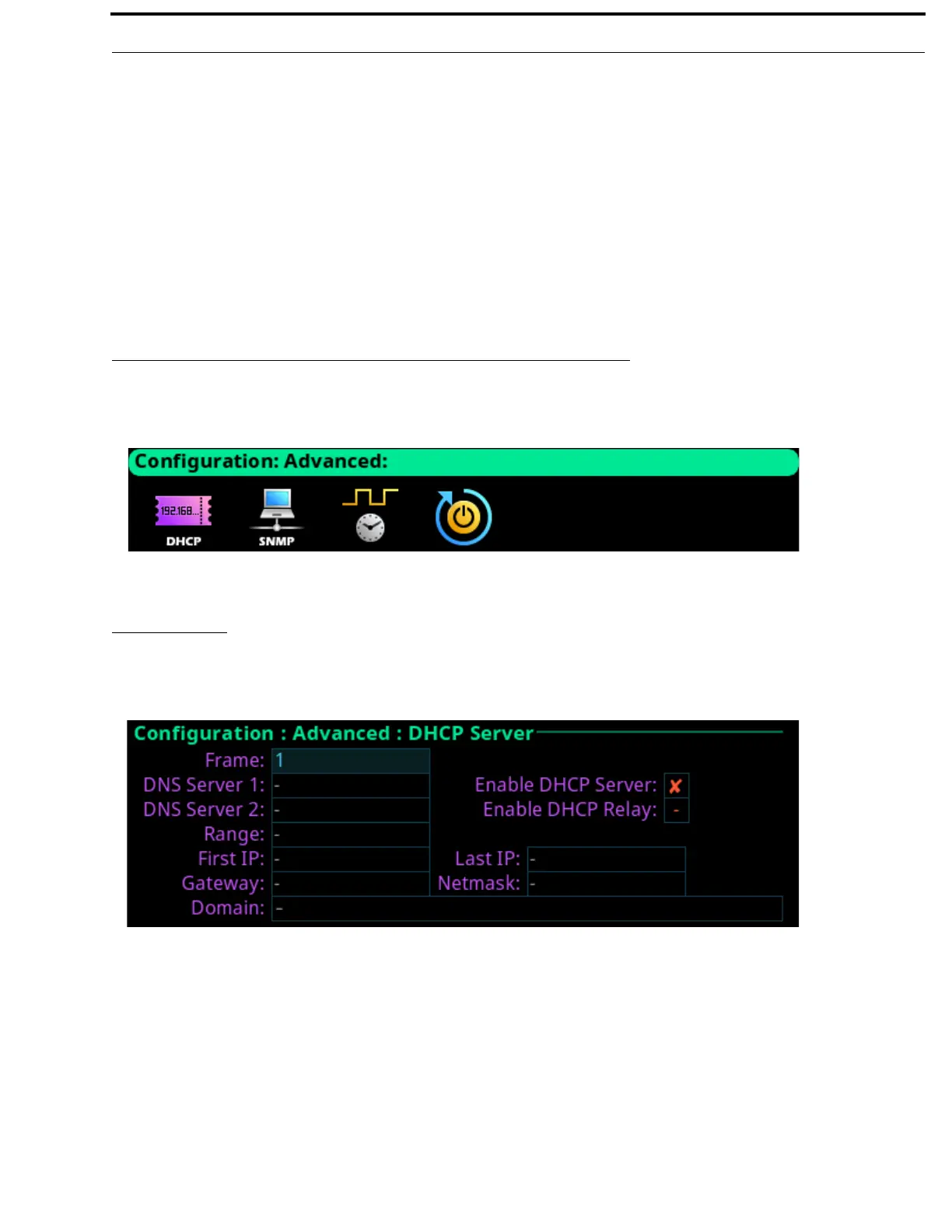
Advanced Menu
The Advanced menu is used to configure more advanced options on the frame.
DHCP Server
The DHCP Server screen is used to enable and configure DHCP (Dynamic Host Configuration Protocol) server settings for the
selected frame.
Frame Field
The Frame field is used to select the frame to be viewed.
DNS Server 1 Field
The DNS Server 1 field is used to enter the IP address of the DNS server.
DNS Server 2 Field
The DNS Server 2 field is used to enter the IP address of a second DNS server, if needed.
FIGURE 80. Configuration | Advanced Menu Icons
FIGURE 81. Configuration | Advanced | DHCP Server



 To Next Page