ODIN Intercom Matrix Menu System Description 163
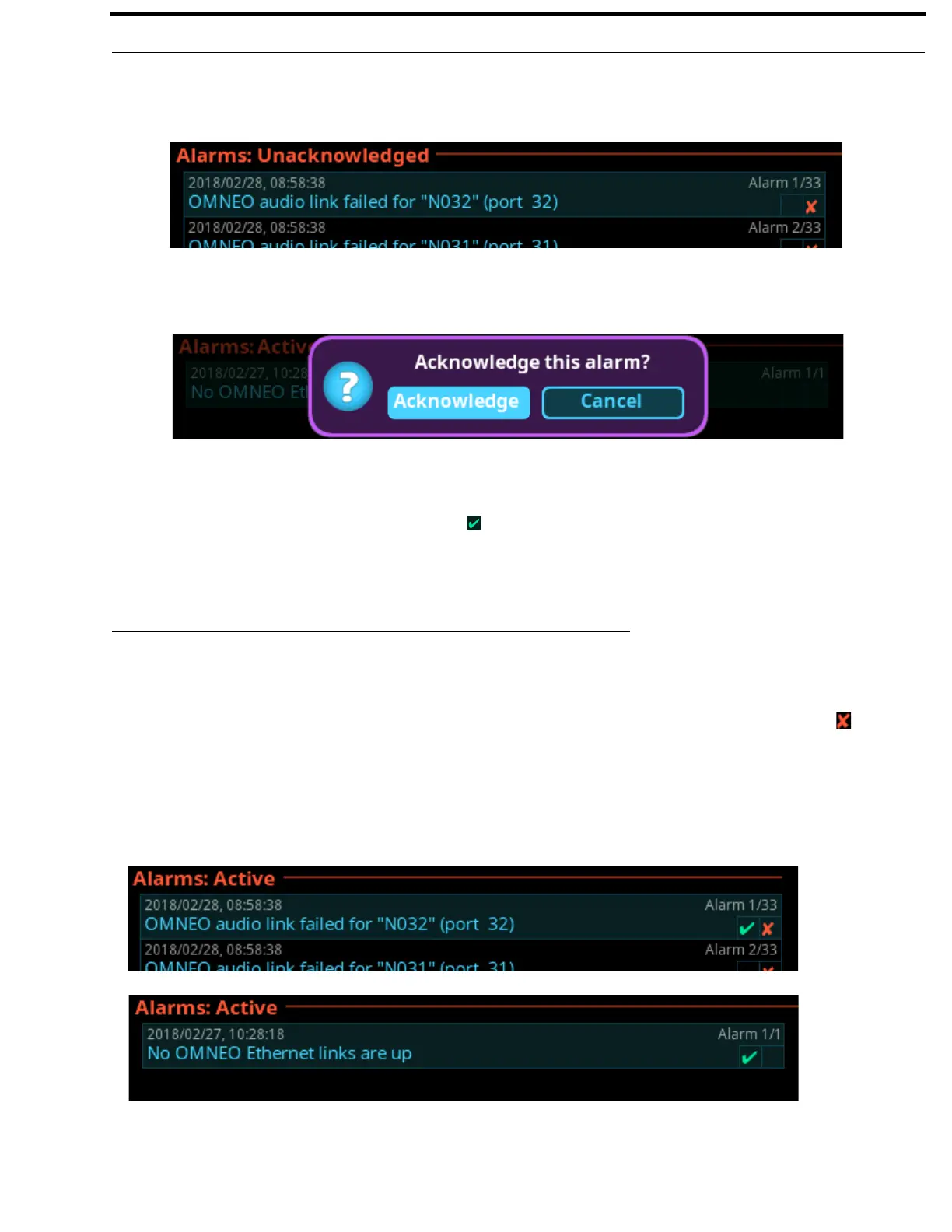
To acknowledge an alarm, do the following:
1. Click the Unacknowledged Alarms icon.
The Unacknowledged Alarms list appears.
2. Navigate to the desired alarm to acknowledge.
3. Click the right encoder knob.
A popup message appears confirming the acknowledgement.
4. Navigate to the Acknowledge button.
5. Click the right encoder knob.
The alarm is acknowledged and cleared from the unacknowledged alarm list. A green check mark can be seen in the
Active Alarm list indicating it is acknowledged. (See Figure 107).
NOTE: Pressing SHIFT+SEL prompts acknowledging ALL alarms at once.
Active
Active Alarms are alarm notifications that are currently active. There are two types of alarms seen on this screen; Clearable and
non-clearable alarms.
Clearable AlarmsNon-serious issues that are more notification than alarm. Clearable alarms display a red X icon at the right
edge. These alarms can be removed from the alarm list.
Non-Clearable AlarmsMore serious issues that should be resolved and are not removed from the alarm list until the problem is
fixed.
NOTE: The first check box indicates if the alarm has been acknowledged.
FIGURE 107. Alarms | Active with Clearable and Non-Clearable Alarms



 To Next Page