ODIN Intercom Matrix Menu System Description 107
Retransmits Field
The Retransmits field displays approximately how many messages (for example, packets) needed to be retransmitted because no
acknowledgement for those packets was received by the frame.
Packets From Field
The Packets From field displays the number of packets (for example, messages) sent from the selected frame and received by this
frame.
Duplicates Field
The Duplicates field displays how many messages (for example, packets) have been received by the select frame more than once.
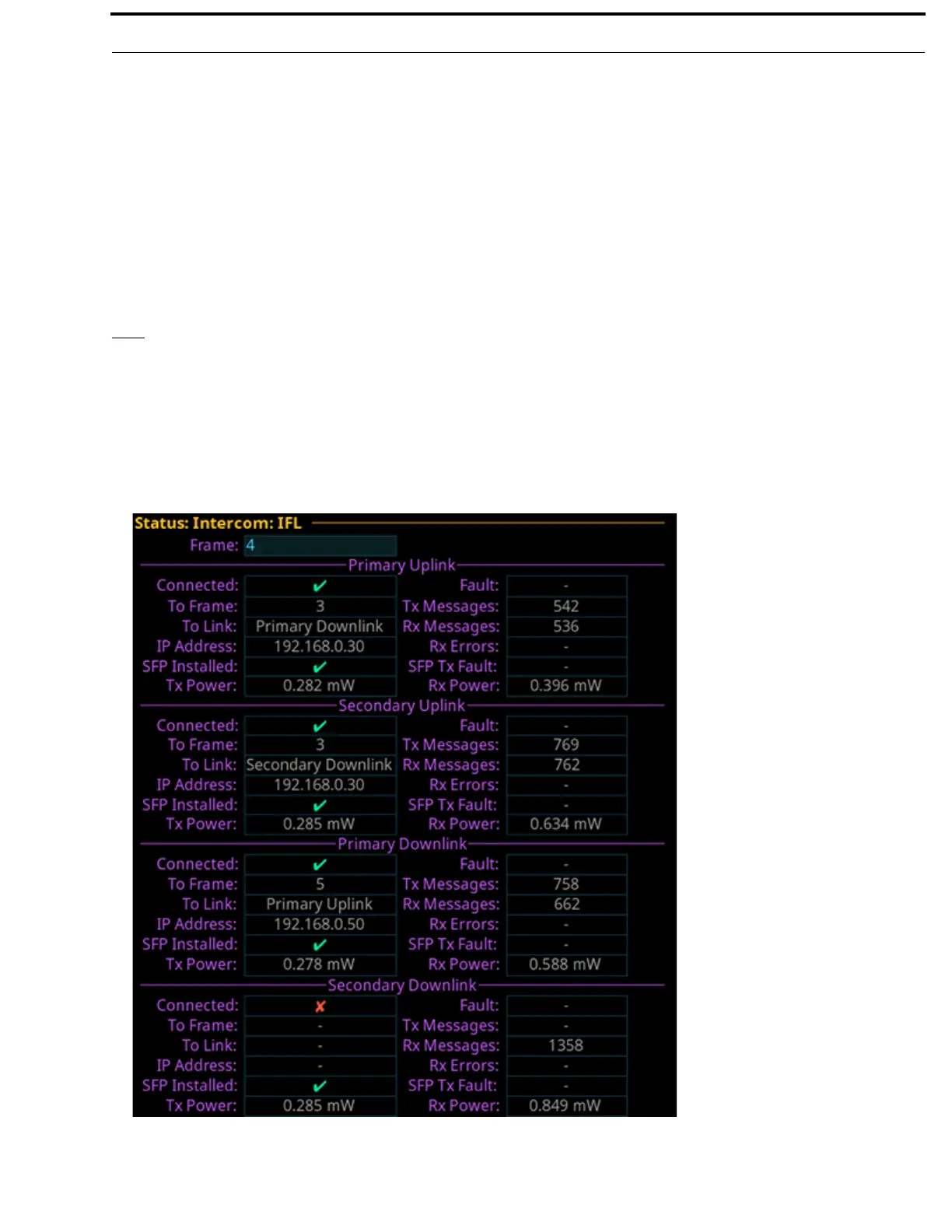
IFL
The IFL screen is used to display and monitor the Inter-Frame Link status between frames. For more information on IFL, see “IFL
Inter-Frame Linking (Multi-Frame Only)” on page 41.
When referring to a multi-frame (more than one frame) system connected via IFL, the use of the terms upstream and downstream
indicate the immediate frame above or below the current frame in the IFL system. For example, frame 1’s downlink is frame 2;
frame 2’s downlink is frame 3. Since IFL uses ring architecture, the last frame in the system is linked to the first. So, the downlink
from the last frame in the system will be connected to the uplink of first frame.
FIGURE 39. Status | Intercom | IFL



 To Next Page