EasyManua.ls Logo

Seca mVSA 535 - User Manual

Seca mVSA 535
194 pages
Print Icon
To Next Page IconTo Next Page
Loading...
3UHFLVLRQIRUKHDOWK
VHFDFRP
Software version 1.0 from Build 1163
Art no: 17-10-05-353-002g_10-2020 B
seca mVSA 535
seca mBCA 525
Instructions for use

Table of Contents

Questions and Answers

  • S
    scott44Sep 5, 2025
    Why is the Vital signs tab not displayed on Seca Measuring Instruments?
    • H
      Hannah ChambersSep 5, 2025
      The Vital signs tab might not be displayed because: * The USB connecting cable of the SmartBucket is not connected to the monitor. Connect the USB connecting cable of the SmartBucket to the monitor and restart the device. * The SmartBucket is not activated.
  • J
    jodi07Sep 3, 2025
    Why is the Vital signs tab not active on a Seca mVSA 535 Measuring Instruments?
    • J
      jamiedanielSep 3, 2025
      The Vital signs tab on a Seca mVSA 535 might not be active because: * The USB connecting cable of the SmartBucket is not connected to the monitor. Connect the USB connecting cable of the SmartBucket to the monitor and restart the device. * The SmartBucket is not activated.
  • E
    Edward KerrSep 1, 2025
    What does it mean when one or more Electrode contact LEDs are red on Seca Measuring Instruments?
    • W
      William FischerSep 1, 2025
      If one or more electrode contact LEDs are red on your Seca Measuring Instruments, this indicates: * Electrode cables are not connected to electrodes. Ensure that all electrode cables are engaged in the push-buttons of the electrodes. * Electrodes are defective. Replace the electrodes. * Electrode cables or measuring mat are faulty. Replace the measuring mat.
  • B
    bakerbrandonAug 31, 2025
    Why is the measuring mat not switching on for Seca Measuring Instruments?
    • J
      Jason WatkinsAug 31, 2025
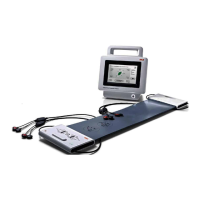
      If the measuring mat for your Seca Measuring Instruments cannot be switched on: * The rechargeable battery might be discharged. Suspend the measuring mat in the storage compartment of the monitor and charge the rechargeable battery. * The measuring mat might be faulty. Replace the measuring mat.
  • N
    Nicole JonesAug 29, 2025
    Why is the BIA tab not active on Seca Measuring Instruments?
    • M
      Martin ColemanAug 29, 2025
      The BIA tab might not be active on your Seca Measuring Instruments due to: * No seca patient file prepared. Prepare a seca patient file. * Measuring mat not activated. * No measuring mat present.
  • D
    Daniel JenkinsAug 27, 2025
    Why is the WiFi LED red on Seca Measuring Instruments?
    • S
      sarahsanchezAug 28, 2025
      A red WiFi LED on your Seca Measuring Instruments indicates: * There is no WiFi connection to the monitor. Check the settings for the WiFi connection and correct if necessary. * The WiFi module of the measuring mat is faulty. Replace the measuring mat.
  • A
    Aaron ChapmanAug 26, 2025
    Why is the charge status LED red on Seca Measuring Instruments?
    • K
      Kevin KrauseAug 27, 2025
      A red charge status LED on your Seca Measuring Instruments indicates: * The rechargeable battery is discharged. Suspend the measuring mat in the storage compartment of the monitor to charge the rechargeable battery. * The rechargeable battery is faulty and needs replacement. Replace the measuring mat. * The inductive charging interface of the monitor is covered. Suspend the measuring mat in the magnetic catch of the monitor, then stow other measuring accessories.
  • M
    melissamillerAug 25, 2025
    What to do if the touchscreen display remains off on Seca Measuring Instruments?
    • D
      Daniel WagnerAug 25, 2025
      If the touchscreen display on your Seca Measuring Instruments remains off, consider these possibilities: * The device might be on standby. Touch the touchscreen display or press the ON/OFF button. * The device may not be switched on. Ensure the device is powered on. * There might be no power supply. Check the power connection.

Seca mVSA 535 Specifications

General IconGeneral
BrandSeca
ModelmVSA 535
CategoryMedical Equipment
LanguageEnglish

Related product manuals