Using Objet Studio
5–66
DOC-06810 Rev. A
OpenGL Driver
Configuration
TheOpenGLdriverdisplays3Dgraphicsonyourscreen.Thereisnormally
noreasontoadjustitssettings.IfyoususpectaproblemwiththewayObjet
Studiodisplaysobjects,youcanusetheOpenGLDriverConfigurationtool
tocheckandconfigurethedriversettings.
To access the OpenGL Driver Configuration dialog box:
1. FromtheToolsmenu,selectOptions.
or—
IntheObjetStudioCommandsmenu ,click
Options.
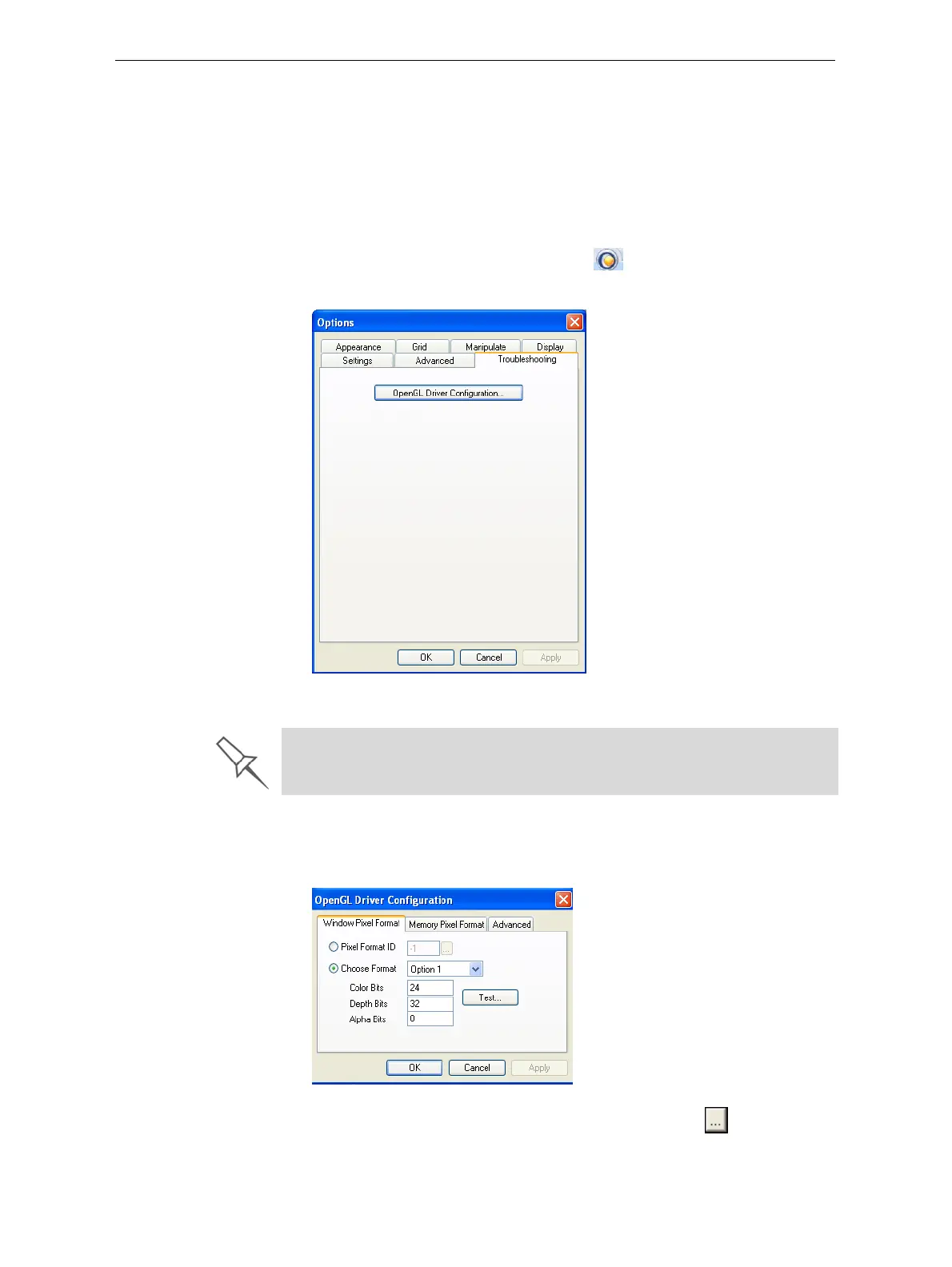
2. IntheOptionsdialogbox,displaytheTroubleshootingtab.
Figure 5-95: Access to OpenGL Driver configuration
3. ClickOpenGL Driver Configuration.
ThedialogboxthatopensdisplaysdetailsofthepixelformatID(index)
forthewindowandthememory.
Figure 5-96: OpenGL Driver Configuration dialog box
Ifyouwanttodisplaythevaluesandchangethem,click . Alternately,
youcanselect
Choose Formatandchangethevaluesinthisdialogbox.
The Troubleshooting tab is only accessible when Professional Mode is
active (see “Professional Mode Features” on page 64).













 To Next Page