DOC-06810 Rev. A 5–73
Objet1000 Plus User Guide
Setting the
Printer
Connection
WhenanObjet3Dprinterisinstalled,theservercomputerisconnectedto
thatprinter.Normally,thereshouldbenoreasontochangethisconnection.
Occasionally,however,youmayneedtoresettheconnection,toconnect
theservertoanotherprinter,ortouseObjetStudioinoff‐linemode
(without
aprinterconnection).
To set (or change) the printer connection:
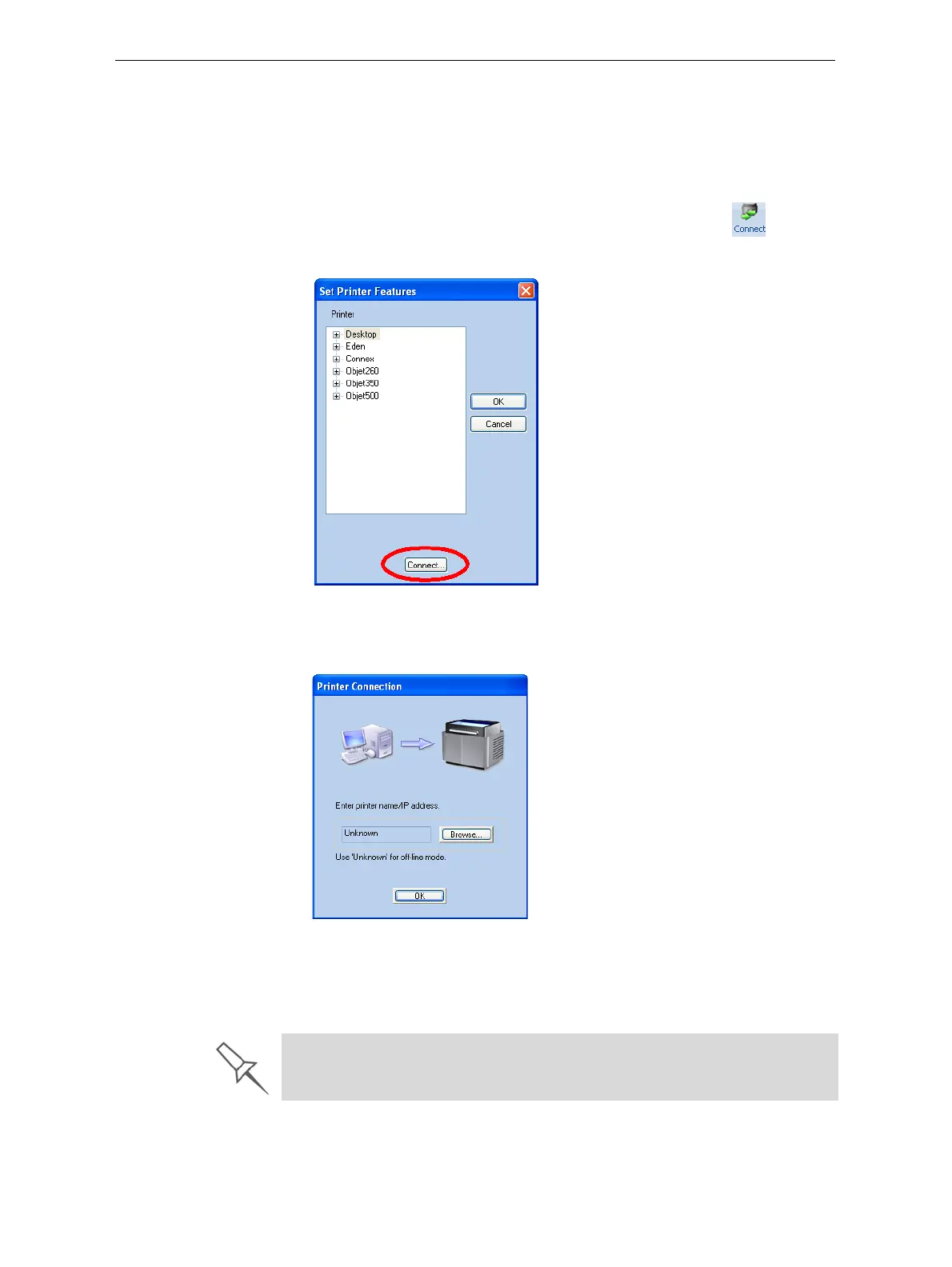
1. OntheJobManagerribbon,inthe3DPrintergroup,click .
2. IntheSetPrinterdialogbox,click
Connect.
Figure 5-104: Connecting to a printer (A)
3. EnterthecomputernameoritsIPaddress,orclickBrowsetofindand
selectit.
Figure 5-105: Connecting to a printer (B)
4. ClickOK.
Whentheconnectionisestablished,ObjetStudioisconfiguredto
prepareprintjobsforthatprinter.
If you can see the material levels in the Job Manager screen (see
figure 5-103 on page 71), Objet Studio is connected to the printer.













 To Next Page