DOC-06810 Rev. A 5–23
Objet1000 Plus User Guide
Assigning a
Model Material
to Objects
Youcanassignanyoftheavailabledigitalmaterialstoobjectsonthebuild
tray.
To assign a model material to objects:
1. Selectanobjectonthebuildtray(see“SelectingObjects”onpage 18).
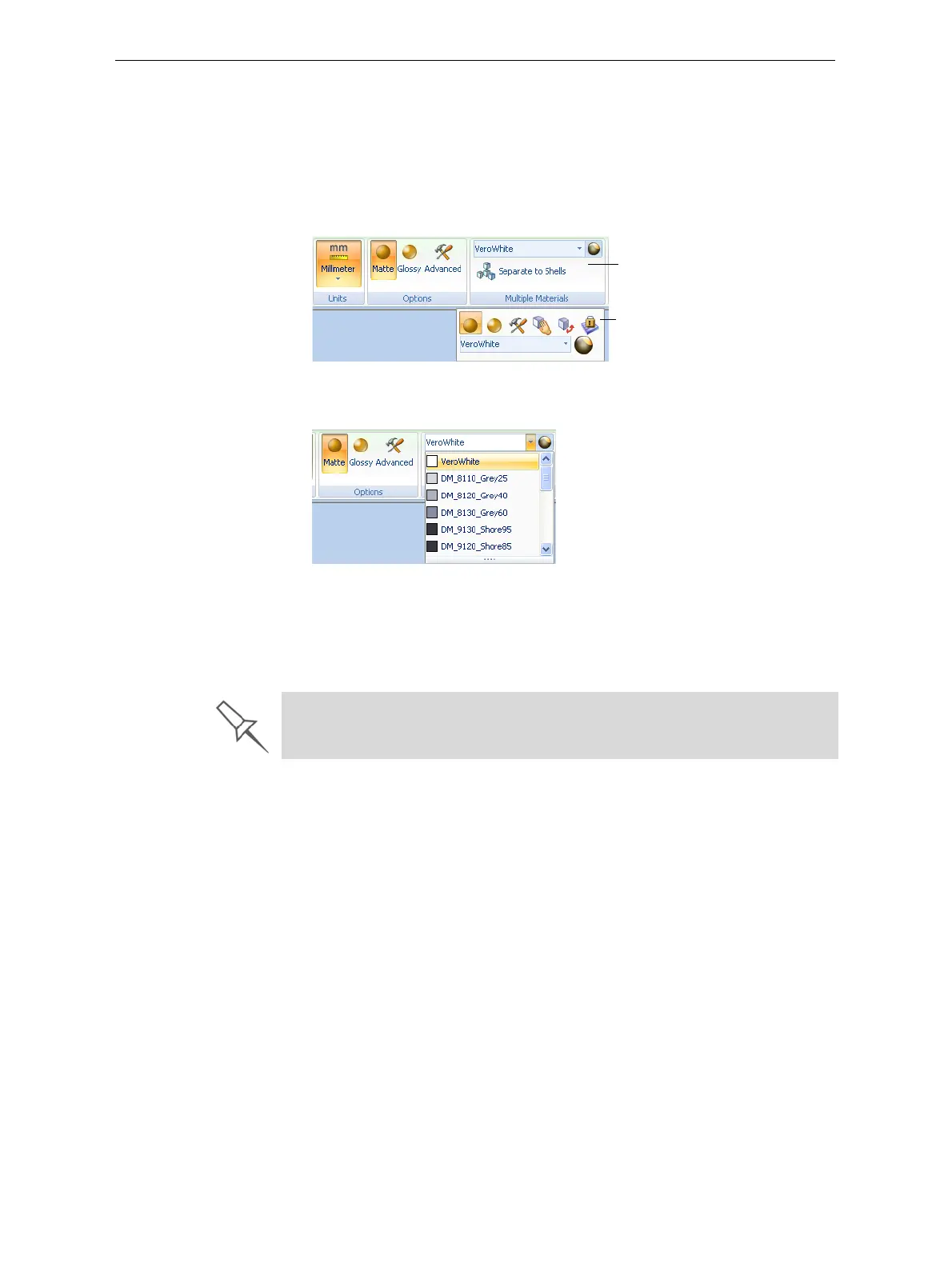
Whenanobjectisselected,itsproperties—includingmodelmaterials—
aredisplayedontheModelToolbarandontheribbon.
Figure 5-28: Object properties, on ribbon and Model Toolbar
2. Displaythematerialdrop‐downlistandselectthedesiredmaterial.
Figure 5-29: Menu for assigning materials to objects
Whenyoude‐selecttheobjectonthebuildtray,itisdisplayed,by
default,withthecolorofthematerialyouselected.Inthesameway,
youcanassignmodelmaterialstoeachoftheindependentobjectson
thebuildtray.
Ribbon
Model Toolbar
To separate an object into independent, component parts (each an stl file),
see “Splitting Objects into Components” on page 19.













 To Next Page