Using Objet Studio
5–22
DOC-06810 Rev. A
Digital
Materials
Whentwodifferentmodelmaterialsappearontheribbon,youcanproduce
objectsfromeithermaterialorfromacombinationofthem—digital
materials.Differentpairsofmodelmaterialsenableyoutoprintobjects
usinguniquedigitalmaterials.Certaindigitalmaterialscanproduce
objectswithdifferentshadesofcolor.Combinationsof
modelmaterials
thathavedifferentmechanicalpropertiesresultindigitalmaterialswith
uniquecharacteristics.
To view the digital materials available for printing objects (using two
basic model materials):
1. Makesurethatyouhaveselectedtheappropriatemodelmaterials,and
that
Multiple Materialsisselected.
Figure 5-26: Material selectionwith two basic model materials
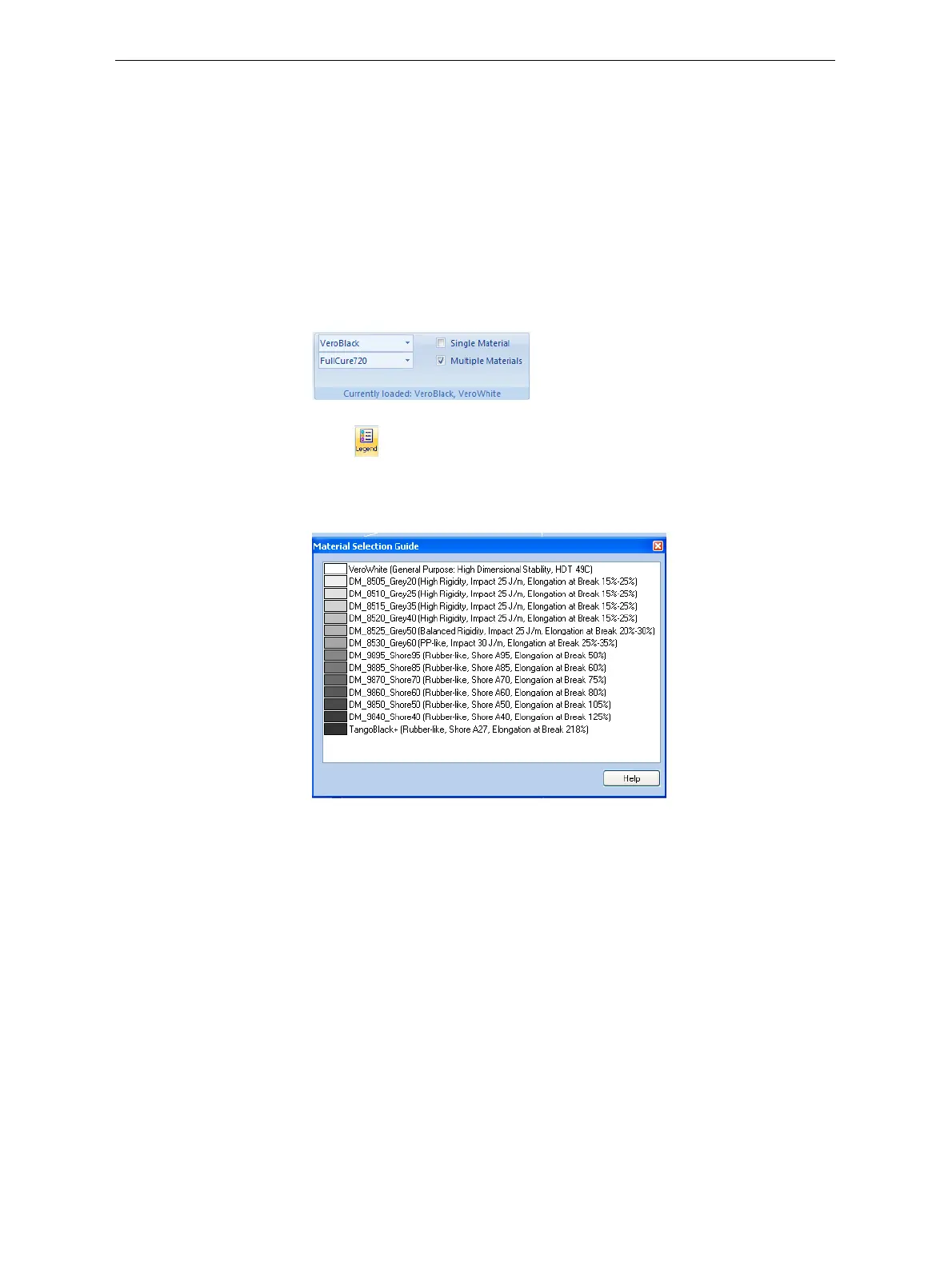
2. Click .
TheMaterialSelectionGuideappears,showingthebasicmodel
materials(atthetopofthelist)andthedigitalmaterialsavailable
(combinationsofthem).
Figure 5-27: Material Selection Guide, showing the digital materials
available with the basic model materials













 To Next Page