GTS Technical Manual
9. April 2021 Edition: V1.00/2021 5-5
Copyright © 2020, Diversey
05.70.17 tank - vacuum motor - 3500µicro_V1.00.fm
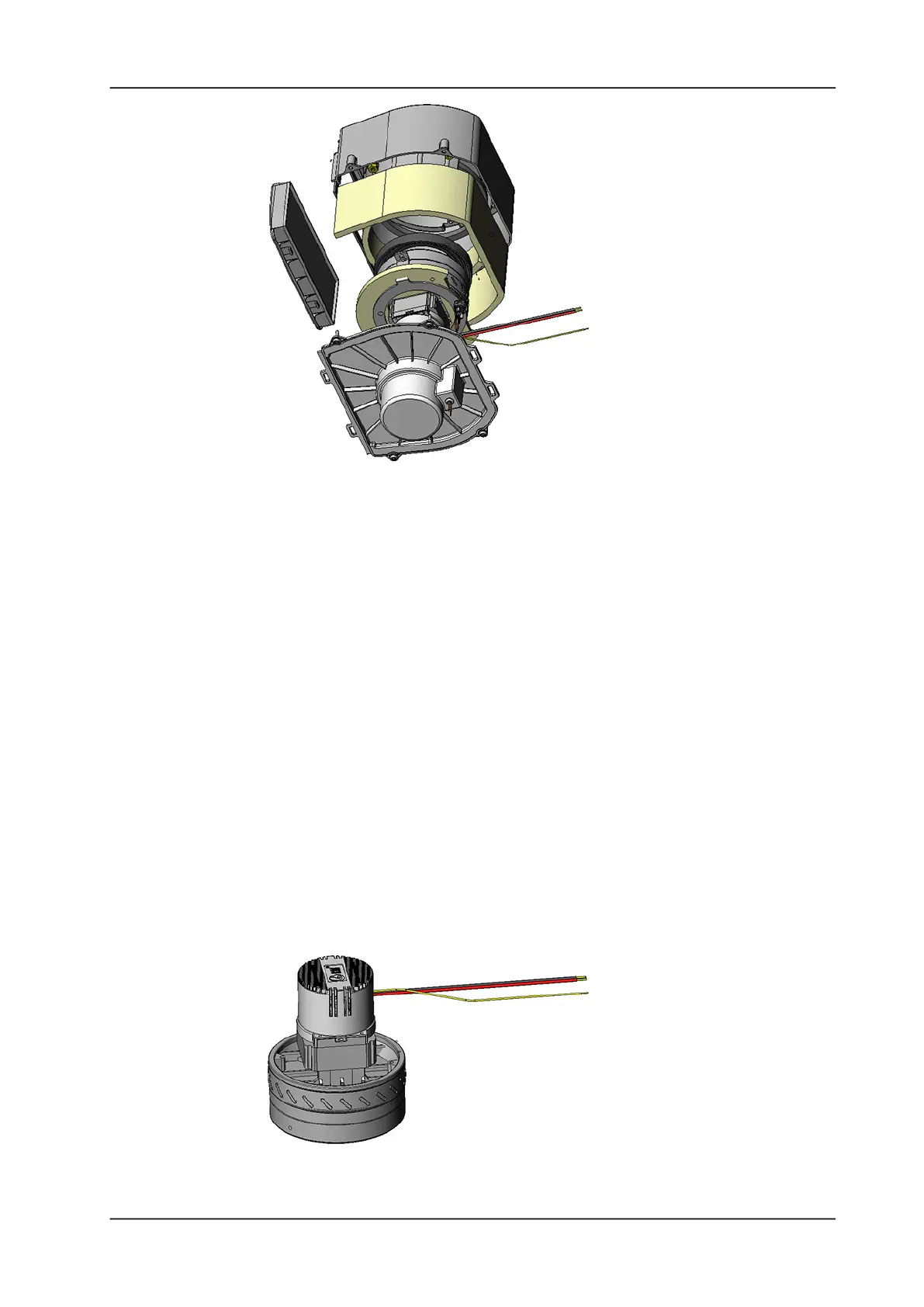
Picture 5: Vacuum motor assembly details
• Remove the four screws (4122639) from the vacuum motor
cover (4134087).
• Remove the vacuum motor cover.
Remarks
Carefully remove the vacuum motor cover, as you can damage the
wires of the thermo switch.
• Remove the upper (4134085) and the surrounding (4134084)
noise absorbing mat.
• Remove the two screws (4122639) from the vacuum motor
holder (4134089).
• Remove the vacuum motor holder.
• Remove vacuum motor sealing (4134088).
• Remove the vacuum motor (4134053).
Remarks
Remove the vacuum motor cable from the cover, by pulling it gently
trough the grommet (4046150).
Picture 6: Vacuum motor detail





 To Next Page