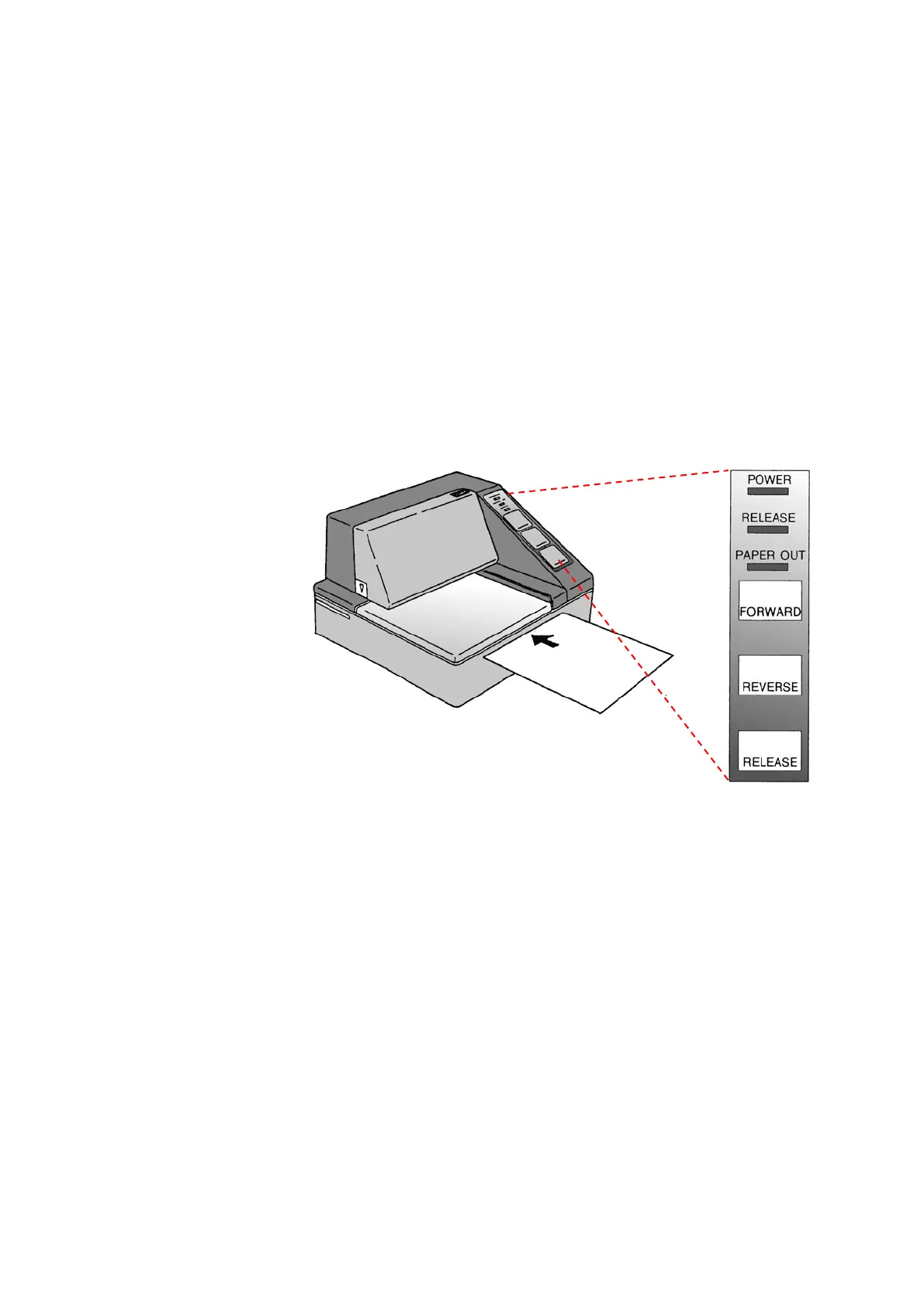
☺ The RELEASE light then indicates that the paper has been released from
the print head, and may now be inserted or removed.
Insert the paper from the front (see illustration) using the guiding rail on
the right side until it is stopped by the form stopper.
☺ The PAPER OUT light goes out.
Press the FORWARD button (DR-U295) or wait for max. 5 seconds until
the paper is fed automatically (DR-298).
The print head is lowered fixing the paper. The RELEASE light goes out
and the printer is now ready to print.
You should not use paper that is perforated at the sides.
The perforation indicates "PAPER OUT", so that printing
is interrupted.
Control
Board of
the Printer
6.6.2
Replacing a Ribbon
Open the printer cover.
The cover has ridges on the top right corner and an arrow mark on the
bottom left corner. By slightly pressing the ridges on the top right and
pulling the cover forward you can easily lift off the cover.
•
Behind the cover there is a cassette with the ribbon.
•
The ribbon cassette is easily released when the printer is in the
RELEASE and PAPER OUT modes.
•
The RELEASE status is indicated by the RELEASE light.
If the RELEASE light is not on, press the RELEASE button.












 To Next Page