99
Per Line Setup—Tetra Mode
Serial Port Mode Drop Down Menu
The Serial Port Mode drop down menu is used to identify the specific radio interface for the serial port configuration.
Selecting an item with a Scan List suffix enables a frequency scan list update function. The Freq Scan List function
synchronizes the console scan list with the radio's can list.
Available selection for this field is only iDEN.
NOTE: Once this mode is changed and parameters saved, the system automatically resets.
Serial Port Params Drop Down Menu
The Serial Port Params drop down menu identifies the configuration of the serial port data speed and format. Serial port
parameters refer to bit rate, parity, data bits, and stop bits.
The default setting for this field, 19200.N.8.1, is not configurable.
Per Line Setup—Tetra Mode
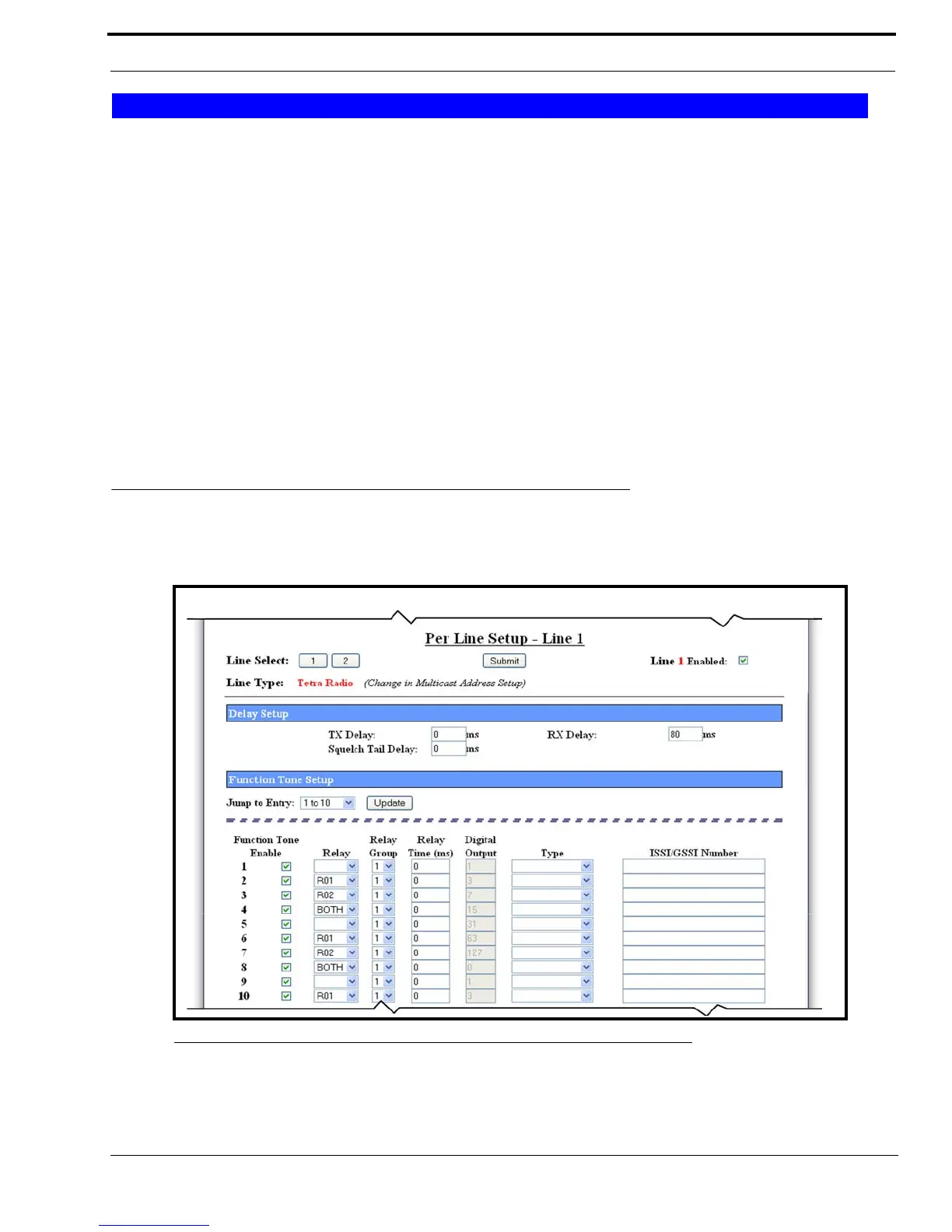
The Per Line Setup window for Tetra Radio configuration, shown in Figure 51, appears when Tetra is selected from the Line
Type drop down menu on the Multicast Address Setup window.
Serial Port Mode
FIGURE 51. Per Line Setup—Tetra Mode, View 1



 To Next Page