3.1 Overview
27
3.1.5 System Information
In order to check system information of TC-3000C,
press Menu select “Configuration” from the pop-up menu on the screen M4
( “Peripherals” ) F8 ( “System Info” ) Verify: Serial Number, Version, Core Version,
DSP Version, FPGA Version, Software Options
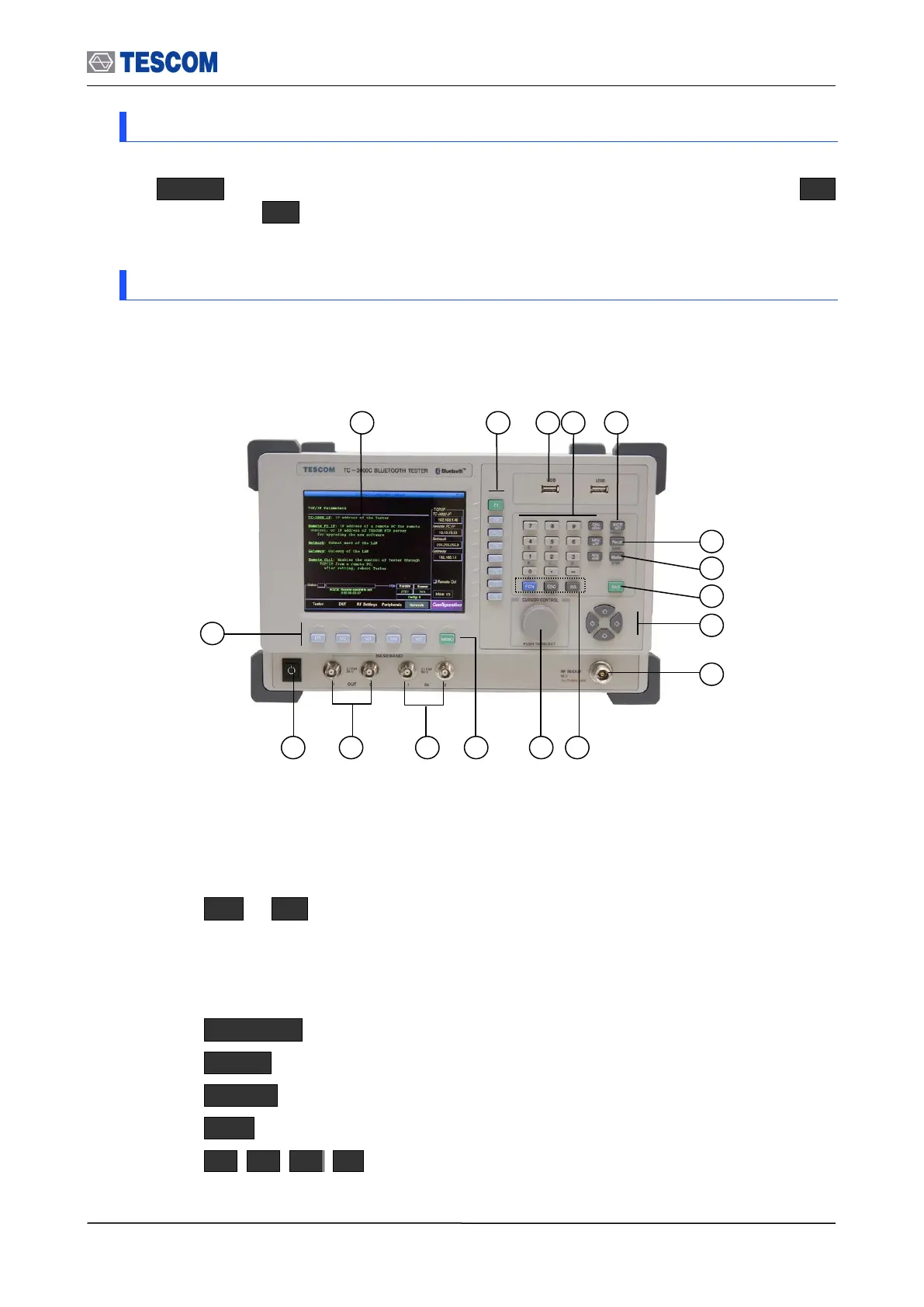
3.1.6 Front Panel View
The front panel controls and connector are illustrated below; and the detailed descriptions
are as follows:
[Figure 2] Front Panel View
① Color Graphic LCD
The LCD display color is configured in the Peripherals of the Configuration
screen.
② F1 ~ F8 : Soft keys. Soft keys select submenus.
③ USB port : It is used for testing the BT USB Dongle, storing the test result,
capturing screen or system upgrade.
④ Data Input keypad. Provides the means for entering data.
⑤ INCR SET : Defining data increasing step. The default value is 1.
⑥ Recall : Recall stored data.
⑦ Marker : Enable a line-shaped marker on the Measurement screen to activate.
⑧ ENT : It is used to enter your chosen function or accept input.
⑨ : Cursor movement.



 To Next Page