3.6 Operation Procedure (EDR Measurement)
58
3.6.2 Step 4. Measuring EDR Characteristics of DUT
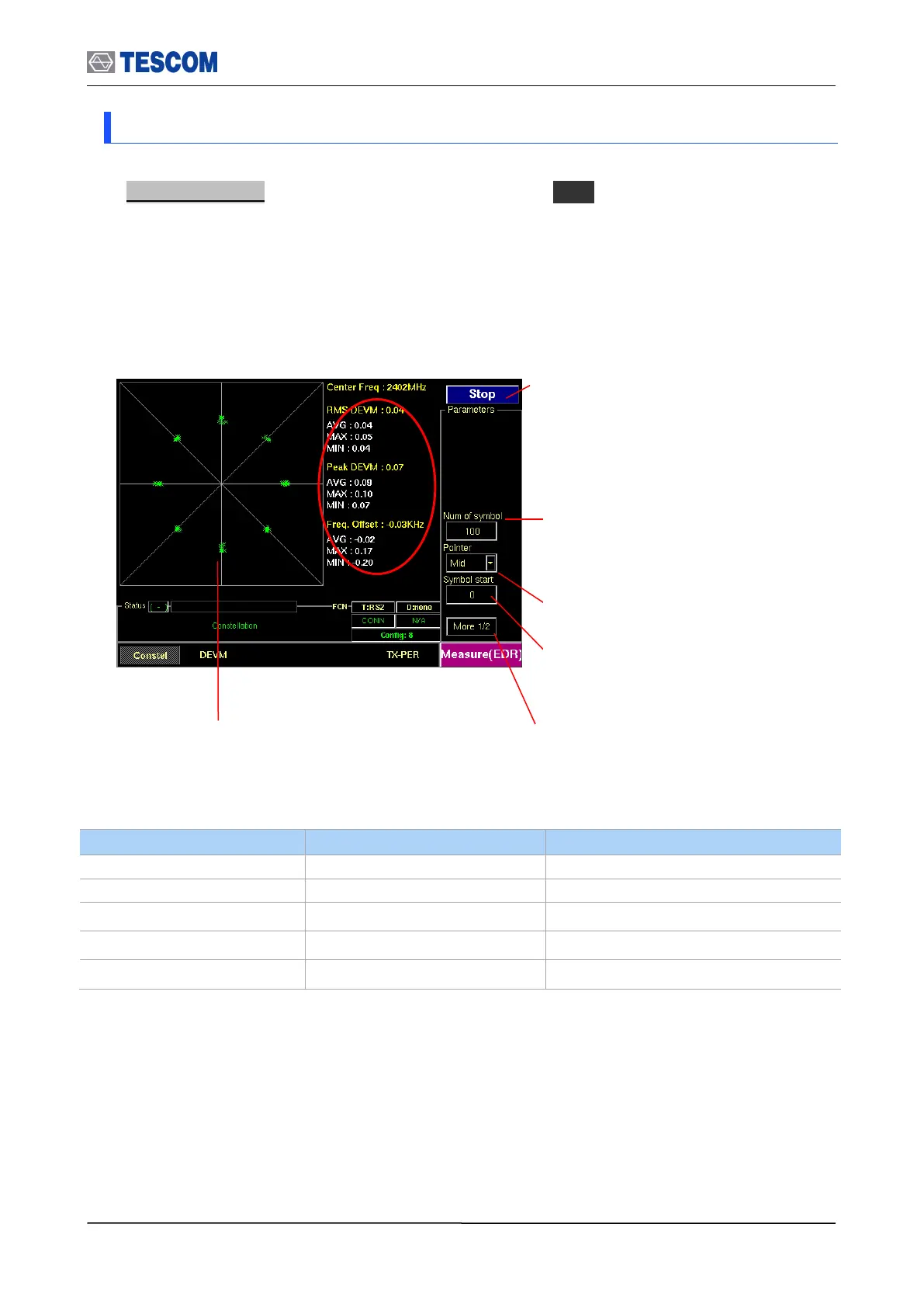
1. Constellation : To access the constellation, press M1 soft key. This screen shows
the I-Q constellation spectrum of a channel in single channel or hopping mode.
Num of symbol : Number of PSK symbols
displayed on screen, To see more symbol,
increase this value
Pointer : Graphical size of symbol
Symbol start : Specifies the start point to
display PSK symbol. “0” means the start point of
PSK Payload
Transmitted PSK symbol
from DUT
RMS DEVM: Variance of DEVM(Differential
Error Vector Magnitude)
Peak DEVM: maximum DEVM
Freq. Offset: carrier frequency offset of PSK
payload
Test mode: Configures Bluetooth Test
Mode connection with DUT
Start/Stop: When this menu is pressed the tests
will run once. When pressed again while the
tests are running, the testing will stop.



 To Next Page