3.8 Operation Procedure (Bluetooth Conformance Test)
71
3.8.1 Step 3. Selecting the Test Cases Screen
Test Cases screen can be accessed by pressing the Menu hard key. Press Menu
Rotary Knob or Select “Test Cases” from the pop-up menu on the screen
ENT . Test cases and parameters can be accessed by using Rotary Knob or
keys.
3.8.2 Step 4. Selecting the Test Cases and Setting Up Test Parameters
Selecting test case:
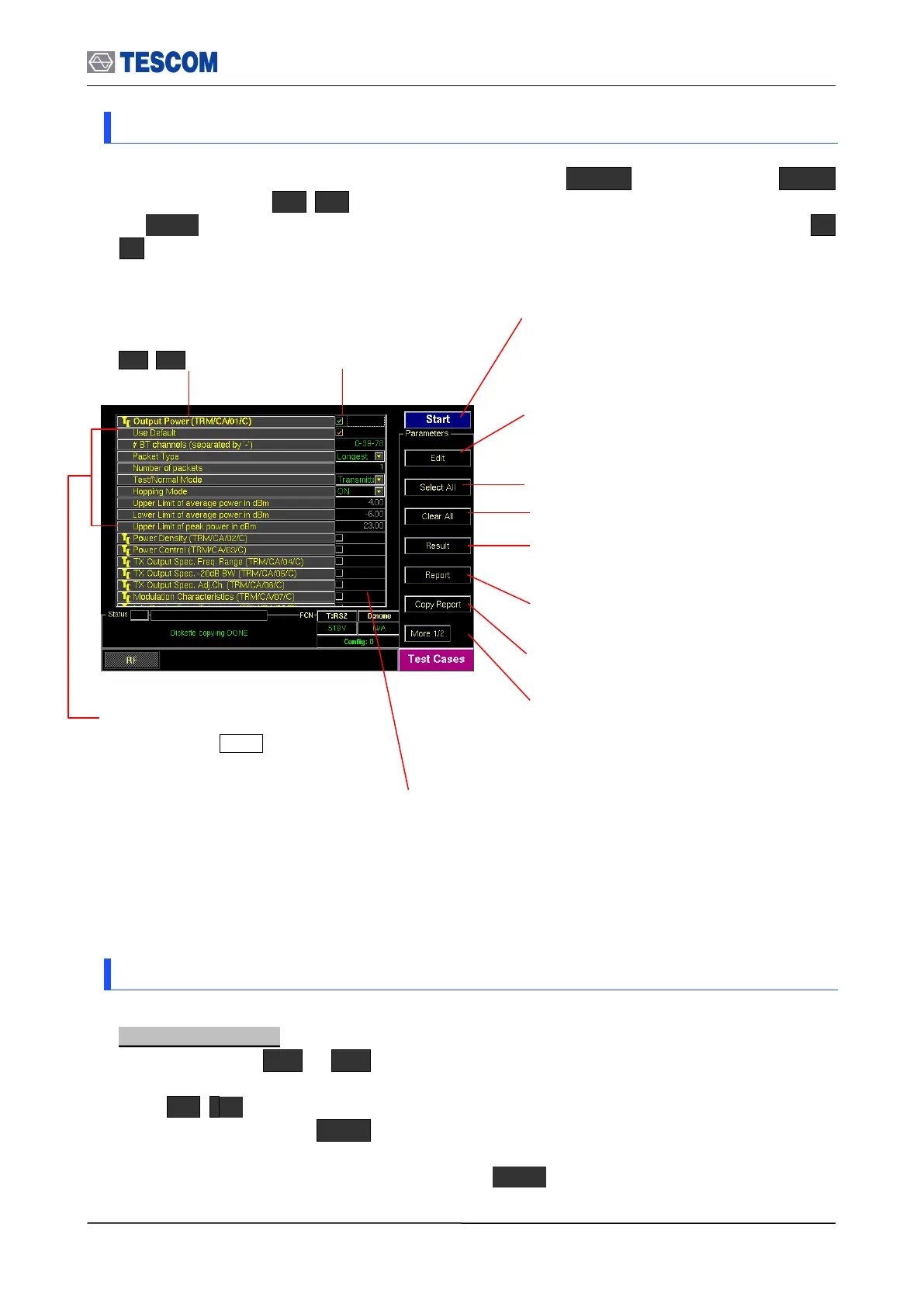
1) Press soft key ( M1 ~ M5 ) related to a test case screen.
2) Move the box-shaped cursor to a test case that you want to perform using Rotary Knob
or keys.
3) Press Rotary knob or ENT key and confirm that the check box related to the test
case is checked.
4) To unselect test case, press Rotary knob or ENT key again.
Start/Stop: When this menu is pressed the tests
will run once. When pressed again while the
tests are running, the testing will stop.
Edit: When this menu is pressed, you can edit
the various parameters of a highlighted test
case.
Result: Shows the test result of a highlighted
test case.
Report: Shows the report that record test
results and logs from the latest clearing to now.
Copy Report: Copies test cases report to
diskette
Check Box: Indicates if
a test case is selected
or not.
Parameters: This parameters is
displayed when Edit is pressed.
The changing parameter turns the
text color red.
Auto detach: Disconnect DUT after tests are
done automatically.
Status window: Indicates status of test case as follows:
“Run…”: Running the test.
“PASSED”: Pass this test case for test limits set.
“FAILED”: Fail this test case for test limits set.
“Not yet”: Test is not completed.
Test Case: To select test
cases, use Rotary Knob
or keys
Select All: Selects all test case
Clear All: Clear all test case



 To Next Page