3.3 Operation Procedure (Link Analyzer)
41
3.3.2 Step 3. Viewing the Recorded Data
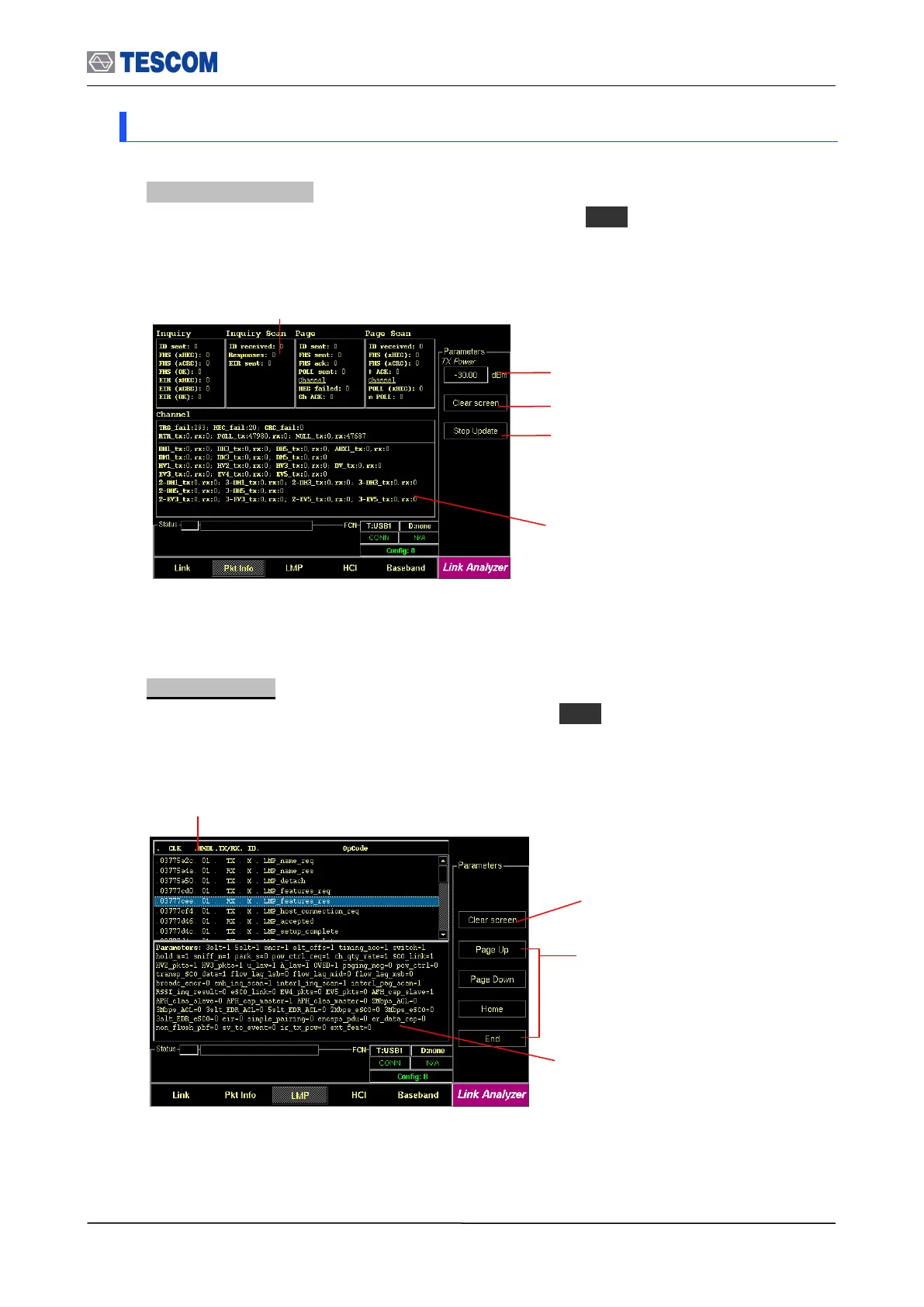
1. Packet Information: This screen shows how many packets received and transmitted
for each packet type. To access Pkt Info screen, press M2 soft key.
2. LMP messages: This screen shows the LMP messages exchanged between the TC-
3000C and the DUT. To access LMP screen, press M3 soft key.
Channel Information: This window
displays the channel traffic information.
Inquiry/Page packet information: These windows display
how many packets are received and transmitted during
Inquiry/Page/Inquiry Scan/Page Scan procedure.
Clear Screen: Clears all messages
LMP Messages: This window displays the
LMP messages exchanged between the TC-
3000C and the DUT.
Cursor movement functions: For
easy scrolling the messages.
Parameters window: This window
shows detail parameters about the
highlighted LMP message.
Clear screen: Resets all values to 0
TX Power: Defines TX power of the Tester
Stop Update/Restart Update: It stops or restarts
updating of the tx/rx packet information.



 To Next Page