3.7 Operation Procedure (Audio Analyzer)
61
3.7 Operation Procedure (Audio Analyzer)
3.7.1 Step 2. Creating Connection to DUT
1. Selecting the Audio Screen: Audio screen can be accessed by pressing the Menu
hard key. Press Menu Rotary Knob or Select “Audio” from the pop-up
menu on the screen Press ENT .
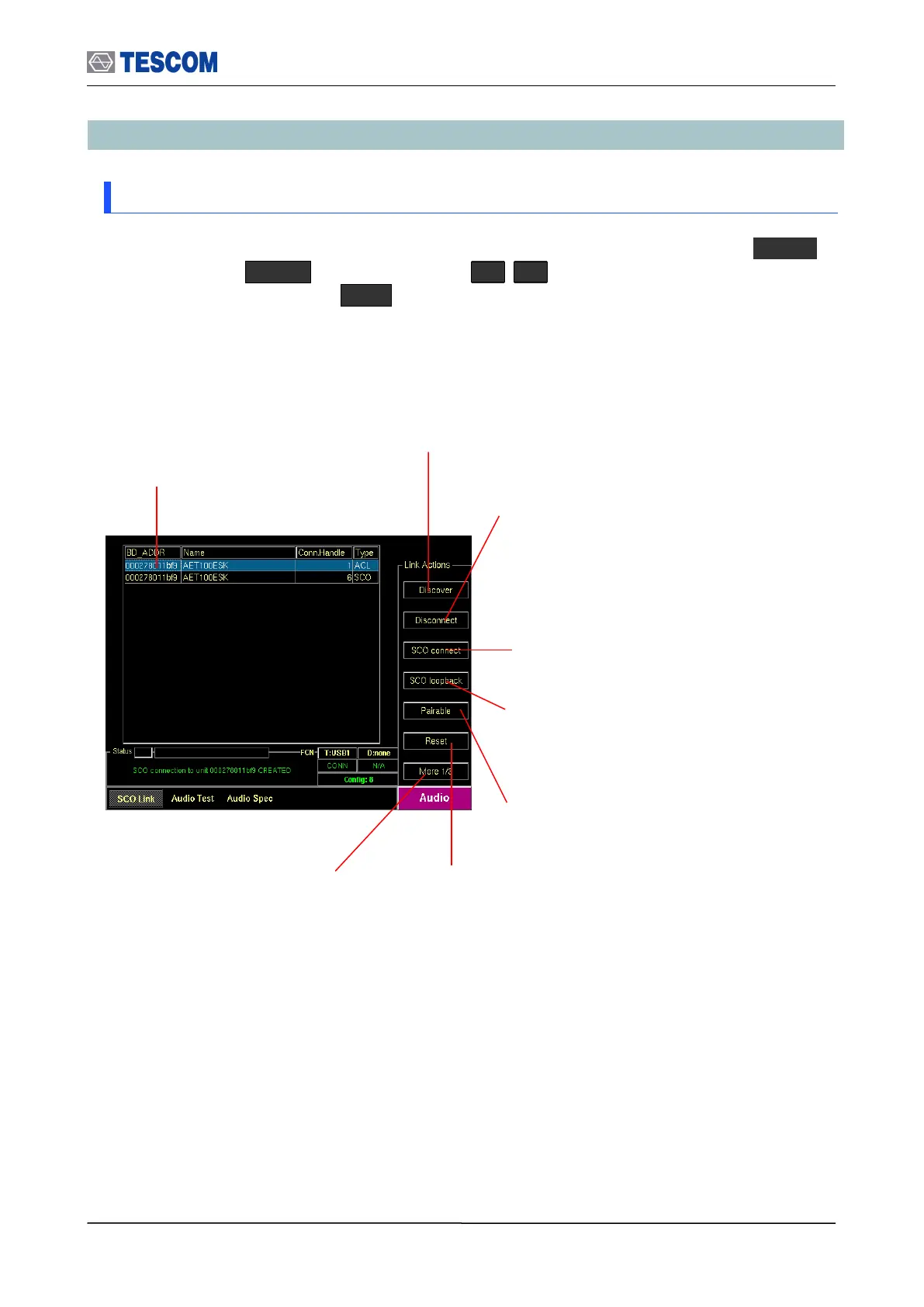
Show Devices Found: This
window display details about the
found devices.
Discover: Searches for all Bluetooth
devices that are in range and in
Inquiry Scan Mode through the Inquiry
procedure.
Connect/Disconnect: Creating connection to
highlighted DUT on the screen through the Page
procedure or disconnecting. This menu is
displayed when a DUT is discovered and listed on
the screen. If the highlighted DUT is connected,
this menu is changed to “Disconnect”.
SCO connect: Create SCO connection
to a highlighted DUT on the screen.
Pairable: Enables the TC-3000C to be
responder in pairing procedure.
Change submenus: For setting
up Inquiry, Page, and test mode
parameters.
SCO loopback: Enables the SCO
loopback test.
Reset: Resets the TC-3000C. In case
DUT is connected to the TC-3000C with
HCI, the DUT is reset simultaneously.



 To Next Page