3.1 Overview
29
3.1.7 Rear Panel View
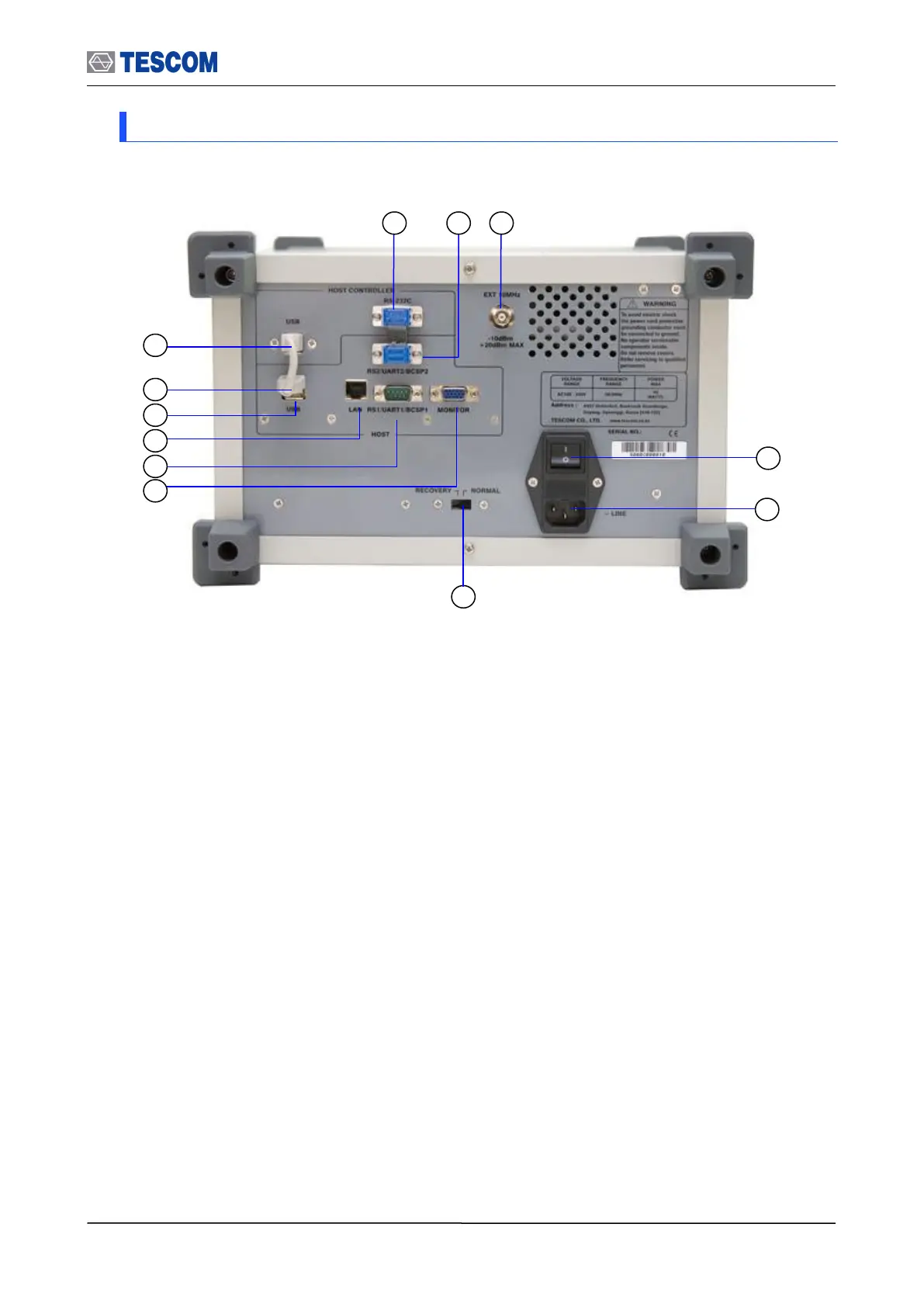
The Rear panel connectors are illustrated below; detailed descriptions are as follows:
[Figure 3] Rear Panel View
① RS-232C: This port is a serial port to Host Controller.
② RS2/UART2/BCSP2: This port is a RS2/UART2/BCSP2/ port to Host.
③ EXT 10 MHz: This port is an external 10 MHz reference signal.
④ Power switch
⑤ AC Power Input: 100-240 VAC, 50/60 Hz
⑥ Emergency Firmware download switch: For upgrading firmware when Host
Controller doesn’t boot. This switch is not used after normal firmware
upgrading
⑦ Monitor connector: For using an external monitor.
⑧ RS-232C/UART 1/BCSP1 connector: This port is the first serial port to Host.
It can be used for the remote control.
⑨ LAN connector
⑩ USB : This port is a USB port to Host.
⑪ USB : This port is a USB port to Host.
⑫ USB : This port is a USB port to Host controller. It is for the remote control
with DLL.



 To Next Page